

Audi MMI & B&O Audio Failure (2009-2025): No Sound, Black Screen & Component Protection Explained
A detailed guide to diagnosing and replacing faulty audio amplifiers and MMI units in Audi Q5, A4, A5, A6, Q7, and more, with a focus on the critical 'Component Protection' issue.
- Replacing a used amplifier or MMI unit will trigger 'Component Protection', requiring a dealer or specialist visit to unlock the part's full function.
- The most common cause of amplifier failure is water damage from clogged sunroof drains or leaking washer lines in the trunk area. Always fix the leak before replacing the part.
- Common symptoms include no sound, a black MMI screen, or sound only from the driver's side speakers.
- A simple MMI reset or using a fiber-optic bypass loop are key initial diagnostic steps you can perform yourself.
Symptoms of Audio System Failure

A failing audio system component in these Audi models can manifest in several ways. Because the system operates on a fiber-optic loop, a single point of failure can cause a variety of symptoms. Pay close attention to the specific behavior to help narrow down the cause.
1. No Sound From Speakers
This is the most common symptom. The MMI screen may appear to function normally—you can see the radio station or media track—but no audio comes from any speaker. Sometimes, you may hear a faint pop or crackle when the system tries to initialize, followed by silence. This often points directly to a failed amplifier or a break in the fiber-optic loop.
2. Sound Only From One Side
If you have replaced a component like the amplifier with a used part, you may find that sound only plays on the driver's side of the vehicle. The passenger side speakers and the subwoofer will be silent. This is not a sign of a defective replacement part, but a classic symptom of 'Component Protection' being active.
3. MMI Screen is Black or Intermittent
The MMI screen may refuse to turn on, remaining completely black, even though the console buttons may light up. In other cases, the screen may flicker, get stuck on the Audi logo, or reboot intermittently. This can be caused by several issues:
- A simple software glitch that can be solved with an MMI system reset.
- A blown fuse for the MMI display unit.
- A complete failure of the main MMI control unit (often located in the dash).
- On models with a retractable screen (like the A6/A7), the internal wiring harness can fray and break from repeated movement, cutting power to the display.
4. MMI Controls Are Unresponsive or Erratic
The main MMI control knob and surrounding buttons may stop working or behave erratically. This is frequently caused by liquid damage from spills in the center console. Sugary drinks are especially damaging. Sometimes, a thorough cleaning of the control panel's circuit board can restore function, but often the panel itself needs to be replaced.
5. Popping or Crackling Sounds
Audible pops and crackles from the speakers, which may be intermittent or constant, can indicate an internal failure of the amplifier or a bad ground connection. This can happen on all audio sources and at various volumes.
6. Specific Diagnostic Trouble Codes (DTCs)
Using a diagnostic tool like VCDS (VAG-COM) can read specific fault codes from the system. Common codes related to audio system failure include:
- Modules "Cannot be reached": A scan showing that modules like 56-Radio, 47-Sound System, or 0E-Media Player 1 "cannot be reached" strongly suggests a break in the fiber-optic MOST bus loop.
- 00417 / 00418 / 02559 - Open Circuit: These codes point to a specific speaker having an open circuit, which could be a blown speaker or a wiring issue. However, if multiple speaker faults appear at once, it's more likely an issue with the amplifier that drives them.
- Component Protection Active: This message confirms that a replaced module needs to be adapted to the vehicle by a dealer.
Diagnosing the Problem: A Step-by-Step Guide


Before buying parts, follow these diagnostic steps to pinpoint the faulty component.
- Perform an MMI Reset: This is the first and easiest step. A soft reset can fix many software glitches. The method varies by MMI generation:
- For MMI 2G/3G (typically pre-2016): Press and hold the SETUP button, the main Control Knob, and the upper-right function button simultaneously.
- For MMI MIB (typically 2016+): Press and hold the NAV/MAP toggle switch up, the RADIO toggle switch up, and press down on the main Control Knob at the same time. Alternatively, simply pressing and holding the volume knob for 10-15 seconds can force a reboot on many newer models.
- Check the Fuses: The audio system has several fuses. Check the fuse panels located in the dashboard and, more importantly, in the trunk (usually on the right side panel). A blown fuse can indicate a shorted component, like a water-damaged amplifier.
- Use a Fiber-Optic Bypass Loop: This is the definitive way to find a failed module on the MOST bus. A bypass loop is an inexpensive tool that allows you to remove one module from the fiber-optic circuit at a time. You will typically find the amplifier in the trunk. Unplug its fiber-optic connector and install the loop. If the sound or MMI screen comes back to life (though you'll have no audio without the amp), you have found your failed component. You can repeat this process for other modules in the loop, such as the satellite radio tuner or CD changer.
Pro Tip: The most common component to fail is the amplifier, especially the Bang & Olufsen and Bose units. Start your diagnosis there. They are almost always located in the trunk and are highly susceptible to water damage.
Known Issues, TSBs, and Recalls
Amplifier Water Damage
The single most common cause of failure for amplifiers in these vehicles is water intrusion. The amplifiers are typically mounted in the left or right rear quarter panel area of the trunk. Clogged sunroof drains or a leaking rear windshield washer hose can allow water to drip directly onto the amplifier, shorting out the electronics. Before replacing a dead amplifier, you must find and fix the source of the water leak, or the new part will suffer the same fate.
Technical Service Bulletins (TSBs)
Audi has issued several TSBs for MMI software issues. These can cause problems like a blank screen when connecting an iPhone, the system freezing on the loading screen, or settings being lost. In most cases, the fix is a software update that must be performed by an Audi dealer.
Safety Recall 70G6: Loose Speaker Trim
For certain 2017-2018 Audi A4, Allroad, and 2018 A5 Sportback models, Audi issued a safety recall because the aluminum trim ring on the door speakers could come loose, exposing a very sharp edge that could cause injury. The fix involves the dealer replacing the trim. While this doesn't cause an electronic failure, it's an important safety issue to be aware of for those model years.
Vehicle-Specific Information & Part Locations
The location of the main amplifier varies by model and generation. Always look in the trunk first.
- Audi Q5 / SQ5 (2009-2017): The amplifier is located in the trunk on the left side, behind a trim panel.
- Audi Q5 / SQ5 (2018-2025): For vehicles with the B&O system, the amplifier is in the driver's side rear panel of the trunk. Base audio systems may have the amplifier integrated into the main radio unit in the dashboard.
- Audi A4 / S4 / RS5 / Allroad (2009-2016): The amplifier is in the trunk on the left side, mounted in a rack.
- Audi A5 / S5 (2010-2017): Similar to the A4, the amplifier is in the left side of the trunk.
- Audi A6 / S6 (2012-2018): The amplifier is typically in the left rear of the trunk, behind the trim.
- Audi Q7 (2007-2015): The amplifier is located in the trunk on the right side, behind the side trim panel and often mounted in a bracket with other modules.
- Audi Q7 (2017-2025): The amplifier is typically on the driver's side in the rear cargo area.
Buying a Used Audio System: What You MUST Know

Purchasing a used audio component like an MMI unit or amplifier is a great way to save money, but it comes with critical considerations. Failure to follow this advice can result in a part that does not work in your car.
The #1 Issue: Component Protection
Warning: Any major audio module (MMI unit, amplifier, radio tuner) you install will trigger Audi's 'Component Protection' (CP). This is an anti-theft feature that locks the component when it detects it's in a different vehicle. Symptoms include no sound, or sound only from the driver's side speakers. You cannot remove Component Protection yourself.
To make a used part fully functional, you must take the vehicle to an Audi dealer or a qualified independent specialist who has the official ODIS diagnostic tool with an online GEKO subscription. They will perform an online adaptation that registers the used part's serial number to your car's VIN. Expect to pay a fee for this service, typically one hour of labor ($100-$250). Before buying a used module, call your local dealer or specialist, confirm they are willing to program a customer-supplied used part, and ask for a quote.
Physical Inspection
- Check for Water Damage: When buying a used amplifier, inspect it carefully for any signs of corrosion on the casing or connectors. Ask the seller for clear pictures of the ports. Any hint of water damage is a major red flag.
- Match Part Numbers: Match the OEM part number exactly. While some part numbers with different ending letters are compatible revisions, it's safest to match the number on your original part. A part from a different model or year may have different software or hardware configurations.
- Verify Compatibility: Be aware of the different system types (Standard, Bose, Bang & Olufsen) and MMI generations (2G, 3G, 3G+, MIB). A B&O amplifier will not work correctly in a car with the standard sound system, and vice-versa. Ensure the donor vehicle had the same audio option as yours.
Cost of Replacement
The cost to fix a failed Audi audio system can vary dramatically depending on the failed component and whether you use new or used parts.
| Part/Service | Estimated Cost |
|---|---|
| New OEM Amplifier (B&O/Bose) | $1,500 - $2,000+ |
| Used OEM Amplifier (B&O/Bose) | $200 - $500 |
| New OEM MMI Head Unit | $2,000 - $4,000+ |
| Used OEM MMI Head Unit | $300 - $800 |
| New OEM MMI Control Panel | $400 - $700 |
| Used OEM MMI Control Panel | $100 - $250 |
| Shop Labor (Diagnosis) | $100 - $250 |
| Shop Labor (Component Protection Removal) | $125 - $250 |
| Shop Labor (Amplifier/MMI Unit Replacement) | $150 - $300 |
Frequently Asked Questions (FAQ)
Do I have to go to the dealer to get a used amplifier to work?
Almost always, yes. A used amplifier will trigger Component Protection, which mutes most or all of the audio. Only an Audi dealer or a specialist with the correct online diagnostic tools can remove this protection and adapt the part to your car.
My MMI screen is black but the radio still plays. What's the problem?
This suggests the main MMI unit is working but the screen itself (or its connection) has failed. The most likely causes are a blown fuse for the screen, or a broken wire in the harness that connects to the screen, which is common on models with retractable displays like the A6 and A7.
Why did my amplifier fail? I see no water damage.
While water damage is the leading cause, amplifiers can also fail from internal electronic issues like cracked solder joints, failed capacitors, or voltage spikes. Heat can also be a factor, as the units are often in enclosed spaces with limited ventilation.
Can I upgrade from the standard audio system to a B&O system?
This is a very complex and expensive conversion. It involves not only swapping the amplifier and all the speakers, but also extensive wiring changes and coding. The fiber-optic system is different, and the MMI must be coded to recognize the B&O system. It is generally not considered a cost-effective or practical retrofit.
Can I use a fiber-optic loop permanently?
A fiber-optic loop is a diagnostic tool, not a permanent fix. For example, if you use a loop to bypass a failed amplifier, your MMI screen and controls will work again, but you will have no audio. It's only useful for restoring the rest of the system's functionality while you source a replacement for the failed module.
Technical Specifications
OEM Part Numbers: 4G0035050E 4G0035056J 4G0035080E 4G0035080G 4G0035082E 4G0035082G 4M0035223 4M0035223A 4M0035223C 4M0907247A 4N0035456A 4N0035456C 4N0035456E 80A035050 80A035050A 80A035050B 80A035050C 8T0035223A 8T0035223T
System architecture is based on a fiber-optic MOST (Media Oriented Systems Transport) bus. Amplifiers are specific to the sound system installed (Standard, Bose, or Bang & Olufsen) and are not interchangeable. MMI systems are categorized by generation (e.g., MMI 3G+, MIB, MIB2), which must match the vehicle's platform.
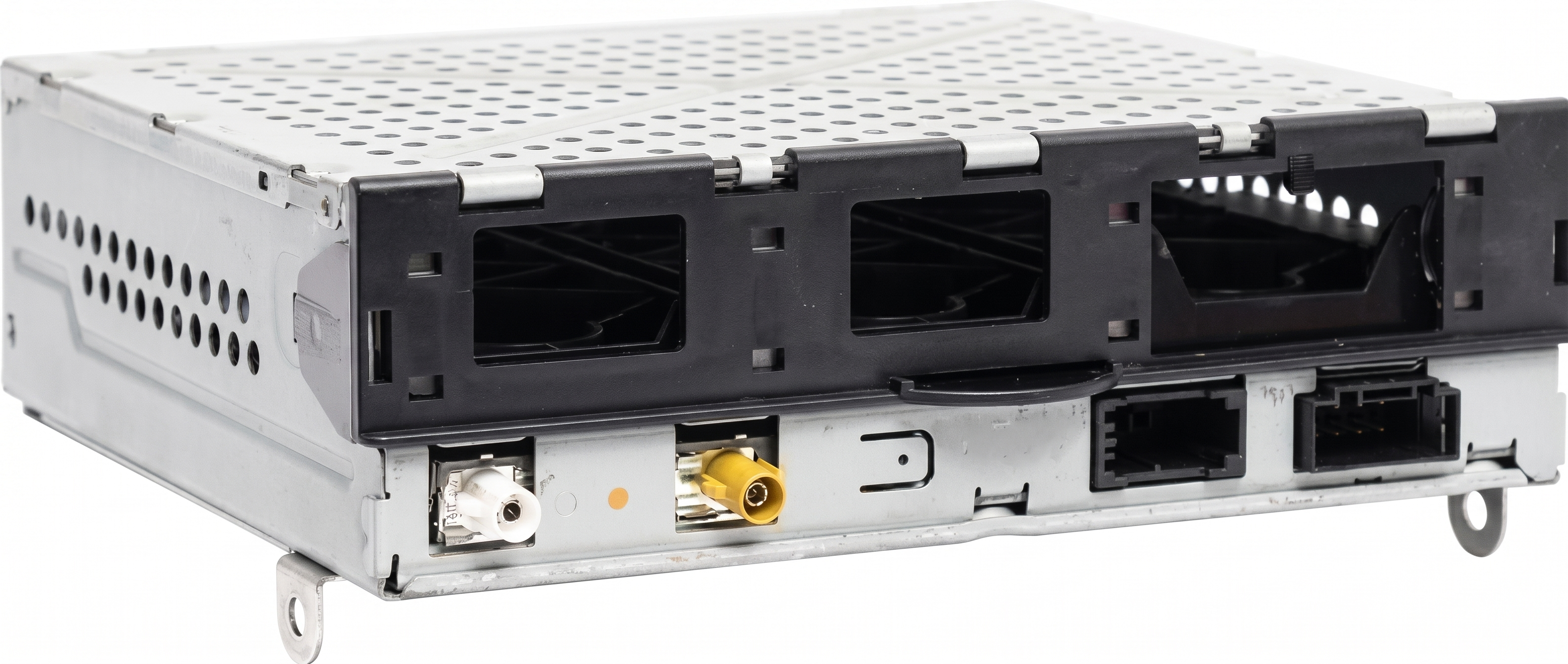
We Have This Part in Stock




The information in this article is provided for general reference and educational purposes only. Vehicle specifications, procedures, and part compatibility can vary by production date, trim level, and region. Always consult your vehicle's factory service manual and verify part numbers before purchasing or performing repairs. Safety-critical components such as airbags, seat belts, and braking systems should be installed by a qualified professional.
- Audi Q5:
- Audi SQ5:
- Audi A5:
- Audi A4:
- Audi Allroad:
- Audi S4:
- Audi S5:
- Audi RS5:
- Audi A6:
- Audi Q7:
- Audi Q8:
- Audi e-tron:
- Audi A3:
- Audi A6 Quattro:
- Audi A7:
- Audi A8 Quattro:
- Audi Q5 PHEV:
- Audi Q8 e-tron:
- Audi RS Q8:
- Audi RS3:
- Audi S3:
- Audi S6:
- Audi SQ8:
- Bentley Bentayga:
- Lamborghini Urus:
- Porsche Cayenne:
- Porsche Panamera:
- 🛍️ Shop This Part
- Symptoms of Audio System Failure
- 1. No Sound From Speakers
- 2. Sound Only From One Side
- 3. MMI Screen is Black or Intermittent
- 4. MMI Controls Are Unresponsive or Erratic
- 5. Popping or Crackling Sounds
- 6. Specific Diagnostic Trouble Codes (DTCs)
- Diagnosing the Problem: A Step-by-Step Guide
- Known Issues, TSBs, and Recalls
- Amplifier Water Damage
- Technical Service Bulletins (TSBs)
- Safety Recall 70G6: Loose Speaker Trim
- Vehicle-Specific Information & Part Locations
- Buying a Used Audio System: What You MUST Know
- The #1 Issue: Component Protection
- Physical Inspection
- Cost of Replacement
- Frequently Asked Questions (FAQ)
- 🎟️ Get 5% Off