

Audi & Bentley Audio Failure (2002-2018): The Truth About Component Protection and Water Damage
This guide explains the most common audio system problems in the A3, A4, R8, TT, and more, focusing on the dreaded 'Component Protection' lock and water-damaged amplifiers.
- Replacing an audio module (like an amplifier or radio) is not plug-and-play due to 'Component Protection'. A dealer or specialist visit for online programming is mandatory.
- Water damage is the #1 killer of trunk-mounted amplifiers in these vehicles, especially the Audi TT, A3, and A4. Check for leaks before replacing parts.
- A total loss of sound or a black MMI screen can be caused by a single failed module in the MOST fiber-optic loop. A bypass loop is the best tool for diagnosis.
- When buying a used part, you must match the OEM part number exactly and budget for the additional cost of Component Protection removal.
Understanding the Core Problems: MOST Bus and Component Protection

When the audio system in your 2004-2018 Audi A3, 2007-2015 Audi R8, 2007-2015 Audi TT, 2002-2008 Audi A4, or other related models goes silent, the cause is rarely simple. Two key technologies are often at the heart of the issue: the MOST fiber-optic network and Audi's anti-theft 'Component Protection' system.
The MOST Fiber-Optic Loop
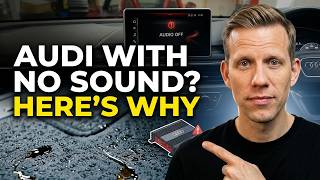
Think of the MOST bus as a ring of Christmas lights. The head unit, amplifier, satellite radio, and CD changer are all connected in a continuous fiber-optic loop. If one of these modules fails—often due to water damage or internal electronics failure—it breaks the loop. When the loop is broken, communication stops, and the entire audio and infotainment system can go down. This can result in no sound, a black MMI screen, or a system that constantly reboots.
Component Protection (CP)
Component Protection is an anti-theft feature that electronically 'locks' modules like the amplifier, radio tuner, and MMI unit to the car's original Vehicle Identification Number (VIN). When you install a used module, the car recognizes it's from a different vehicle and activates Component Protection. This puts the part in a restricted mode, typically causing a 'no sound' symptom, even though the MMI display may appear to work perfectly. A message like "Component Protection Active" might briefly flash on the screen. Removing this lock is not a DIY job; it requires special equipment and an online connection to Audi's servers.
Warning: A used audio module from another vehicle will not fully function until Component Protection is removed by an authorized dealer or a qualified independent specialist with the correct online tools (ODIS). This programming step is mandatory and adds to the total repair cost.
Common Symptoms of Audio System Failure

Diagnosing audio issues in these vehicles can be tricky, as a single failed component can cause a variety of symptoms.
- Complete loss of sound: The most common symptom. The MMI screen may work, but no audio comes from any source (radio, CD, Bluetooth). This often points to a failed amplifier or a break in the MOST loop.
- Intermittent sound or crackling/popping noises: Sound may cut in and out, or you may hear static and pops from the speakers, even with the radio off. This is a classic sign of a failing amplifier, often due to water damage and corrosion.
- MMI screen is black or reboots: If a critical module like the amplifier or radio tuner fails, it can break the MOST loop and prevent the entire MMI system from starting up correctly.
- Sound only from one side: When Component Protection is active on a replacement amplifier, it sometimes results in sound playing only from the left or right speakers.
- MMI works but media sources are unavailable: The system may power on, but the radio, CD, or satellite radio options are grayed out or won't activate. This can happen when the respective module has failed.
Common Diagnostic Trouble Codes (DTCs)
A scan with a VAG-specific tool like VCDS can reveal codes pointing to the problem:
- 00463 - Control Module for Digital Sound Package (J525): No Signal/Communication: This code is a strong indicator that the main amplifier has failed or is not communicating on the MOST bus.
- 01304 - Radio: No Signal/Communication: This points to a fault with the radio tuner module.
- 02084 / 02095 - Component Protection Active: These codes confirm that a module has been replaced and needs to be adapted to the vehicle by a dealer.
Diagnosing the Faulty Module

If you have no sound, the first step is to determine which module in the MOST fiber-optic loop has failed. The most effective way to do this is with a fiber optic bypass loop. This simple tool allows you to remove one module at a time from the ring and 'close' the loop.
- Locate the audio components, which are typically in the trunk.
- Disconnect the fiber optic plug from one module (e.g., the amplifier).
- Plug the bypass loop into the disconnected plug, completing the circuit without that module.
- Turn on the ignition. If the sound returns (or if other parts of the MMI system come back to life), you have found the faulty component.
- Repeat this process for each module (satellite radio, CD changer) until the failed part is identified.
Vehicle-Specific Issues and Component Locations

While the underlying technology is similar, component locations and common problems can vary by model.
2004-2018 Audi A3 / S3 / RS3
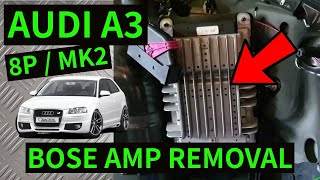
- Component Location: The Bose or Bang & Olufsen amplifier is located in the trunk, behind the left-side trim panel. Non-Bose systems may have a smaller amplifier for the rear speakers integrated into the subwoofer enclosure.
- Known Issues: These models can suffer from water leaks from a cracked or disconnected rear window washer fluid line, which drips directly onto the amplifier and its connectors, causing corrosion and failure. Some owners of the RS3 have also reported issues with the B&O system lacking midrange or having crackling sounds.
2002-2008 Audi A4 / S4 / RS4 (B6/B7 Platforms)
- Component Location: The amplifier is typically located behind the trim panel on the right (passenger) side of the trunk.
- Known Issues: Water leaks into the trunk from clogged sunroof drains or failed taillight seals are a common cause of amplifier failure. A failed bass speaker can also cause a short, prompting the amplifier to shut down as a protective measure.
2007-2015 Audi TT
- Component Location: The Bose amplifier is mounted behind the left-side panel in the trunk.
- Known Issues: The Mk2 TT is notorious for amplifier failure due to water intrusion. Water gets past the taillight seals or through a body seam in the rear wheel well, dripping onto the amplifier and causing severe corrosion. Symptoms include sudden loss of sound or popping noises. 🎬 See how water damage causes crackling and pops in the TT.
2007-2015 Audi R8
- Component Location: The amplifier is located in the front trunk (frunk) area, typically behind the liner on the driver's side.
- Known Issues: While less prone to the water issues of trunk-mounted amps, failures can still occur due to internal electronics. The system shares the same MOST bus and Component Protection architecture as other Audis.
2006-2012 Bentley Continental Flying Spur
- Component Location: The amplifier (either standard, Naim, or other) is located in the trunk, behind the battery on the passenger side.
- Known Issues: These vehicles use the same VW/Audi Group electronics platform, including the MOST bus and Component Protection. Failures of the Naim audio system are known, sometimes related to subwoofer vibration or internal amplifier faults. Replacing a module will require a dealer or specialist visit for programming.
Buying a Used Audio System Component

Purchasing a used amplifier, radio, or CD changer can be a cost-effective solution, but it requires careful attention to detail.
Pro Tip: For these complex electronic systems, a quality used OEM part is almost always a better choice than a cheap aftermarket alternative. Aftermarket units often cannot integrate with the MOST fiber-optic network or the vehicle's steering wheel controls without expensive, complicated adapters.
- Match Part Numbers Exactly: The most critical step. The part number on the replacement unit must be an exact match to your original part, or a known, compatible superseded number. Even a different letter at the end can signify different hardware or software that will not work in your car.
- Budget for Programming: Remember that the used part will be locked by Component Protection. You MUST factor in the cost of a dealer or specialist visit (typically 1-2 hours of labor) to remove the CP lock. Call ahead for a quote.
- Inspect for Water Damage: When buying a used amplifier, carefully inspect the casing and electrical connector pins for any signs of white or green corrosion. This is a dead giveaway of past water damage, and the unit should be avoided.
- Verify the Source: Whenever possible, buy from a reputable recycler that offers a warranty. A dealer will check the part's history when removing Component Protection; if the part is flagged as stolen, they may be required to report it.
Cost of Replacement
Prices can vary significantly based on the specific component, vehicle model, and sound system option (Bose, B&O, Naim).
| Part / Service | Estimated Cost (USD) |
|---|---|
| New OEM Amplifier (Bose/B&O) | $900 - $2,000+ |
| New OEM Satellite Radio Module | $450 - $600 |
| Used OEM Amplifier (Bose/B&O) | $150 - $500 |
| Used OEM Satellite Radio Module | $50 - $150 |
| Remanufactured/Repaired Amplifier | $250 - $450 |
| Shop Labor (Replacement) | $100 - $250 |
| Dealer Labor (Component Protection Removal) | $150 - $300 (typically 1-1.5 hours) |
Frequently Asked Questions (FAQ)
Why is there no sound after I installed a used amplifier?
This is the classic symptom of Component Protection. The used amplifier is electronically locked to its original vehicle. You must take the car to an Audi/Bentley dealer or a qualified independent specialist to have the protection removed and the amplifier adapted to your car's VIN.
Can I upgrade from the standard audio system to a Bose or B&O system?
This is a very complex and expensive conversion. It involves much more than just swapping the amplifier and speakers. You would need to change wiring harnesses, speaker mounts, and potentially the main MMI unit. It also requires extensive coding with specialized tools. It is generally not considered a practical or cost-effective upgrade.
My MMI screen is black. Could the audio amplifier be the cause?
Yes. All the infotainment modules are connected in a fiber-optic loop. If the amplifier fails, it can break this loop and prevent the MMI screen and controller from functioning. Diagnosing with a fiber optic bypass loop is the best way to confirm if the amp is the cause.
Can an independent mechanic remove Component Protection?
Only if they have invested in the official ODIS diagnostic system and maintain a licensed online subscription with the VW/Audi group, which allows them to connect to the factory servers in Germany. Many independent shops do not have this capability and will refer you to a dealer. Always ask specifically if they can perform online Component Protection removal before booking a repair.
Helpful Videos

Technical Specifications
OEM Part Numbers: 8E0035111D 8E0035593H 8E0035593K 8E0035593L 8E0035593M 8E0035593N 8E0035593P 8E0035593Q 8P1862336 8P1862336A 8P4035223C 8P4035223D 8V0035039C 8V1035880B 8V1035880C 3W5035465A
System Architecture: Media Oriented Systems Transport (MOST) fiber-optic bus. Security: Vehicle-specific Component Protection on key modules.
We Have This Part in Stock



The information in this article is provided for general reference and educational purposes only. Vehicle specifications, procedures, and part compatibility can vary by production date, trim level, and region. Always consult your vehicle's factory service manual and verify part numbers before purchasing or performing repairs. Safety-critical components such as airbags, seat belts, and braking systems should be installed by a qualified professional.
- Audi A3:
- Audi R8:
- Audi TT:
- Audi A4:
- Audi S3:
- Audi A3 Quattro:
- Audi RS3:
- Audi RS4:
- Audi S4:
- Bentley Continental Flying Spur:
- Bentley Continental GT:
- Bentley Continental GTC:
- Bentley Continental Supersports:
- 🎬 Helpful Videos
- 🛍️ Shop This Part
- Understanding the Core Problems: MOST Bus and Component Protection
- The MOST Fiber-Optic Loop
- Component Protection (CP)
- Common Symptoms of Audio System Failure
- Common Diagnostic Trouble Codes (DTCs)
- Diagnosing the Faulty Module
- Vehicle-Specific Issues and Component Locations
- 2004-2018 Audi A3 / S3 / RS3
- 2002-2008 Audi A4 / S4 / RS4 (B6/B7 Platforms)
- 2007-2015 Audi TT
- 2007-2015 Audi R8
- 2006-2012 Bentley Continental Flying Spur
- Buying a Used Audio System Component
- Cost of Replacement
- Frequently Asked Questions (FAQ)
- 🎟️ Get 5% Off