

2019-2021 Veloster Audio Screen Guide: Black Screens, Resets, and Replacement
Your definitive guide to diagnosing common audio control panel failures, understanding compatibility, and navigating the replacement process for the second-generation Hyundai Veloster.
- Compatibility is critical: Audio units from Veloster N models are NOT interchangeable with Base or Turbo models.
- A used replacement unit will likely require programming by a Hyundai dealer or specialized shop to ensure full functionality.
- Before replacing a faulty unit, try a simple pinhole reset or battery disconnection, as software glitches are common.
- A blank or flickering screen may be caused by a loose cable, a known issue with a TSB, not necessarily a failed unit.
Symptoms of a Failing Audio Control Panel
When the audio control panel in a 2019-2021 Veloster begins to fail, it can manifest in several ways. Before assuming the entire unit is bad, it's worth trying a simple system reset. Many Hyundai head units have a small, pinhole reset button that can be pressed with a paperclip to reboot the system, which can resolve temporary software glitches. Some owners also report that disconnecting the car's battery for about 15 minutes can perform a 'hard reset' and temporarily fix issues.
Common Failure Symptoms:
- Black or Blank Screen: The display may fail to turn on, either intermittently or permanently. This can sometimes be caused by a loose internal connection that is sensitive to bumps or temperature changes.
- Unresponsive or Frozen Touchscreen: The screen may light up but will not respond to touch commands. Sometimes this is temporary and resolves after the car has been turned off and on again.
- Constant Rebooting: The unit may get stuck in a boot loop, where it continuously shows the Hyundai logo and restarts without ever fully loading.
- No Audio Output: The display may work perfectly, but no sound comes from the speakers for any audio source (radio, Bluetooth, etc.). This can sometimes be a software glitch solvable by a hard reset.
- Loss of Specific Functions: Bluetooth may refuse to connect, or Apple CarPlay/Android Auto may fail to launch, even while other functions work.
- "Ghost Touch" or Erratic Behavior: The unit may seem to operate on its own, changing stations or settings without any input. This can sometimes be a sign of a failing touchscreen digitizer.
Pro Tip: Before replacing the unit, check the simple things first. Ensure the audio system fuse in the fuse box is not blown. Also, try the pinhole reset button, which is often located near the screen or volume knob, to perform a soft reboot.
Known Issues, TSBs, and Recalls
While there are no major recalls specifically for the audio control panel itself, Hyundai has issued Technical Service Bulletins (TSBs) for related software issues. For example, TSB T3Q was released for the 2019 Veloster to update the display audio software to correct a blank home screen issue. Another TSB addressed issues where Blue Link remote services would not process. A separate issue, covered by TSB 24BEH, notes that a flickering or black screen can be caused by a loose coaxial cable connection behind the display, which can be fixed by adjusting the cable shield rather than replacing the entire unit.
It's important to note that while several recalls exist for the 2019-2021 Veloster, they primarily concern engine issues and door latches, not the infotainment system.
Compatibility: Base vs. Veloster N Models
Warning: The audio control panel for a standard (Base, Turbo) Veloster is NOT interchangeable with the unit from a Veloster N. The Veloster N has a different system with unique performance-related displays. Part numbers will be different, and the units are not compatible. For example, a Veloster N unit may have a part number like 96170-K9510-MPP, while the Base model with navigation uses 96560J3200RET. Always verify the part number from your original unit before purchasing a replacement.
Buying a Used 2019-2021 Veloster Audio Control Panel
Purchasing a used audio control panel can be a cost-effective solution, but it requires careful attention to detail. Given the complexity of modern infotainment systems, simply swapping the hardware is often not enough.
- Verify the Part Number: This is the most critical step. The part number on the replacement unit MUST match your vehicle's original part number. There are different units for models with and without navigation, and for different trim levels. The part number is typically on a sticker on the unit's chassis. The known part number for a Base model with navigation is 96560J3200RET.
- Inspect for Physical Damage: Check the screen for deep scratches, cracks, or signs of delamination (bubbling). Ensure all connectors on the back are clean and free of bent or damaged pins.
- Programming May Be Required: This is a significant consideration. While not explicitly stated in every source, modern head units are often integrated with the vehicle's other systems. It is highly likely that a replacement unit—even a used OEM one—may require programming by a Hyundai dealer or a specialized independent shop with access to Hyundai's diagnostic software to ensure all features (like navigation, Blue Link, and vehicle settings) function correctly. Do not assume it will be plug-and-play.
- Anti-Theft Systems: While specific anti-theft links for this head unit are not widely documented in search results, many modern radios have some form of component protection that links them to the original vehicle's VIN. Be prepared for a potential dealer visit to unlock the unit.
Cost of Replacement
The cost to replace a Veloster audio control panel can vary significantly depending on the source of the part and labor.
| Part Type | Estimated Cost |
|---|---|
| New OEM | $1,900 - $3,400+ |
| Used OEM (Salvage/eBay) | $200 - $500 |
| Shop Labor | $150 - $300 |
Note: Prices are estimates and can vary based on location, supplier, and the specific part number required. Labor costs typically cover the physical installation but may not include any required software programming, which could be an additional charge.
Frequently Asked Questions (FAQ)
My screen is black. Do I need to replace the whole unit?
Not necessarily. First, check the fuse for the audio system. Next, try a soft reset using the pinhole button next to the screen. You can also try disconnecting the battery for 15 minutes. A black screen can also be caused by a loose cable behind the unit, an issue addressed by a Hyundai TSB. Replacement should be the last resort after these diagnostic steps.
Will a used audio control panel need to be programmed by a dealer?
It is very likely. While some basic functions might work, features like navigation, Blue Link, and full integration with the vehicle's systems often require programming to the car's VIN. Buyers should assume that a trip to a dealer or a qualified independent shop will be necessary for full functionality.
Can I install a Veloster N audio unit in my base Veloster for the performance pages?
No, this is not a compatible swap. The Veloster N uses a different infotainment system and wiring. The part numbers are different, and the units are not interchangeable between the N and non-N models.
Can I replace the audio unit myself?
The physical replacement is generally straightforward for a DIY mechanic, involving the removal of dash trim panels and a few screws. However, the potential need for post-installation software programming means the job might not be fully complete without professional help.
Technical Specifications
OEM Part Numbers: 96560J3200RET
Fits Base models with factory navigation. Does not fit Veloster N.
We Have This Part in Stock
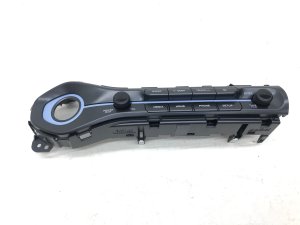



The information in this article is provided for general reference and educational purposes only. Vehicle specifications, procedures, and part compatibility can vary by production date, trim level, and region. Always consult your vehicle's factory service manual and verify part numbers before purchasing or performing repairs. Safety-critical components such as airbags, seat belts, and braking systems should be installed by a qualified professional.
- Hyundai Veloster: