

2012 Honda Pilot Radio: Fixing No Sound & Entering Anti-Theft Codes
This guide covers common failures, compatibility checks, and the crucial anti-theft code process for the 2012 Honda Pilot audio control panel.
- Compatibility is critical: The unit must be from a 2012 Pilot EX/EX-L without navigation and have faceplate ID 39106SZAL11.
- This part does not need dealer programming, but you MUST have the 5-digit anti-theft code to unlock it after installation.
- The anti-theft code can be retrieved for free from a Honda website using the radio's serial number and the car's VIN.
- Common failures include no sound, random rebooting, and unresponsive buttons.
Key Compatibility Warnings for 2012 Honda Pilot Radio
Warning: Compatibility for this part is very specific. Before purchasing a replacement, confirm your vehicle and the part match these exact criteria:
- Trim Level: Fits EX and EX-L models without the factory navigation system.
- Audio System: Designed for the 7-speaker, 229-watt audio system. It will not work correctly with the standard LX trim or premium systems.
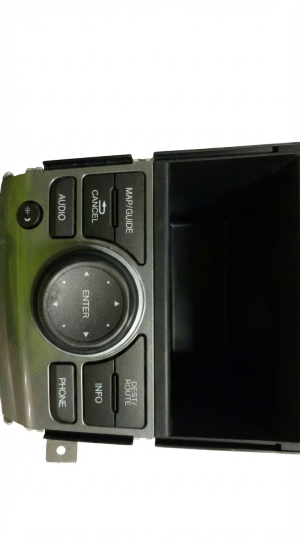
- Faceplate ID: The most critical check. The faceplate of the radio must have the ID number 39106SZAL11 printed on it. A unit with a different faceplate ID will likely not function correctly.
Symptoms of a Failing Audio Control Panel
When the audio unit in a 2012 Pilot begins to fail, it can cause a range of frustrating issues. Here are the most common symptoms reported by owners:
- No Sound: The display may turn on and appear to function normally, showing the radio station or CD track, but no sound comes from any of the speakers. This can be intermittent or permanent.
- Popping, Crackling, or Static: Loud popping or crackling noises may occur, sometimes followed by the system shutting down and rebooting.
- Display Screen Goes Black: The screen may randomly go blank and reboot itself. In other cases, the unit may lose power entirely and fail to turn on.
- Unresponsive Buttons: Buttons on the faceplate, particularly the 'AUX' button, may stop responding, preventing you from selecting that audio source.
- Bluetooth Call Quality Issues: When making calls via Bluetooth, you or the person on the other end may hear static, beeping, or distorted audio. This can sometimes be traced to a separate but related Hands-Free Link (HFL) module.
- CD Player Malfunctions: The unit may fail to play, load, or eject CDs. A known Technical Service Bulletin (TSB) also addresses a software issue where the CD player restarts from the beginning of the track every time the car is turned off and on.
Buying a Used Audio Control Panel: What to Look For
A used OEM radio is often the most cost-effective solution. Because these units are not coded to a specific vehicle's VIN, a compatible used part is a simple plug-and-play replacement once you enter the anti-theft code. Here’s what to check:
- Verify the Faceplate ID: This is the most important step. Insist on a clear photo of the front of the unit to confirm the ID is 39106SZAL11. Do not buy a unit if you cannot verify this number.
- Check for Trim and Options: Double-check that the donor vehicle was a 2012 Pilot EX or EX-L without navigation. Units from models with navigation or from different trim levels are not compatible.
- Inspect the Buttons and Display: Look for excessive wear on the buttons, which could indicate heavy use. Ask the seller to confirm that all buttons are physically working and that the display is free from scratches or dead pixels.
- Ask About the Anti-Theft Code: While you can retrieve the code yourself, it's a bonus if the seller can provide the 5-digit anti-theft code from the donor vehicle. It's often found on a sticker in the glove box.
Pro Tip: Buying a used OEM unit is generally a better choice than a cheap, no-name aftermarket radio. The OEM unit guarantees a perfect fit, retains steering wheel controls without complex adapters, and matches the vehicle's interior lighting and design.
Cost Comparison: New vs. Used
Replacing the audio control panel can vary widely in cost depending on the source of the part. New units from Honda are typically remanufactured. Here is a general cost breakdown:
| Part Type | Estimated Cost |
|---|---|
| New OEM (Remanufactured) | $190 - $245 |
| New Aftermarket | $150 - $400+ |
| Used OEM | $95 - $150 |
| Shop Labor | $100 - $225 |
After Installation: Entering the Anti-Theft Code
This unit does not require dealer programming or flashing. However, it is equipped with an anti-theft system that requires a 5-digit code after it loses power, such as during a battery replacement or installation. If the radio displays the word "CODE," you must enter it to unlock the unit.
How to Find Your Radio Code:
- Check the Glove Box: Look for a small white sticker inside the glove box. It will have the 5-digit radio code and the radio's serial number.
- Check Your Owner's Manual: The code is sometimes on a card included with the vehicle's original paperwork.
- Retrieve the Code Online (Most Reliable Method):
- With the radio off, press and hold preset buttons 1 and 6.
- While holding the buttons, turn the ignition to the 'ON' position (II).
- The radio display will show a 10-digit serial number. Write this number down.
- Go to the official Honda Radio/Navi Code website (radio-navicode.honda.com).
- Enter your vehicle's VIN, your contact information, and the radio serial number you just retrieved. The website will display your 5-digit unlock code.
- Contact a Honda Dealer: A dealership can look up the code for you with the VIN and proof of ownership.
Once you have the 5-digit code, use the radio preset buttons to enter it. The radio will beep and resume normal function.
Known Issues, Recalls, and Service Bulletins
There are no specific recalls for this audio unit. However, one Technical Service Bulletin (TSB) has been issued that relates to its function:
- TSB #SB-11-070: Addresses a software issue where the CD player or Rear Entertainment System (RES) restarts from the beginning of a track or disc after the ignition is turned off and back on. A dealer can perform a software update to correct this.
Frequently Asked Questions (FAQ)
Does a replacement radio need to be programmed by the dealer?
No, dealer programming is not required. You only need to enter the 5-digit anti-theft code to unlock the radio after installation. You can retrieve this code yourself online or from a dealer.
Can I install a radio from a Pilot with navigation in my non-navigation Pilot?
No, the wiring and system architecture are completely different. You must use a radio from a vehicle with the same audio system (non-navigation, 7-speaker) for it to work.
My radio turns on but there's no sound. Is the radio bad?
It's a very common symptom of internal failure in the head unit. Before replacing the unit, it's wise to check the radio fuse first to ensure it's not a simple power issue. If the fuse is good, the head unit's internal amplifier has likely failed.
Can I replace the audio control panel myself?
Yes, this is a feasible DIY job for someone with basic tools. The process involves carefully prying off several dash and console trim pieces to access the four screws holding the radio in place. The difficulty is moderate, mainly due to the risk of scratching the plastic trim.
Part Numbers and Specifications
| Specification | Detail |
|---|---|
| Vehicle Fitment | 2012 Honda Pilot EX, EX-L (Without Navigation) |
| Faceplate ID | 39106SZAL11 |
| Known OEM Part Numbers | 39100-SZA-L11CN, 39100-SZA-L11CP, 39100-SZA-L11RM, 39106-SZA-L11, 39106SZAL11, 39107-SZA-L11 |
| System Output | 229 Watts, 7-Speaker System |
Technical Specifications
OEM Part Numbers: 39100-SZA-L11CN 39100-SZA-L11CP 39100-SZA-L11RM 39106-SZA-L11 39106SZAL11 39107-SZA-L11
Fits 2012 Honda Pilot EX & EX-L without factory navigation. For 7-speaker, 229-watt system. Faceplate ID: 39106SZAL11.
We Have This Part in Stock



The information in this article is provided for general reference and educational purposes only. Vehicle specifications, procedures, and part compatibility can vary by production date, trim level, and region. Always consult your vehicle's factory service manual and verify part numbers before purchasing or performing repairs. Safety-critical components such as airbags, seat belts, and braking systems should be installed by a qualified professional.
- Honda Pilot:
- 🛍️ Shop This Part
- Key Compatibility Warnings for 2012 Honda Pilot Radio
- Symptoms of a Failing Audio Control Panel
- Buying a Used Audio Control Panel: What to Look For
- Cost Comparison: New vs. Used
- After Installation: Entering the Anti-Theft Code
- How to Find Your Radio Code:
- Known Issues, Recalls, and Service Bulletins
- Frequently Asked Questions (FAQ)
- Part Numbers and Specifications
- 🎟️ Get 5% Off