

2021-2025 Genesis G80 Audio Control Panel: Solving Issues with Freezing, Unresponsiveness & Replacement
This guide covers common problems, compatibility checks, and replacement considerations for the audio control panel in the 2021-2025 Genesis G80.
- Many infotainment issues like freezing or rebooting are software-related and may be fixed with an update, not by replacing the controller.
- A faulty controller is indicated by unresponsive physical buttons/dials while the screen itself still functions.
- This part is plug-and-play and does not require dealer programming, but you MUST match the part number (e.g., 96110-T1000) to ensure compatibility.
- Be aware of a recall (NHTSA 26V019000) for 2025-2026 models where a software bug causes the screen to reboot; this is not a hardware failure.
Known Issues and Software Updates
The most widely reported issues with the Genesis G80's infotainment system are often software-related rather than a physical failure of the audio control panel itself. Owners have reported system freezing, lagging touch inputs, slow responsiveness, and features like navigation becoming unavailable. Many of these problems can be traced to software glitches or the system needing an update. In some cases, issues with Genesis Connected Services have been suspected of causing the head unit to become slow and unresponsive.
Recalls and Technical Service Bulletins (TSBs)
NHTSA Recall 26V019000 (Genesis Recall 031G): This recall affects some 2025-2026 G80 models. A software error related to HD radio memory storage can cause the instrument panel and the main AVN display to intermittently reboot while driving. This can lead to a temporary loss of the speedometer, fuel gauge, and other critical information. The remedy is a software update, which can be performed over-the-air (OTA) or by a Genesis dealer. While the recall primarily lists 2025-2026 models, similar software-driven symptoms have been reported by owners of earlier models.
While no TSBs directly point to the failure of the audio control panel hardware itself, various bulletins address software updates for related systems, such as mood lighting controllers and infotainment glitches. This suggests that many perceived hardware issues may be solvable with software updates from a dealer.
Symptoms of a Failing Audio Control Panel
While many issues are software-based, the physical controller can fail. Here are symptoms that point specifically to a hardware problem with the control panel:
- Unresponsive Buttons: Physical buttons for 'Map', 'Nav', 'Media', etc., do not respond when pressed.
- Rotary Dial Malfunction: The dial spins freely but does not navigate menus on the screen, or it skips over options erratically.
- Touchpad Issues: The touchpad on top of the dial is inaccurate, unresponsive, or registers "ghost" inputs.
- Intermittent Operation: The controller works sporadically, often cutting out without warning.
- No Power/No Lights: The backlighting on the controller is off, and it is completely non-functional. This could also indicate a fuse or wiring issue.
Pro Tip: Before assuming the controller is bad, perform a system reset. Turn the vehicle off, open the driver's door for a few minutes to ensure all modules power down, and then restart the car. This can often clear temporary software glitches that mimic hardware failure.
Programming and Installation
A critical question for any electronic module replacement is whether it requires programming. For the 2021-2025 Genesis G80, the audio control panel appears to be a plug-and-play component. Searches for replacement procedures and part sales do not indicate a need for dealer programming, VIN flashing, or anti-theft synchronization. The unit's primary function is to send input signals to the main AVN head unit, which houses the actual system logic. As long as the replacement part number is correct, it should function upon installation.
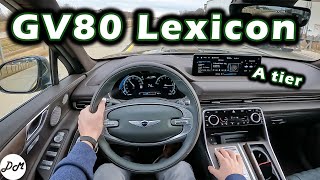
Warning: While the controller itself may not need programming, it must be compatible with your vehicle's specific audio system. The G80 was available with a standard audio system and a premium 21-speaker Lexicon system. 🎬 See our review of the Lexicon premium sound system These systems may use different controllers. Always verify compatibility before purchasing.
Buying a Used Audio Control Panel
Purchasing a used OEM audio control panel is a cost-effective way to restore functionality. Here’s what to look for:
- Verify the Part Number: This is the most important step. The original part number is printed on a label on the unit itself. You must remove some console trim to access it. The known part numbers are 96110-T1000 and 96110T1000UV2. The 'UV2' suffix likely denotes a specific color or finish, which is common for interior components. Ensure the main number (96110-T1000) matches.
- Inspect for Physical Damage: Check for deep scratches, cracks, or damage to the rotary knob and buttons. Pay close attention to the seams around the buttons and knob for any signs of liquid spills. Spilled coffee or soda is a common cause of failure for console-mounted electronics.
- Check Button and Knob Feel: The buttons should have a crisp, tactile click. The rotary knob should turn smoothly with distinct detents (clicks) for each step. A loose, gritty, or overly stiff knob is a red flag.
- Confirm Compatibility: When buying from a recycler, provide your vehicle's VIN and specify whether you have the standard or Lexicon premium audio system to help ensure you receive a compatible part.
Cost Comparison
Prices can vary based on supplier and condition. Here are some estimated costs:
| Part Type | Estimated Cost |
|---|---|
| New OEM | $580 - $650 |
| New Aftermarket | Not commonly available |
| Used OEM | $200 - $350 |
| Shop Labor for Replacement | $100 - $200 |
Frequently Asked Questions (FAQ)
Does a replacement audio control panel need to be programmed by the dealer?
No, the audio control panel for the 2021-2025 Genesis G80 does not appear to require any special programming or flashing. It is considered a plug-and-play part, provided you install a unit with the correct part number for your vehicle's options.
My infotainment screen is black or keeps rebooting. Is the audio controller the problem?
It is unlikely. A black or rebooting screen is typically caused by a software issue in the main AVN head unit or a problem with the display itself. This was the subject of NHTSA recall 26V019000 for some 2025-2026 models. A faulty controller usually results in unresponsive physical buttons or dials, while the screen continues to display information correctly.
Can I install a controller from a G80 with the Lexicon sound system if my car has the standard system?
This is not recommended. While they may be physically identical, the internal electronics could be different to accommodate the features of the premium sound system, such as Quantum Logic Surround settings. Using the wrong controller could lead to limited functionality or incompatibility. Always match the part number from your original unit.
Is it difficult to replace the audio control panel myself?
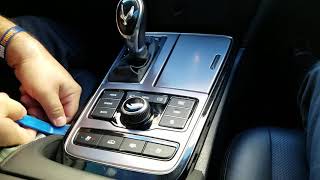
For a DIYer with some experience, the replacement is manageable. The process involves carefully prying up the center console trim panels to access the controller's mounting screws and electrical connectors. The main challenge is removing the trim pieces without scratching or breaking them. The difficulty is estimated at 2 out of 5.
🎬 Watch: How to remove the console audio controllerHelpful Videos

Technical Specifications
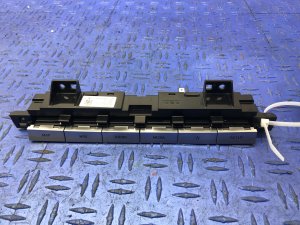
OEM Part Numbers: 96110-T1000 96110T1000 96110T1000UV2
Center console-mounted rotary/touchpad controller with shortcut buttons for the AVN (Audio/Video/Navigation) system.
We Have This Part in Stock

The information in this article is provided for general reference and educational purposes only. Vehicle specifications, procedures, and part compatibility can vary by production date, trim level, and region. Always consult your vehicle's factory service manual and verify part numbers before purchasing or performing repairs. Safety-critical components such as airbags, seat belts, and braking systems should be installed by a qualified professional.
- Genesis G80: