

2018-2020 Genesis G80 Audio Control Panel: Diagnosis and Replacement Guide
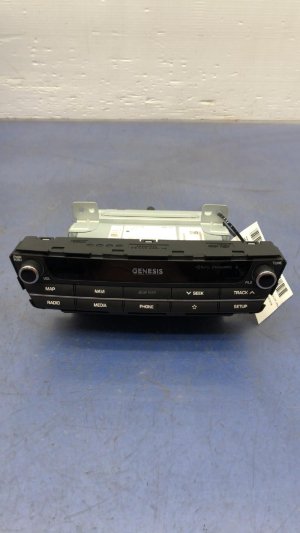
This guide covers common failures, part number verification, and the potential need for programming when replacing the console-mounted infotainment controller in your 2018-2020 Genesis G80.
- Compatibility is critical: You must match the OEM part number 96540B11504X.
- Professional programming is likely required after installation for full functionality.
- Failure is often caused by liquid spills, leading to sticky or unresponsive buttons. Inspect used parts carefully for signs of spills.
- Many infotainment issues like screen freezing are caused by the head unit, not this controller. If the buttons feel fine, diagnose the head unit first.
Symptoms of a Failing Audio Control Panel


When the audio control panel in a 2018-2020 Genesis G80 begins to fail, the symptoms are typically related to physical inputs not working correctly. It's important to distinguish these from software glitches that might affect the entire infotainment system.
- Unresponsive Buttons or Rotary Dial: Pressing buttons like 'Media', 'Nav', or 'Home' does nothing, or the effect is delayed. The main rotary dial may not register scrolling or pressing.
- Sticky or Sluggish Buttons: Buttons may feel slow to return to their position or stick down after being pressed. This is almost always caused by a spilled beverage, like soda or coffee, gumming up the internal mechanisms.
- Intermittent Operation: The controller may work perfectly one moment and fail the next. This can sometimes be related to temperature changes or simple wear and tear on the internal electronic components.
- Ghost Inputs: The infotainment system may act as if buttons are being pressed or the dial is being turned, even when no one is touching the controller. This can be caused by an internal short circuit.
- Backlighting Failure: The illumination behind the buttons may flicker or go out completely, making the controller difficult to use at night.
Pro Tip: Many infotainment issues, such as a frozen screen, system reboots, or problems with Apple CarPlay/Android Auto, are often caused by the main head unit (the screen and computer behind it), not the console controller. If your controller's buttons feel physically fine but the screen is glitching, the problem likely lies elsewhere. A simple system reset can sometimes resolve these software issues.
Known Issues, TSBs, and Recalls
As of mid-2026, there are no specific recalls or Technical Service Bulletins (TSBs) from the NHTSA or Genesis that directly address the failure of the console-mounted audio control panel for the 2018-2020 G80.
However, owners should be aware of other significant safety recalls for these vehicles:
- NHTSA Recall 21V160000: This recall addresses a potential malfunction in the Anti-Lock Brake System (ABS) module that could cause an electrical short, increasing the risk of an engine compartment fire while parked or driving. Owners were advised to park their vehicles outside and away from structures until the repair was completed.
- NHTSA Recall 24V191000: For G80 models equipped with the 3.3L V6 turbocharged engine, the left turbocharger oil feed pipe may crack and leak oil onto hot engine components, increasing the risk of a fire.
You can verify if your specific vehicle is affected by these recalls by entering your VIN on the NHTSA website.
Programming and Installation Requirements

This is the most critical consideration when replacing the audio control panel.
Warning: This module is not considered a simple plug-and-play part. While it may have some basic functionality after installation, professional programming is often required for the vehicle's head unit to fully recognize the new controller. Failure to program the part can result in some buttons not working, intermittent functionality, or other unpredictable behavior.
Modern Genesis vehicles use complex, interconnected electronic systems. A new module like this often needs to be initialized or 'variant coded' to the car using a dealer-level diagnostic tool, such as the Genesis GDS (Global Diagnostic System) or a high-end professional scan tool like an Autel MaxiSys. This procedure syncs the controller with the main infotainment computer. While some independent shops have this capability, you may need to visit a Genesis dealership to ensure the part is programmed correctly.
Buying a Used Audio Control Panel
Purchasing a used OEM controller is a cost-effective way to restore functionality. Since aftermarket versions of this specific part are not available, a recycled OEM unit is the best alternative to an expensive new part. Here’s what to look for:
- Verify the Part Number: The most important step is to ensure you are buying the correct part. The verified OEM part number for the 2018-2020 Genesis G80 is 96540B11504X (also appears as 96540-B1150-4X). This number is typically found on a sticker on the bottom or side of the unit. You must remove the part to see this sticker.
- Physical Inspection: When buying from a source with photos, look for signs of liquid damage. Check for any shiny, sticky residue around the buttons and in the seams. This is a major red flag.
- Test Button and Dial Feel: If you can inspect the part in person, press every button and turn the rotary dial. The buttons should have a crisp, positive click and return to their position immediately. The dial should rotate smoothly with distinct detents (clicks) and have a solid press-down click. Any mushiness or sticking indicates internal damage, likely from a spill.
- Check Connectors: Ensure the electrical connector ports on the back of the unit are clean and free of corrosion or bent pins.
- Budget for Programming: Even when buying used, assume you may need to pay for professional programming. Factor this potential cost into your decision.
Cost Breakdown
Prices can vary by location and supplier, but this table provides a general estimate of what to expect.
| Part Type | Estimated Cost |
|---|---|
| New OEM | $400 - $450 |
| New Aftermarket | Not Available |
| Used OEM | $95 - $160 |
| Shop Labor (Replacement) | $75 - $150 |
| Shop Labor (Programming) | $100 - $200 |
Replacement Procedure Overview

Replacing the controller is a feasible DIY job for someone comfortable with removing interior trim panels. The process generally takes 30-60 minutes. A similar procedure is shown on 2016 models.
- Set Parking Brake and Shift to Neutral: This provides clearance to remove the console trim.
- Disconnect Battery: As a safety precaution, disconnect the negative battery terminal.
- Remove Console Trim: Using a plastic trim removal tool, carefully pry up the edges of the large trim piece that surrounds the shifter and controller.
- Lift Shifter Boot: The leather boot around the shifter can be unclipped and pushed down into the console cavity to allow the trim panel to be lifted over the shifter knob.
- Disconnect and Remove Panel: Carefully lift the entire console trim panel. You will need to disconnect several electrical connectors from the underside before you can remove it completely. Place it on a soft surface to avoid scratches.
- Unbolt the Controller: With the panel upside down, the audio control panel is held in place by several Phillips head screws. Remove them and the old controller will come free.
- Installation: Installation is the reverse of removal. Install the new controller, reconnect all electrical connectors to the trim panel, and carefully snap the panel back into place. Reconnect the battery.
Frequently Asked Questions (FAQ)
Does a replacement audio control panel need to be programmed?
It is highly likely. To ensure all functions work correctly and the part communicates properly with the vehicle's main computer, a programming or initialization procedure with a dealer-level scan tool is recommended after installation.
Is this controller the same as the radio or head unit?
No. This is only the input controller located on the center console. The radio, amplifier, and main computer are part of the head unit, which is located behind the dashboard display screen. This part tells the head unit what to do.
Can I fix my sticky buttons instead of replacing the whole unit?
It is sometimes possible but not recommended. Cleaning a spill from inside the complex electronic assembly is very difficult and often unsuccessful. Attempting to disassemble the unit can easily cause further damage. Replacement with a clean, used unit is usually the more reliable and time-effective solution.
Why do my radio, navigation, and Bluetooth all freeze, but the buttons feel fine?
If the buttons and dial on the controller feel mechanically sound, but the entire infotainment system is freezing, rebooting, or lagging, the problem is almost certainly with the head unit software or hardware, not the console controller. You may need a software update from a Genesis dealer.
Technical Specifications
OEM Part Numbers: 96540B11504X 96540-B1150-4X
Console-mounted multimedia interface controller for the Audio/Video/Navigation (AVN) system.
We Have This Part in Stock





The information in this article is provided for general reference and educational purposes only. Vehicle specifications, procedures, and part compatibility can vary by production date, trim level, and region. Always consult your vehicle's factory service manual and verify part numbers before purchasing or performing repairs. Safety-critical components such as airbags, seat belts, and braking systems should be installed by a qualified professional.
- Genesis G80: