

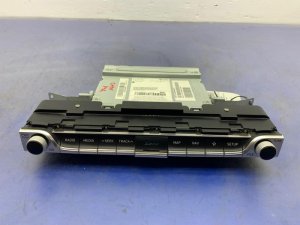
2019-2021 Genesis G70 Audio Control Panel: Troubleshooting Black Screens and Replacement Guide
This guide covers common failures like blank screens and unresponsive controls for the 2019-2021 Genesis G70 audio system, and explains how to choose the right used replacement part.
- The most common failure is a blank screen, which can often be fixed with a simple soft reset using the pinhole button next to the volume knob.
- Part number matching is critical when buying a used unit. Ensure the replacement is for the correct transmission (automatic) and navigation (present or not) options.
- Be prepared for the possibility of dealer programming. A used unit may need to be electronically synced to your vehicle's VIN to unlock all features.
- Software issues are common. Before replacing hardware, check for available system updates from the official Genesis website, as this can resolve many glitches.
Symptoms of a Failing Audio Control Panel
When the audio control panel in a 2019-2021 Genesis G70 begins to fail, it can cause a range of frustrating issues. Many of these problems are related to software glitches, which can sometimes be resolved with a simple reset. However, they can also indicate a deeper hardware failure within the unit itself.
- Blank or Black Screen: The most common complaint is the infotainment screen going completely black. In some cases, the audio may continue to play in the background or the backup camera may still function, but the main interface is inaccessible.
- Intermittent Rebooting or Freezing: The system may randomly freeze, become unresponsive to touch or button presses, or restart on its own while driving.
- Flickering Display: Before going completely black, the screen might flicker or display thin horizontal lines.
- No Audio Output: The display may appear to be working correctly, but there is no sound from any source. This can point to a failure in the head unit or the separate, external audio amplifier.
- Specific Functions Fail: Sometimes only one function, like the AM/FM radio or a specific app, will stop working while others continue to operate normally.
- Bluetooth Connectivity Problems: The unit may fail to pair with phones or repeatedly drop the connection.
Pro Tip: Before assuming the unit is broken, try a soft reset. Use a paperclip or the tip of a pen to press and hold the small, recessed reset button located next to the volume knob for 5-10 seconds. This forces the system to reboot and can clear many common software glitches causing a black screen or unresponsiveness.
Known Issues and Technical Service Bulletins (TSBs)
While the 2019-2021 G70 has been generally reliable, there are some known patterns related to its infotainment system.
- Software Glitches: The vast majority of infotainment problems reported by owners are rooted in software. These can often be resolved by performing a reset or, in more persistent cases, by having a dealer reinstall or update the system's firmware. Owners have reported that reinstalling the latest update from the official Genesis website has fixed issues.
- Recall for Later Models: Genesis issued a recall (NHTSA ID: 26V019000) for nearly 84,000 vehicles from the 2025-2026 model years due to a software bug that caused the screen to reboot. The issue was traced to an error in how HD radio data was stored in memory. While this recall does not apply to the 2019-2021 G70, it highlights a history of software-related screen failures in Genesis vehicles.
- Potential for Loose Connections: On other Genesis models like the GV70, flickering screens have sometimes been traced to a poorly crimped coaxial cable connector behind the display. While not a widespread, documented issue on the G70, it points to the possibility of a hardware connection issue if symptoms appear after hitting a bump.
Programming and Installation Requirements
Replacing an electronic module like the audio control panel in a modern vehicle is not always a simple plug-and-play process. Be aware of the following requirements.
Warning: This part may require programming by a dealership or a qualified independent shop to ensure full functionality. Modern infotainment systems are often tied to the vehicle's specific Vehicle Identification Number (VIN) for anti-theft purposes and to enable the correct features for that car's trim level.
If a replacement unit is installed and certain features don't work, or if a 'Component Protection' or 'Locked' message appears, it will likely need to be programmed. This process involves connecting a specialized diagnostic tool (like a J2534 pass-thru device) to the vehicle and using the manufacturer's software to sync the new module to the car's VIN. This is not something that can be done by most DIY mechanics.
Buying a Used 2019-2021 G70 Audio Control Panel
Purchasing a used OEM audio control panel can save you a significant amount of money compared to a new unit from the dealer. However, careful verification is essential to ensure you get a compatible part that will work correctly in your vehicle.
1. Match Part Numbers Exactly
This is the most critical step. There are different versions of this panel depending on the vehicle's options. The two most common OEM part numbers for this generation are:
- 96160-G9140-VCA: Typically referred to as the 'Receiver' or 'Audio Assembly' for models with an automatic transmission.
- 96560-G9500-VCA: Often listed as the 'Head Unit Assembly AVN' (Audio, Video, Navigation) and is likely for models equipped with factory navigation.
Do not interchange these parts. Installing a navigation unit in a non-navigation car (or vice-versa) will likely result in compatibility issues. Always match the part number from your original unit to the one you are buying.
2. Verify Vehicle Options
Beyond the part number, confirm the donor vehicle had the same key options as yours:
- Transmission: These units are specified for vehicles with an automatic transmission.
- Navigation: As mentioned, there are different units for cars with and without factory navigation.
- Sound System: While less likely to cause a compatibility lock-out, it's best to source a unit from a car with the same sound system (base or Lexicon premium audio) to ensure proper amplifier communication.
3. Physical Inspection
When you receive the used part, inspect it carefully before installation.
- Screen Condition: Check for deep scratches, delamination (a bubbling or peeling look), or cracks in the display.
- Connectors: Ensure all connector ports on the back are clean, free of corrosion, and that no pins are bent or broken.
- Casing: Look for signs of water intrusion or physical damage to the housing, which could indicate internal problems.
Cost Comparison for a G70 Audio Control Panel
The price for a replacement unit can vary dramatically depending on the source.
| Part Type | Estimated Cost |
|---|---|
| New OEM | $1,500 - $2,250 |
| Used OEM | $100 - $250 |
| Shop Labor for Replacement | $300 - $500 |
Frequently Asked Questions (FAQ)
Does a used Genesis G70 audio control panel need to be programmed by a dealer?
It might. While not always required if you match the part number exactly, it is a strong possibility. These units can be linked to the car's VIN. If you install a used unit and it seems 'locked' or features are missing, a trip to the dealer or a specialized shop with access to Genesis diagnostic software will be necessary to program the unit to your vehicle.
My G70's screen is black. What's the first thing I should do?
The very first step is to try a soft reset. Use a paperclip to press and hold the tiny reset button next to the volume knob for about 10 seconds. If that doesn't work, the next step is to check the fuses related to the audio system. As a final resort, you can perform a hard reset by disconnecting the negative terminal of your car's 12V battery for about 15 minutes.
Can I upgrade my non-navigation G70 with a used navigation unit?
This is not recommended. The wiring harnesses and communication with other vehicle modules (like the instrument cluster and GPS antenna) are different. Attempting this swap will likely lead to compatibility problems and non-functioning features. It is crucial to buy a replacement unit that matches your car's original specifications.
Is the replacement difficult to do myself?
Replacing the audio control panel is a moderately difficult job for a DIYer. It requires careful removal of several dash trim pieces, which can be easily scratched or broken without proper plastic trim removal tools. While it involves basic unbolting and unplugging, the risk of cosmetic damage is high. The potential need for professional programming after installation also adds a layer of complexity.
Technical Specifications
OEM Part Numbers: 96160G9140VCA 96560G9500VCA
Fits models with automatic transmission. Specific part numbers are used for models with and without factory navigation.
We Have This Part in Stock



The information in this article is provided for general reference and educational purposes only. Vehicle specifications, procedures, and part compatibility can vary by production date, trim level, and region. Always consult your vehicle's factory service manual and verify part numbers before purchasing or performing repairs. Safety-critical components such as airbags, seat belts, and braking systems should be installed by a qualified professional.
- Genesis G70:
- 🛍️ Shop This Part
- Symptoms of a Failing Audio Control Panel
- Known Issues and Technical Service Bulletins (TSBs)
- Programming and Installation Requirements
- Buying a Used 2019-2021 G70 Audio Control Panel
- 1. Match Part Numbers Exactly
- 2. Verify Vehicle Options
- 3. Physical Inspection
- Cost Comparison for a G70 Audio Control Panel
- Frequently Asked Questions (FAQ)
- 🎟️ Get 5% Off