

2024-2025 Ford Mustang Audio Screen & Control Module Guide
Diagnosing a black screen, no sound, or SYNC 4 glitches and understanding the critical programming requirements for replacement.
- A replacement module (new or used) absolutely MUST be programmed to your vehicle's VIN by a dealer or qualified shop with Ford's FDRS software.
- Many common issues like a black screen or no sound are software glitches that can be temporarily fixed with a soft reset (holding Volume Down + Seek Right on the steering wheel).
- The system has two main parts: the APIM (SYNC brain) and the ACM (audio/radio). A failure in either can cause problems. DTC codes like U0253 (APIM) and U0256 (ACM) help identify the source.
- Buying a used module is a good value, but you must match the part number prefix (e.g., PR3T-18K811) and budget for professional programming costs.
Known Issues and Symptoms of a Failing Audio Module
Problems with the audio and infotainment system in the 2024-2025 Mustang are common and are frequently caused by software glitches rather than complete hardware failure. Many owners report intermittent issues that may resolve on their own after the vehicle sits, or can be temporarily fixed with a system reset.
Common Symptoms:
- Black or Unresponsive Screen: The entire center display may be black, frozen, or fail to respond to touch. This can happen on startup or intermittently while driving.
- No Audio Output: The screen may appear to function normally—showing the radio station or navigation map—but there is no sound from any source, including radio, Bluetooth, or navigation prompts.
- Apple CarPlay / Android Auto Issues: The system may fail to connect to a phone, or the screen may go black immediately upon connecting.
- Random Reboots or Glitches: The SYNC 4 system may restart on its own, or features like the on-screen volume display or source selection may stop working.
- Loss of GPS Signal: The navigation system may show a crossed-out GPS icon, indicating it cannot determine the vehicle's location.
Associated OBD-II Diagnostic Trouble Codes (DTCs)
A professional scan tool that can read Ford-specific codes is necessary to properly diagnose these modules. Standard OBD-II readers often won't see these codes. Common DTCs point to communication and internal module failures:
| Code | Description | Common Cause |
|---|---|---|
| U0253 | Lost Communication With Accessory Protocol Interface Module (APIM) | Indicates a network problem or failure of the main SYNC 4 computer (APIM). |
| U0256 | Lost Communication With Audio Control Module (ACM) | Points to a network issue or failure of the audio/radio module (ACM). |
| U3000 | Control Module: Internal Electronic Failure | A generic code indicating the module itself has an internal fault. This often requires module replacement. |
| B15EB | Consumer Apps: Invalid / Incompatible Software Component | Suggests a software or configuration mismatch within the APIM, often after a failed update or incorrect programming. |
Preliminary Diagnosis: Try a Soft Reset First
Before assuming the hardware has failed, perform a soft reset of the SYNC 4 system. This simple procedure fixes many temporary software glitches without erasing any of your settings or paired phones.
Pro Tip: To perform a soft reset, press and hold the Volume Down button and the Seek Right (Next Track) button on the steering wheel at the same time. Hold them for about 10 seconds until the screen goes black and the Ford logo appears, indicating a reboot.
If a soft reset or turning the car off and on doesn't resolve the issue, the next step is to check the fuses for the audio system (ACM and APIM) in the passenger compartment fuse box. If the fuses are good, a hardware or persistent software issue is likely.
Important: A separate issue covered by a safety recall involves the Instrument Panel Cluster (the screen in front of the driver) going blank. While this involves a different screen, it highlights the potential for software-related display problems in this vehicle generation. Ensure all safety recalls are completed by a dealer.
Programming and Calibration: The #1 Requirement for Replacement
This is the most critical information for anyone replacing this part. You cannot simply swap an audio control module (ACM) or SYNC module (APIM) from another vehicle. The replacement module MUST be programmed to your vehicle's specific Vehicle Identification Number (VIN) and factory-installed options.
- Dealer Programming: A Ford dealer or a qualified independent shop with a subscription to Ford's Diagnostic and Repair System (FDRS) is required to perform this programming. They will download the correct software and vehicle configuration (known as "As-Built" data) from Ford's servers.
- VIN and Feature Mismatch: Without programming, you will experience incorrect operation. For example, a module from a car with the base audio system will not work correctly in a car with the premium B&O sound system. Navigation, satellite radio, and other features also depend on correct programming.
- DIY Is Not Recommended: While tools like FORScan are popular for modifications, they may not have full support for programming a new ACM or APIM on a 2024-2025 Mustang. Attempting to do so can lead to further issues.
- Anti-Theft: These modules are not directly linked to the vehicle's immobilizer system, so the car will still start with an unprogrammed module. However, the infotainment system will not be functional.
Buying a Used 2024-2025 Mustang Audio Control Panel
Buying a used OEM module is an excellent way to save money, as aftermarket options for these new vehicles are not available. However, you must follow these guidelines to ensure a successful repair.
1. Match the Part Number Exactly
The most important step is to match the OEM part number. The ACM is located on the back of the main touchscreen assembly. The part number is printed on a white sticker and will follow a format like PR3T-18K811-XXW. The initial part numbers provided, PR3T-18K811-AHW and PR3T-18K811-BAW, are confirmed to be for this module. While the last few letters may vary based on revision, the prefix (PR3T-18K811) is the key identifier. Do not install a module from a different vehicle model (like an F-150) even if it looks identical, as the internal software will be different.
2. Inspect for Physical Damage
When you receive the used part, inspect the screen for deep scratches or delamination. Check all plastic mounting tabs and, most importantly, the electrical connector ports. Ensure no pins are bent, broken, or corroded.
3. Budget for Professional Programming
Remember that the cost of the used part is not your final cost. You MUST factor in the price of having it programmed by a dealer or qualified repair shop. Call local shops or your dealer beforehand to get a quote for programming a customer-supplied used module. Expect to pay for 1-2 hours of labor for this service.
Cost Comparison
Prices can vary significantly based on your location and the chosen repair path.
| Item | Estimated Cost | Notes |
|---|---|---|
| New OEM Module | $600 - $1,200+ | Part only, from a Ford dealership. Price varies by specific part number and features. |
| Used OEM Module | $150 - $450 | Sourced from online marketplaces or salvage yards. Price depends on condition and availability. |
| New Aftermarket / Remanufactured | Not Available | As of mid-2026, no major aftermarket or remanufactured options exist for this new generation. |
| Shop Labor (Installation) | $100 - $200 | Estimated 1.0-1.5 hours to physically swap the unit. |
| Shop Labor (Programming) | $150 - $400 | This is a separate, required step. Costs can vary widely between dealerships. |
Official Recalls and Technical Service Bulletins (TSBs)
As of mid-2026, there are no specific recalls for the central audio/infotainment module (ACM or APIM). However, there are important related software issues Ford has acknowledged.
- NHTSA TSB #10254135 (Ford SSM 52469): Issued in April 2024, this bulletin addresses an "audio control module (ACM) programming failure" where the dealer's scan tool may show an error. The fix is to update the programming application within the Ford FDRS tool. This confirms Ford is aware of software issues related to this module.
- NHTSA Recall #24V-XXX (Varies): While not for the audio screen, a critical safety recall exists for the Instrument Panel Cluster (IPC) going blank. This requires a dealer software update to fix.
Frequently Asked Questions (FAQ)
Does a replacement 2024 Mustang audio module need to be programmed?
Yes, absolutely. This is not optional. A new or used module must be programmed to your car's VIN and feature list (B&O audio, navigation, etc.) using dealer-level software like Ford FDRS. Without this step, it will not function correctly.
Can I install a used audio control panel myself?
Yes, the physical installation is straightforward for a DIY mechanic. It involves removing trim panels around the center console and screen to access the mounting bolts. However, you will still need to take the vehicle to a dealer or equipped independent shop for the mandatory final programming.
My screen is black but the radio still plays. Is it the module?
If you have audio but no display, the problem is more likely with the APIM (the SYNC computer) or the screen itself, rather than the ACM (the audio module). A soft reset (holding Volume Down + Seek Right) should be your first step. If that fails, professional diagnosis is needed to pinpoint the faulty component.
What is the difference between the ACM and the APIM?
Think of the APIM as the computer and the ACM as the stereo. The APIM runs the SYNC 4 software, touchscreen, and apps. The ACM takes commands from the APIM and generates the sound you hear. A failure in either one can cause the whole system to malfunction.
Technical Specifications
OEM Part Numbers: PR3T-18K811-AHW PR3T-18K811-BAW PR3T-18K811-AEW PR3T-18K811-AFW
This is the Audio Control Module (ACM) for the SYNC 4 system. It works in conjunction with the APIM (Accessory Protocol Interface Module) which has part numbers in the format PU5T-14G670-XXX or SU5T-14G670-XXX.
We Have This Part in Stock
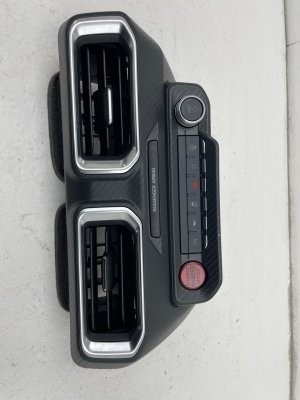

The information in this article is provided for general reference and educational purposes only. Vehicle specifications, procedures, and part compatibility can vary by production date, trim level, and region. Always consult your vehicle's factory service manual and verify part numbers before purchasing or performing repairs. Safety-critical components such as airbags, seat belts, and braking systems should be installed by a qualified professional.
- Ford Mustang:
- 🛍️ Shop This Part
- Known Issues and Symptoms of a Failing Audio Module
- Common Symptoms:
- Associated OBD-II Diagnostic Trouble Codes (DTCs)
- Preliminary Diagnosis: Try a Soft Reset First
- Programming and Calibration: The #1 Requirement for Replacement
- Buying a Used 2024-2025 Mustang Audio Control Panel
- 1. Match the Part Number Exactly
- 2. Inspect for Physical Damage
- 3. Budget for Professional Programming
- Cost Comparison
- Official Recalls and Technical Service Bulletins (TSBs)
- Frequently Asked Questions (FAQ)
- 🎟️ Get 5% Off