

2012-2018 Ford Focus Audio Control Panel: Solving Issues with the Sony System
This guide covers common failures, replacement, and the critical programming requirements for the audio control panel in Ford Focus models equipped with the Sony premium sound and navigation system.
- Programming is required. Replacing the Audio Control Module (ACM) assembly requires programming it to your vehicle's VIN for full functionality.
- Match part numbers exactly. This panel is specific to the Sony/Navigation system, and part numbers like BM5T-18K811-FG must be identical to ensure compatibility.
- No sound or loud popping is usually the ACM. The most common failures (total silence, loud static) are caused by the separate Audio Control Module (ACM) box, not the button faceplate.
- Check fuses first. Before buying parts, check fuses 67, 79, and 88 in the passenger-side fuse box to rule out a simple electrical issue.
Distinguishing the Control Panel from the Audio Control Module (ACM)

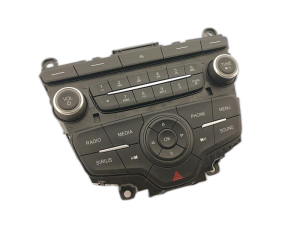
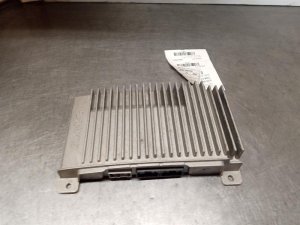
It's crucial to understand the difference between two key components. The Audio Control Panel (also called the faceplate) is the part you see and touch, containing the buttons and knobs. The Audio Control Module (ACM) is a separate silver metal box located behind the control panel. The ACM is the actual radio and amplifier; it processes signals and sends sound to the speakers. While the control panel can fail, many common audio issues, like a complete loss of sound or loud popping noises, are actually caused by an internal failure of the ACM. Often, these two parts are replaced as a single assembly.
Common Symptoms of Failure

Diagnosing an issue with the audio system can be tricky, as symptoms can point to the control panel, the ACM, the SYNC module, or even a simple fuse. Here are common signs of a faulty audio control panel or the related ACM:
- Loud Popping or Static: Sudden, loud static or popping noises from the speakers, which can occur even when the radio is off or the car is turned off, is a classic sign of ACM failure.
- No Sound from Speakers: The display screen and controls may appear to work normally, but there is complete silence from all speakers. This points directly to an internal amplifier fault in the ACM.
- Unresponsive Buttons: Buttons on the faceplate do not respond when pressed, or they perform the wrong function.
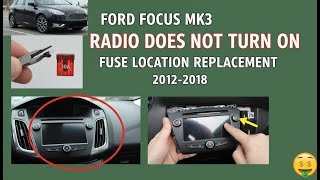
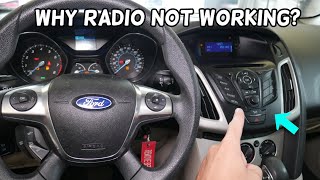
- Radio Won't Turn On: The entire system is dead and the screen is black. 🎬 Watch: Troubleshooting why your Ford Focus radio won't turn on While this can be a fuse, it's also a symptom of a failed ACM.
- Intermittent Audio: Sound cuts in and out, which may indicate a failing component or a bad solder joint inside the ACM.
- Flashing Clock: The clock on the display blinks continuously and cannot be set.
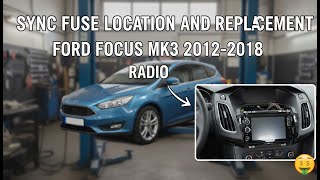
Before assuming the panel is bad, it's wise to check the audio system fuses first. In the passenger compartment fuse box (under the glove box), check fuses #67 (7.5A for SYNC), #79 (15A for radio), and #88 (25A for GPS/Navigation). 🎬 See this quick video guide to locating your radio fuses A simple fuse replacement can sometimes resolve these issues.
🎬 Watch: How to perform a SYNC hard reset by replacing the fuseImportant: The audio control panel and ACM discussed here are for 2012-2018 Ford Focus models equipped with the optional Sony premium audio system and the 8-inch MyFord Touch navigation screen. They are not interchangeable with the parts from base models with the smaller 4.2-inch screen or standard radio.
Known Issues, TSBs, and Recalls

While there are no recalls specifically for the audio control panel itself, the 2012-2018 Ford Focus has had several recalls and Technical Service Bulletins (TSBs) related to electronic systems that can affect its operation.
- TSB 13-1-13: Ford issued this bulletin for audio popping, distorted sound, and issues with FM reception, which could be resolved by reprogramming the ACM.
- Canister Purge Valve Recalls (NHTSA 18V735, 19V515): A major recall for this Focus generation involved a faulty canister purge valve that could deform the fuel tank, leading to stalling and incorrect fuel gauge readings. While not directly related to the radio, the fix involves a software update to the Powertrain Control Module (PCM), highlighting the vehicle's reliance on properly functioning software. Ford later had to re-issue this recall because the initial software fix was not applied correctly to all vehicles.
- Seat Belt Warning Recall (NHTSA 22V-953): A recall was issued because the Audio Control Module software could cause the seat belt reminder chime to be shorter than legally required, increasing injury risk. The fix was a software update to the ACM.
Programming and Calibration Requirements

Yes, this module assembly almost always requires programming after installation. This is the most critical factor to understand when replacing this part.
The Audio Control Module (ACM) is configured to the specific vehicle it came from. It stores information about the car's features, such as whether it has the Sony amplifier, navigation, satellite radio, and the correct number of speakers. If you install a used ACM/control panel assembly without programming it to your car's VIN, you will likely experience issues:
- Features not working (e.g., no sound from the subwoofer).
- Incorrect audio equalization.
- Steering wheel controls not responding.
- Error messages on the display.
Programming can be done in a few ways:
- Ford Dealership: A dealer can use their Integrated Diagnostic System (IDS) to program the new module with the correct "As-Built" data for your vehicle's VIN. This is the most straightforward but often most expensive option.
- Independent Shop: A well-equipped independent mechanic may have the tools and subscriptions necessary to perform Ford module programming.
- DIY with FORScan: For advanced DIY mechanics, the FORScan software combined with a compatible OBD-II adapter can be used to program modules. This involves backing up the configuration from your old module (if possible) and writing it to the replacement module. If the old module is dead, you can often download the original As-Built data from Ford's database using your VIN. This requires an extended license for FORScan.
Pro Tip: If you are replacing only the control faceplate and keeping your original ACM, programming is typically not required, provided the new faceplate has the exact same part number as the old one. However, these parts are most often sold as a complete unit.
Buying a Used Audio Control Panel
Buying a used OEM audio control panel assembly is a great way to save money, but careful selection is key to avoid compatibility headaches.
- Match Part Numbers Exactly: This is the most important rule. The part number is printed on a sticker on the unit. Part numbers like BM5T-18K811-FF, FG, or FH must be matched. Even if a unit looks identical, different part numbers can have different internal data streams for various vehicle options.
- Verify Vehicle Options: Ensure the donor vehicle had the same audio system (Sony with Navigation) as yours. A panel from a non-Sony car will not work correctly.
- Inspect for Physical Damage: Check for deep scratches on the face, worn-off button graphics, and damage to the connectors. Some sellers note cosmetic issues like glue residue, which may or may not be removable.
- Budget for Programming: Remember that the part will need to be programmed to your vehicle. Factor in the cost of a dealer visit or the tools needed for DIY programming.
- Why Used OEM is a Good Choice: For this part, a used OEM unit is often superior to new aftermarket alternatives. Many aftermarket units are cheap, Android-based systems that can have poor integration with vehicle features like steering wheel controls and may lack the quality of the Sony sound system. A used OEM unit, when properly programmed, restores original factory function.
Cost of Replacement
| Part Type | Estimated Cost |
|---|---|
| New OEM | $275 - $450 |
| New Aftermarket (Full Android Head Unit) | $150 - $250 |
| Used OEM | $95 - $200 |
| Remanufactured / Repaired Original | $125 - $250 |
| Shop Labor (Installation & Programming) | $150 - $300 |
Step-by-Step Replacement Guide (Simplified)

Replacing the audio control panel assembly is a manageable DIY job for someone comfortable with basic tools. The process generally takes 1-2 hours.
- Disconnect the Battery: Always disconnect the negative battery terminal before working on vehicle electronics.
- Remove Trim: Using plastic trim removal tools to avoid scratches, carefully pry off the trim pieces around the gear shifter and the main center stack.
- Unscrew the Faceplate/Control Panel: The panel is typically held in by several T20 or T25 Torx screws, or 7mm hex screws. Some are located under a small cover below the radio.
- Disconnect the Control Panel: Gently pull the panel away from the dash and disconnect the main electrical connector on the back.
- Remove the ACM: With the faceplate removed, you can now access the two screws holding the ACM (the silver radio box) in the dash. Remove them.
- Disconnect the ACM: Pull the ACM out and disconnect the main wiring harness and antenna cables from the back.
- Installation: Installation is the reverse of removal. Connect the new unit, bolt it in, reattach the trim, and reconnect the battery.
- Programming: The final step is to have the replacement unit programmed to your vehicle's VIN as described in the programming section.
Frequently Asked Questions
Can I just swap the audio control panel without programming?
If you are swapping the entire assembly (control panel + ACM), you absolutely need to program it. If you are only swapping the faceplate and reusing your car's original ACM, you might not need to program it, but you MUST match the part number exactly.
My radio has no sound but the screen works. Is this the control panel?
This is a classic symptom of a failed Audio Control Module (ACM), not the control panel itself. The ACM contains the amplifier, and when it fails internally, all sound is lost even though the controls and display appear to function. You can have the original ACM repaired or replace the entire assembly and have it programmed.
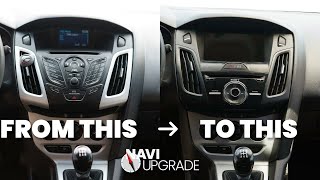
Can I upgrade from the basic radio to the Sony navigation system by just installing this panel?
No, this is a complex conversion. It requires not only the control panel and screen but also the ACM, a different wiring harness, a GPS antenna, and potentially other modules. It is not a simple plug-and-play swap.
Why do my speakers make a loud popping noise even when the car is off?
This is a well-documented sign of an internal failure within the Audio Control Module (ACM). The module remains partially powered even when the car is off, and an internal short or component failure can cause this loud, often painful, noise. The only fixes are to repair the ACM or replace it.
Helpful Videos

Technical Specifications
OEM Part Numbers: BM51-18835-DAW BM5T-18K811-FF BM5T-18K811-FG BM5T-18K811-FH CV6Z18C858FA F1EB-18835-DE3JA6
Designed for 2012-2018 Ford Focus with Sony premium audio and MyFord Touch 8-inch navigation screen.
We Have This Part in Stock





The information in this article is provided for general reference and educational purposes only. Vehicle specifications, procedures, and part compatibility can vary by production date, trim level, and region. Always consult your vehicle's factory service manual and verify part numbers before purchasing or performing repairs. Safety-critical components such as airbags, seat belts, and braking systems should be installed by a qualified professional.
- Ford Focus:
- 🎬 Helpful Videos
- 🛍️ Shop This Part
- Distinguishing the Control Panel from the Audio Control Module (ACM)
- Common Symptoms of Failure
- Known Issues, TSBs, and Recalls
- Programming and Calibration Requirements
- Buying a Used Audio Control Panel
- Cost of Replacement
- Step-by-Step Replacement Guide (Simplified)
- Frequently Asked Questions
- 🎟️ Get 5% Off