

2017-2019 Escape & 2017-2018 C-Max Audio Failure: Fixing No Sound and Unresponsive Controls
This guide explains the common failure of the Audio Control Module (ACM) in the Ford Escape and C-Max, causing no sound, and details diagnosis, replacement, and required programming.
- The most common cause of no sound is a failed Audio Control Module (ACM), not the screen or button panel.
- A replacement ACM (new or used) is NOT plug-and-play and MUST be programmed to your vehicle's VIN using dealer tools or FORScan software.
- Verify compatibility before buying: this part is for vehicles with the 8.0-inch screen and standard audio, NOT the Sony system.
- Repairing your original module is a great alternative that avoids the need for programming.
Is This Your Part?
This guide covers the Audio Control Module (ACM) and its related control panel for the 2017-2019 Ford Escape and 2017-2018 Ford C-Max. These vehicles share the same audio architecture. The information here applies to models equipped with the 8.0-inch SYNC 3 touchscreen and the standard, non-branded audio system.
Compatibility Warning: This audio control module and panel are NOT for vehicles equipped with the premium Sony audio system. The Sony system uses a different module and an external amplifier. Check your vehicle's original specifications before purchasing a replacement.
Known Issues, TSBs, and Recalls
While widespread, the common audio failure in these vehicles is not part of a safety recall. However, Ford has issued Technical Service Bulletins (TSBs) related to the audio system:
- TSB for 2017 Escape: Some 2017 Escape models may experience completely inoperative radio or climate controls. This can be caused by a loss of communication with the Front Control Interface Module (FCIM) or an incomplete module configuration. Associated diagnostic trouble codes (DTCs) include U2100, U0140, and U0164.
- TSB for Apple CarPlay Volume Issues: TSB SSM 48858 notes that on some 2016-2020 Ford vehicles, including the C-Max, the volume controls on the dash and steering wheel may become unresponsive when using Apple CarPlay. This is typically a software issue that may be resolved with an update.
Symptoms of a Failing Audio Control Module (ACM)
A failing ACM, not the button panel, is the primary cause of most audio issues in these vehicles. The SYNC 3 screen may appear to work perfectly, but you will experience audio-related problems. Here are the most common symptoms:
| Symptom | Description |
|---|---|
| Complete Loss of Sound | This is the most frequent symptom. The radio appears on, you can change stations, and connect your phone, but no sound comes from any speaker for any source (FM, AM, Bluetooth, Apple CarPlay, Android Auto). |
| "Audio Off" Message | The touchscreen may display an "Audio Off" message that you cannot clear, and the power button will not turn the audio on. |
| Loud Popping or Static | You may hear a loud pop from the speakers when you start the car, or persistent static and crackling that makes listening impossible. |
| Unresponsive Controls | The volume knob and other buttons on the control panel or steering wheel do not respond, even though the screen may show the volume level changing. |
| Flashing Clock | The clock on the display may blink continuously and fail to hold the correct time. This is a known symptom of an internal ACM fault. |
Diagnosing the Problem: ACM vs. APIM
It's important to distinguish between a faulty Audio Control Module (ACM) and a faulty Accessory Protocol Interface Module (APIM). Both are located behind the touchscreen, but they control different things.
- Bad ACM (Audio Module): Causes sound-related problems. The screen works, but there is no audio.
- Bad APIM (SYNC Module): Causes screen and software problems, like a black screen, the system freezing or rebooting, or features like Bluetooth or navigation failing to work.
If your screen works but you have no sound, the ACM is the likely culprit. A simple first step is to try a system reset by pulling the radio fuse (often F79 in the passenger compartment fuse panel) for a few minutes or disconnecting the car battery. If the problem persists, the ACM has likely failed internally.
Programming and Installation Requirements
Warning: A replacement Audio Control Module (new or used) MUST be programmed to your vehicle's VIN and specific options. It is not a plug-and-play part.
Failure to program the module will result in incorrect operation, such as speakers not working or features being unavailable. There are two main ways to program the ACM:
- Dealer Programming: A Ford dealer can use their Integrated Diagnostic System (IDS) to perform a "Programmable Module Installation" (PMI). They will download your vehicle's original "As-Built" data and write it to the new module.
- DIY with FORScan: Tech-savvy DIYers can use a Windows laptop, a compatible OBD-II adapter, and software called FORScan. With an extended license (available for free), you can access the As-Built data for your VIN from Ford's service website and write it to the replacement ACM. If your old module is still partially working, you can save its configuration file and load it onto the new one.
Step-by-Step Replacement Overview
Replacing the ACM is a moderately difficult job that requires careful removal of dash trim. The module is a silver box attached to the back of the 8-inch touchscreen.
- Disconnect the Battery: Always disconnect the negative battery terminal before working on electronic components.
- Remove Upper Dash Trim: Carefully pry up the center speaker grille on top of the dashboard.
- Remove Center Stack Trim: Remove the screws under the speaker grille, then carefully pry off the large trim piece that surrounds the screen and climate controls.
- Access the ACM/Screen Assembly: With the trim removed, you will see the screws holding the screen and module assembly in place. Remove these screws and gently pull the entire unit forward.
- Swap the ACM: The ACM is the silver box mounted to the back of the screen. Disconnect the wiring harnesses and unbolt it from the screen assembly. Install the replacement ACM in its place.
- Reassemble and Program: Reassemble the dash in the reverse order of removal. Reconnect the battery and proceed with programming the new module.
Buying a Used Audio Control Panel and Module
A used OEM module is a cost-effective solution, but careful purchasing is key. Since the physical button panel rarely fails, you will most likely be buying the ACM itself.
- Verify Compatibility: Double-check that the donor vehicle had the 8.0-inch screen and the standard audio system, NOT the Sony premium system.
- Match the Part Number: While some part numbers are interchangeable with programming, your best bet is to match the OEM part number exactly. The primary service part number is F1CZ-18C858-A, which replaces older versions like F1CT-18K811-HB and F1CT-18K811-HC.
- Inspect Connectors: Ensure the electrical connectors on the back of the module are clean, straight, and free of any corrosion or damage.
- Consider a Repair Service: Several companies offer a repair service for your original ACM. This is an excellent option because it requires no programming; since it's your original unit, it retains your vehicle's VIN and configuration.
Cost of Replacement
The cost to fix a failed ACM can vary significantly depending on the path you choose.
| Part/Service | Estimated Cost |
|---|---|
| New OEM Module (Dealer) | $600 - $1,000+ |
| Used OEM Module | $80 - $220 |
| Mail-in Repair Service | $150 - $300 |
| Shop Labor (Install & Program) | $150 - $300 (1.5-2.5 hours) |
Frequently Asked Questions (FAQ)
Do I have to take my car to the dealer to fix the audio?
Not necessarily. While a dealer can perform the repair and required programming, an independent shop with the right tools can also do the job. For DIYers, using FORScan software is a popular way to program a replacement module at home. Alternatively, using a mail-in repair service for your original module avoids the need for any programming at all.
My screen is black. Is that the Audio Control Module?
No, a black or non-responsive screen is typically caused by a failure of the APIM (SYNC) module, not the ACM. The ACM's job is to produce sound; the APIM's job is to run the screen and the SYNC operating system.
Can I just replace the buttons on the control panel?
Yes, the physical button assembly (FCIM) can be replaced separately from the ACM and screen. However, it is very rare for the buttons themselves to fail. Symptoms like no sound or unresponsive controls are almost always due to the internal failure of the ACM behind the screen.
Why did my radio suddenly stop working?
The ACM is an electronic module that can fail over time due to heat cycles and component wear. In some cases, a blown fuse (check fuse F79) or a wiring issue can be the cause, but most often it is an internal failure of the ACM's circuit board. This is a well-documented common problem on many Ford vehicles from this era.
Technical Specifications
OEM Part Numbers: F1CZ18C858A F1CT18K811HB F1CT18K811HC JJ5T18K811HA
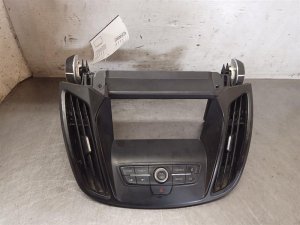
This is the Audio Control Module (ACM), also referred to as the radio receiver. It is located behind the 8-inch touchscreen display. It is distinct from the APIM (SYNC Module) and the FCIM (Front Control Interface Module/Button Panel).
We Have This Part in Stock



The information in this article is provided for general reference and educational purposes only. Vehicle specifications, procedures, and part compatibility can vary by production date, trim level, and region. Always consult your vehicle's factory service manual and verify part numbers before purchasing or performing repairs. Safety-critical components such as airbags, seat belts, and braking systems should be installed by a qualified professional.
- Ford Escape:
- Ford C-Max:
- 🛍️ Shop This Part
- Is This Your Part?
- Known Issues, TSBs, and Recalls
- Symptoms of a Failing Audio Control Module (ACM)
- Diagnosing the Problem: ACM vs. APIM
- Programming and Installation Requirements
- Step-by-Step Replacement Overview
- Buying a Used Audio Control Panel and Module
- Cost of Replacement
- Frequently Asked Questions (FAQ)
- 🎟️ Get 5% Off