

2013 Ford Escape & C-Max Audio Control Panel: Fixing Unresponsive Buttons & Compatibility Issues
Your complete guide to diagnosing, replacing, and ensuring compatibility for the 4.2-inch screen audio control unit in your 2013 Ford Escape or C-Max.
- This control panel is ONLY for 2013 Escape and C-Max models with the 4.2-inch display screen, not the 8-inch touchscreen.
- No dealer programming is required for installation; this is a plug-and-play part.
- Before buying, you must match your vehicle's options and one of the OEM part numbers (CJ5T-18K811-BB, CJ5T-18K811-BC, or CJ5Z-18C858-BA).
- Issues like no sound, a blinking clock, or the system not powering on are typically caused by the separate Audio Control Module (ACM), not this button panel.
Understanding the 2013 Escape & C-Max Audio System
The audio control panel in the 2013 Ford Escape and 2013 Ford C-Max is a critical component for interacting with your sound system. It's important to understand that this part is the faceplate with the buttons, officially called the Front Controls Interface Module (FCIM). It is not the same as the Audio Control Module (ACM), which is the separate metal box that actually powers the system and processes the audio. Many audio problems, like a total loss of sound or a blinking clock, are caused by the ACM, not this control panel. This guide focuses specifically on the control panel itself.
Compatibility Warning: This control panel is only for models equipped with the basic 4.2-inch display screen. It is not compatible with the larger 8-inch MyFord Touch touchscreen system. Always verify your vehicle's screen size before purchasing.
Symptoms of a Failing Audio Control Panel
When the audio control panel begins to fail, the symptoms are usually related to the physical buttons and their functions. You might experience:
- Unresponsive Buttons: One or more buttons (volume, tune, preset, CD, etc.) do not respond when pressed.
- Intermittent Functionality: Buttons work sometimes but not others.
- Stuck Buttons: A button may be physically stuck in the depressed position.
- Incorrect Commands: Pressing one button activates a different function.
If you are experiencing a total loss of sound, a screen that says "Audio Off," or a blinking clock, the problem is more likely the main Audio Control Module (ACM). A common temporary fix for ACM issues is to reset the system by pulling the radio fuse (often F79 in the panel under the glove box) for a few minutes or by disconnecting the car battery.
Known Issues, TSBs, and Recalls
While there are no major recalls specifically for this control panel, the 2013 Ford Escape and C-Max audio systems were subject to some technical service bulletins (TSBs) for related issues.
- TSB 13-1-13: Some 2013 Escapes built on or before December 10, 2012, could experience static, popping, or distorted sound from the speakers on FM radio only. The fix was to reprogram the Audio Control Module (ACM), not replace the control panel.
- General SYNC Issues: Ford issued TSBs for various SYNC-related problems, including slow or no response from phone and voice buttons. These were typically software-related and addressed by updating the ACM.
- Restraints Control Module Recall: A significant recall (14S21) was issued for 2013-2014 Escape and C-Max models for a faulty Restraints Control Module, which could disable airbags. While not directly related to the audio panel, it's a critical safety issue for owners of these vehicles to be aware of.
Pro Tip: Before assuming the control panel is bad, check for simple fixes. First, check the radio fuse in the interior fuse panel. Second, try a system reset by disconnecting the negative battery terminal for about 15 minutes. This can often resolve temporary software glitches affecting the audio system.
Buying a Used Audio Control Panel: What to Look For
A used OEM control panel is an excellent, cost-effective solution. Since this is primarily a user interface, a good-condition used part functions identically to a new one. Here’s what to verify before you buy:
- Match the Part Number EXACTLY: The most critical step is to match the OEM part number. The primary engineering numbers are CJ5T-18K811-BB and CJ5T-18K811-BC. These are often interchangeable, with the 'BC' version being a slightly later revision. The Ford service part number is CJ5Z-18C858-BA. Do not buy a panel just because it looks similar; internal data streams can differ.
- Confirm Vehicle Options:
- For a 2013 Ford Escape, this part fits models with satellite radio and the 4.2-inch display.
- For a 2013 Ford C-Max, it fits models with the 4.2-inch screen built on or before February 3, 2013.
- Physical Inspection: Check photos carefully for excessive wear on the buttons, deep scratches on the faceplate, and damage to the mounting tabs. Ensure the electrical connector on the back is clean and free of bent or corroded pins.
Programming and Installation
Does this part need to be programmed?
No, programming is not required. This audio control panel is a "plug-and-play" part. It is a simple interface that sends button commands to the main ACM. You do not need to visit a dealer or use a special scan tool after installation. Some sellers may mention programming as a general disclaimer for all electronic parts, but it does not apply to this specific control panel.
Replacement Guide Overview
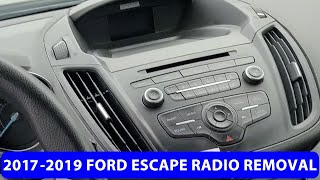
Replacing the audio control panel is a straightforward job that most DIY mechanics can handle in under an hour. The basic steps are as follows:
🎬 Watch this video guide on how to remove the radio.- Use a plastic trim removal tool to carefully pry off the trim piece surrounding the control panel and display screen.
- Remove the 7mm screws that hold the control panel in place. There are typically two at the top and two at the bottom.
- Gently pull the panel forward and disconnect the electrical connector on the back.
- Connect the new panel and reinstall the screws and trim.
Cost Comparison
Prices can vary, but here is a general cost estimate for the audio control panel:
| Part Type | Estimated Cost |
|---|---|
| New OEM | $300 - $450 |
| New Aftermarket | Not Typically Available |
| Used OEM | $50 - $150 |
| Shop Labor | $100 - $180 |
Frequently Asked Questions (FAQ)
Do I need a dealer to program this audio control panel?
No. This specific part is a plug-and-play control interface and does not require any programming or coding after installation.
Will replacing this panel fix my radio that has no sound?
It is unlikely. A complete loss of audio is almost always a failure within the main Audio Control Module (ACM), the separate silver box located behind this panel. This panel only fixes issues with the physical buttons not working.
Can I use this panel to upgrade my car to the 8-inch touchscreen?
No. Upgrading from the 4.2-inch system to the 8-inch MyFord Touch system is a complex and expensive process that involves replacing the screen, the ACM, the wiring harness, and requires extensive programming. This panel is not compatible with the 8-inch screen.
What's the difference between part numbers CJ5T-18K811-BB and CJ5T-18K811-BC?
These numbers represent minor revisions from the factory. For the 2013 Escape and C-Max, they are generally considered interchangeable as long as all other options (4.2-inch screen, satellite radio for Escape) match. It is always best to match your original part number if possible.
Helpful Videos
Technical Specifications
OEM Part Numbers: CJ5T-18K811-BB CJ5T-18K811-BC CJ5Z-18C858-BA
Designed for Ford SYNC systems with a 4.2-inch display. Also known as the Front Controls Interface Module (FCIM).
We Have This Part in Stock



The information in this article is provided for general reference and educational purposes only. Vehicle specifications, procedures, and part compatibility can vary by production date, trim level, and region. Always consult your vehicle's factory service manual and verify part numbers before purchasing or performing repairs. Safety-critical components such as airbags, seat belts, and braking systems should be installed by a qualified professional.
- Ford Escape:
- Ford C-Max:
- 🎬 Helpful Videos
- 🛍️ Shop This Part
- Understanding the 2013 Escape & C-Max Audio System
- Symptoms of a Failing Audio Control Panel
- Known Issues, TSBs, and Recalls
- Buying a Used Audio Control Panel: What to Look For
- Programming and Installation
- Does this part need to be programmed?
- Replacement Guide Overview
- Cost Comparison
- Frequently Asked Questions (FAQ)
- 🎟️ Get 5% Off