

2016-2018 Chevrolet Spark Audio Control Panel: MyLink Screen Failures and Programming Guide
This guide covers common failures of the 7-inch MyLink touchscreen in the 2016-2018 Spark, and explains the critical programming required for a replacement.
- This part only fits 2016-2018 Chevrolet Sparks with the 7-inch MyLink touchscreen system (RPO code IOB).
- A replacement unit, whether new or used, MUST be programmed to your car's VIN by a dealer or properly equipped shop to function.
- Common failure symptoms include a blank screen, unresponsive touch controls, and random reboots.
- Before replacing the unit, check for relevant software updates with a GM dealer, as a TSB exists to fix many common glitches.
Known Issues, Recalls, and Technical Service Bulletins (TSBs)
While there are no widespread recalls specifically for the audio control panel itself on the 2016-2018 Spark, GM has issued related software updates and recalls for similar systems. A recall for some 2013-2015 Spark models involved the radio failing to provide warning chimes. More relevant is a Technical Service Bulletin (TSB) from June 2016 that addresses numerous software-related issues on vehicles with the IOB radio. Symptoms covered by this TSB include a blank or rebooting screen, Android Auto connection problems, and audio buzzing or static. The fix is a dealer-installed software update. Before replacing the hardware, it's wise to check with a GM dealer to see if this or any other software update applies to your vehicle's VIN, as it may resolve the issue without needing a new part.
Symptoms of a Failing Audio Control Panel
Failure of the audio control panel can manifest in several ways, ranging from minor annoyances to a complete loss of function. Many of these issues are intermittent at first.
- Blank or Black Screen: The most common symptom is the 7-inch display not turning on at all, even though the rest of the car works fine.
- Unresponsive or Frozen Screen: The display may light up but will not respond to touch commands, or it may be stuck on the Chevrolet logo.
- "Ghost Touch" or Phantom Inputs: The unit may act as if it's being touched, changing settings, making calls, or switching menus on its own.
- Random Rebooting: The system may restart itself intermittently while driving.
- No Audio: The display may appear to work correctly, but there is no sound from any source.
- Bluetooth Connectivity Problems: The unit may fail to pair with a phone, or constantly drop the connection.
- Steering Wheel Controls Inoperative: The volume, track, and phone buttons on the steering wheel stop working for audio functions.
- Radio Stays On: In some cases, a faulty module can cause the radio to stay on after the car is turned off and the door is opened, leading to a dead battery.
Pro Tip: Before assuming the unit is bad, try a soft reset. Press and hold the Home and Fast-Forward buttons on the panel simultaneously for about 10 seconds until the screen reboots. You can also try a hard reset by disconnecting the car's 12V battery for 15-20 minutes. Also, check the fuse for the radio, which is located in the interior fuse panel on the driver's side of the dashboard.
Buying a Used Audio Control Panel
Purchasing a used OEM audio control panel is a cost-effective solution, but it requires careful attention to detail to ensure compatibility and functionality.
1. Verify Compatibility (IOB System REQUIRED)
This is the most important step. This audio control panel, part number 42342512, is only for 2016-2018 Chevrolet Spark models equipped with the 7-inch MyLink touchscreen system, identified by the RPO (Regular Production Option) code IOB. Vehicles with the base radio (RPO code IOA or similar) use a different unit. You can find your vehicle's RPO codes on a silver sticker, usually located in the glove box. Do not purchase this part unless you have confirmed your vehicle has the IOB system.
2. The Anti-Theft "VIN Lock"
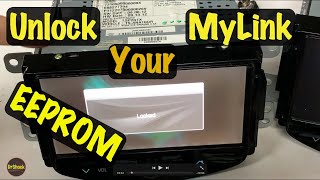
Warning: All GM radios, including this one, are equipped with an anti-theft feature that locks the radio to the original vehicle's Vehicle Identification Number (VIN). When a used radio is installed in a new vehicle, it will power on and display a "LOCKED" message, making it completely non-functional. This is not a defect; it is a security feature.
A used radio MUST be reprogrammed to your car's VIN to work. This procedure requires specialized tools and software subscriptions from GM. You cannot do this yourself. You must have a GM dealership or a qualified independent auto electronics shop perform the VIN unlock service. 🎬 Watch: Advanced DIY EEPROM VIN unlock method for salvage radios Factor this additional cost into your budget when buying a used unit.
3. Physical Inspection
When inspecting a used unit, check for the following:
- Screen Condition: Look for deep scratches, cracks, or signs of delamination (where the top layer of the screen bubbles or peels).
- Connectors: Ensure all electrical connector ports on the back are clean, free of corrosion, and have no bent or broken pins.
- Part Number: Verify the part number on the sticker matches 42342512 or a compatible number.
Programming and Installation
Physical installation is straightforward for a DIYer. It involves carefully prying off the dash trim surrounding the unit, removing a few screws holding the panel in place, unplugging the connectors, and swapping the new unit in.
However, as mentioned above, the critical step is the programming. After the new (or used) unit is installed, the vehicle must be taken to a GM dealer or a specialized shop with a subscription to GM's Service Programming System (SPS). They will connect to the vehicle and program the replacement radio to your car's VIN, which unlocks it and ensures it communicates correctly with the BCM and other modules. Without this step, the radio will remain locked and unusable.
Cost Comparison
Prices can vary based on location and availability. The following is an estimate of what you can expect to pay.
| Part Type | Estimated Cost |
|---|---|
| New OEM | $60 - $100 |
| Used OEM | $50 - $75 |
| Aftermarket | Not commonly available |
| Shop Labor (Installation) | $75 - $150 |
| Shop Labor (Programming) | $100 - $200 |
Frequently Asked Questions (FAQ)
Does a replacement audio control panel for a 2017 Spark need to be programmed?
Yes, absolutely. Whether the replacement part is brand new or used, it must be programmed to your vehicle's VIN using GM's official software. If you do not program it, it will be "locked" and will not function.
Can I install a used radio myself?
Yes, the physical installation is a relatively simple process of removing trim and a few screws. However, the unit will not work until you have it professionally programmed by a dealer or equipped independent shop.
Why is my Spark's screen black but the radio still plays?
This can happen when the display portion of the unit fails, but the internal radio electronics are still functional. It can also be a software glitch. Try a soft reset by holding the Home and Fast-Forward buttons for 10 seconds. If that doesn't work, the unit likely needs to be repaired or replaced.
What is the difference between the IOB and IOA radio systems?
The IOB system is the 7-inch MyLink touchscreen infotainment system. The IOA system is a lower-trim or base radio, which may have a smaller, non-touch display. The control panels are not interchangeable.
Helpful Videos
Technical Specifications
OEM Part Numbers: 42342512
For vehicles with 7-inch MyLink Touchscreen (RPO Code IOB)
We Have This Part in Stock



The information in this article is provided for general reference and educational purposes only. Vehicle specifications, procedures, and part compatibility can vary by production date, trim level, and region. Always consult your vehicle's factory service manual and verify part numbers before purchasing or performing repairs. Safety-critical components such as airbags, seat belts, and braking systems should be installed by a qualified professional.
- Chevrolet Spark:
- 🎬 Helpful Videos
- 🛍️ Shop This Part
- Known Issues, Recalls, and Technical Service Bulletins (TSBs)
- Symptoms of a Failing Audio Control Panel
- Buying a Used Audio Control Panel
- 1. Verify Compatibility (IOB System REQUIRED)
- 2. The Anti-Theft "VIN Lock"
- 3. Physical Inspection
- Programming and Installation
- Cost Comparison
- Frequently Asked Questions (FAQ)
- 🎟️ Get 5% Off