

2013-2016 Buick Encore & Opel Mokka Radio: Fixing Black Screens and VIN Lock Issues
This guide covers the common black screen failures, audio problems, and the critical VIN-locking and programming requirements for the audio control panel in the Buick Encore and Opel Mokka.
- A replacement radio MUST be programmed to your car's VIN to function; it is not plug-and-play due to a built-in anti-theft system.
- Common failure symptoms include a black screen, constant rebooting, freezing, and audio cutting out.
- Verify your vehicle's option codes (especially UHQ for navigation) on the glove box sticker before buying a used part to ensure compatibility.
- Buying a pre-unlocked used unit for around $300 is often the most cost-effective and DIY-friendly solution, avoiding a separate programming fee.
Symptoms of a Failing Audio Control Panel
When the audio control panel in a Buick Encore or Opel Mokka begins to fail, it can cause a range of problems from minor annoyances to a complete loss of function. Here are the most common symptoms reported by owners:
- Black or Blank Screen: The most notorious issue is the screen going completely black. Sometimes the audio may continue to play in the background, but the display is dark and unresponsive. In other cases, the entire unit is dead.
- System Freezing or Locking Up: The infotainment system may become frozen on a single screen, often the Buick or Opel splash screen, and will not respond to any button presses or touch inputs.
- Intermittent Rebooting: The unit may randomly shut down and restart on its own while driving. This can happen during high-traffic data events, like when the navigation is rerouting or a Bluetooth device is connecting.
- Audio Cutting Out: Owners report the audio suddenly cutting out for a few seconds, sometimes accompanied by a popping or snapping sound from the speakers. This can affect all audio sources, including the radio, CD player, and Bluetooth.
- Loss of All Sounds: In some cases, a failing unit can cause the loss of all vehicle sounds, including the radio, turn signal clicks, and warning chimes.
- Unresponsive Touchscreen: The screen may display an image correctly, but it will not respond to any touch inputs, making it impossible to control the system.
- Bluetooth Connectivity Problems: Difficulty pairing a phone, frequent disconnections, or the phone being deleted from the device list are common software-related symptoms.
Known Issues, Recalls, and Technical Service Bulletins (TSBs)
General Motors has issued several service bulletins related to these infotainment systems due to widespread software issues. There are no specific recalls for the radio unit itself in these model years, but the TSBs acknowledge the problems.
| Bulletin # | Subject | Summary & Solution |
|---|---|---|
| PI1356 / Updated Version | Radio Display Blank, Freezes, and/or Locks Up | Acknowledges a known software issue on 2015 models where the screen goes blank or freezes. The bulletin notes that pressing the OnStar call/end button can temporarily resolve the issue. It advises against replacing parts and states a software update would be the final fix. |
| PIC6106A | Intermittent Radio Audio/Display/Control and Resetting | Covers 2014-2015 models where the display goes blank and then reboots. It notes this can happen during high data traffic (e.g., navigation rerouting). If it happens frequently, the bulletin suggests radio replacement may be necessary. |
| PIC6077 | iPhone Pairing/Bluetooth/XM Alert Issues | Addresses various software glitches on 2014-2015 models with UHQ or UP9 options, including iPhones losing their pairing. The fix is a software update performed via a USB drive. |
Crucial Information: VIN Locking and Programming
This is the single most important factor to understand before buying a replacement audio control panel. To prevent theft, General Motors electronically locks these radio units to the original vehicle's Vehicle Identification Number (VIN).
Warning: A used audio control panel from another vehicle will NOT work if you simply plug it in. The screen will display a "LOCKED" message, and the unit will be non-functional until it is reprogrammed to your vehicle's VIN.
Who Can Program a Replacement Radio?
Programming requires special tools and software access. You have a few options:
- GM Dealership: A dealer can perform the VIN relearn procedure using their Service Programming System (SPS). This is the most straightforward but often most expensive option.
- Qualified Independent Shop: Some independent auto repair shops that specialize in electronics or have a subscription to GM's diagnostic software (like GDS2) can also program the module.
- Mail-In Programming Services: Several companies allow you to mail in your replacement radio to have it unlocked and programmed to your VIN before they ship it back to you.
- Pre-Programmed ("Unlocked") Units: Some used parts sellers offer these radios pre-unlocked. They are programmed to be in a neutral state, and once installed in your car, they will learn your VIN automatically. This is often the easiest solution for a DIY replacement.
Buying a Used Audio Control Panel for Your Encore or Mokka
A used OEM radio is an excellent, cost-effective alternative to an expensive new unit, but you must buy smart to avoid compatibility headaches.
Step 1: Verify Your Vehicle's Option Codes
The most critical step is to match the radio to your vehicle's features. GM uses three-digit Regular Production Option (RPO) codes to identify factory-installed equipment. You can find these codes on the "Service Parts Identification" (SPID) label, which is typically located on a sticker inside the glove box.
- UHQ: This code means your vehicle has the factory navigation system. You MUST buy a replacement radio that is also from a UHQ-equipped vehicle.
- UP9: This code indicates the IntelliLink/MyLink system.
Failure to match these option codes will result in features not working or the unit being incompatible.
Step 2: Match the Part Number (If Possible)
While many part numbers supersede each other, the safest bet is to find a used unit with the exact same part number as your original. If you can't, ensure the seller guarantees it is a compatible replacement for your specific year and option package (e.g., "Fits 2015 Encore with Navigation UHQ").
Step 3: Plan for Programming BEFORE You Buy
Unless you are buying a unit that is explicitly advertised as "Unlocked" or "Pre-Programmed," you must factor in the cost and logistics of programming. Call your local dealer or an independent shop to get a quote for programming a customer-supplied used radio. Some dealers may be hesitant to program used parts, so confirm their policy beforehand.
Cost Comparison
The cost to fix a failing audio control panel can vary dramatically depending on the path you choose.
| Item | Estimated Cost | Notes |
|---|---|---|
| New OEM Unit (Part Only) | $1,200 - $1,800+ | Purchased from a GM dealership or online OEM parts store. Still requires programming. |
| Used OEM Unit (Locked) | $60 - $150 | Purchased from a salvage yard or online (eBay, LKQ). Requires programming. |
| Used OEM Unit (Unlocked/Pre-Programmed) | $275 - $350 | The easiest DIY option. Plug-and-play. |
| Aftermarket Head Unit | $250 - $600+ | Android-based units offer modern features like wireless CarPlay but may have quirks. Requires a dash kit and wiring adapters. |
| Shop Labor (Installation) | $100 - $200 | Typically 1-1.5 hours of labor. |
| Shop Labor (Programming Only) | $125 - $200 | A flat fee for VIN-locking a replacement module. |
Replacement Overview
Physically replacing the audio control panel is a straightforward job for a DIYer with basic tools. The process generally involves:
- Disconnecting the negative battery terminal.
- Using plastic trim removal tools to carefully pry off the trim piece below the screen and button assembly.
- Unplugging the electrical connector for the lower button panel.
- Removing four 7mm bolts that secure the main button/screen assembly to the dash.
- Pulling the assembly forward and disconnecting the main electrical harnesses from the back of the unit.
Installation is the reverse of removal. The entire process can typically be completed in under an hour.
Frequently Asked Questions (FAQ)
Do I have to go to a dealer to replace my radio?
No. While a dealer can do the work, you can save significant money by using a used part and having an independent shop program it, or by purchasing a pre-programmed unit and installing it yourself.
My screen is black but the radio still plays. Is the whole unit bad?
Not necessarily. This symptom often points to a failure of the LCD screen or its power supply, rather than the entire radio module. However, since the screen and module are integrated, they are typically replaced as one assembly.
Can I upgrade to a navigation (UHQ) radio if my car didn't have it?
Yes, this is possible, but it's more complex than a simple replacement. It requires the correct UHQ radio, a GPS antenna, and custom programming to enable the navigation features. Specialized aftermarket companies often offer this as a complete kit.
Will an aftermarket radio have the same problems?
No. Aftermarket radios from brands like Kenwood, Pioneer, or various Android-based manufacturers use their own hardware and software. They will not have the GM-specific software glitches or VIN-locking issues. However, you will need a special wiring harness and dash kit to install one and retain features like steering wheel controls.
What is the difference between the HMI module and the radio?
In these GM vehicles, the terms are often used interchangeably. The assembly you see in the dash contains the screen, buttons, and the internal computer (often called the HMI or radio module) that runs the system. For this part, it is a single, integrated unit.
Technical Specifications
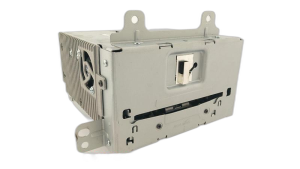
OEM Part Numbers: 23289269 23375146 23447567 23477341 23497398 84027468 84062099 95319299 95319300
Fits 7-inch touch screen systems. Requires matching vehicle option codes, primarily UHQ for Navigation and UP9 for IntelliLink/MyLink.
We Have This Part in Stock





The information in this article is provided for general reference and educational purposes only. Vehicle specifications, procedures, and part compatibility can vary by production date, trim level, and region. Always consult your vehicle's factory service manual and verify part numbers before purchasing or performing repairs. Safety-critical components such as airbags, seat belts, and braking systems should be installed by a qualified professional.
- Buick Encore:
- Opel Mokka:
- 🛍️ Shop This Part
- Symptoms of a Failing Audio Control Panel
- Known Issues, Recalls, and Technical Service Bulletins (TSBs)
- Crucial Information: VIN Locking and Programming
- Who Can Program a Replacement Radio?
- Buying a Used Audio Control Panel for Your Encore or Mokka
- Step 1: Verify Your Vehicle's Option Codes
- Step 2: Match the Part Number (If Possible)
- Step 3: Plan for Programming BEFORE You Buy
- Cost Comparison
- Replacement Overview
- Frequently Asked Questions (FAQ)
- 🎟️ Get 5% Off