

2013-2016 Buick Encore Audio Control Panel: Unresponsive Buttons, Compatibility, and Programming Guide
This guide covers common failures, compatibility traps, and the critical programming steps required when replacing the audio control panel in your Buick Encore.
- This control panel is only for 2013-2016 Encore models with the 7-inch IntelliLink system (RPO code UFU) and without factory navigation.
- Any replacement unit, whether new or used, MUST be programmed to your vehicle's VIN by a dealer or specialist with GM diagnostic tools.
- Common failure symptoms include unresponsive buttons and knobs, not a black screen or frozen display, which usually point to a different part (the HMI module).
- Before replacing the panel, perform a system reset and check with a dealer for any available software updates, which can sometimes fix functionality issues.
Symptoms of a Failing Audio Control Panel
When the audio control panel begins to fail, the issues are typically related to physical inputs not working. It's important to distinguish these symptoms from a black screen or total system freeze, which often point to a different component like the HMI module.
- Unresponsive Buttons: One or more buttons (volume, tuning, home, etc.) stop responding when pressed.
- Intermittent Functionality: The controls work sometimes and not others, often without a clear pattern.
- Audio Stuck on One Source: You may be unable to switch from FM to AM, or from the radio to a USB or Bluetooth source.
- No Response from Knobs: The volume or tuning knobs may not register when turned.
- Audio Cutting Out: Some owners report that audio will momentarily cut out or make a snapping sound, which can sometimes be linked to faults in the control interface.
Pro Tip: Before assuming the hardware is bad, try a system reset. For many IntelliLink glitches, turning the vehicle off, opening and closing the driver's door, and waiting five minutes before restarting can resolve temporary software freezes. If that doesn't work, a factory reset through the settings menu is the next step.
Known Issues, Recalls, and Technical Service Bulletins (TSBs)
While there are no specific recalls for the audio control panel itself, the 2013-2016 Buick Encore has been subject to recalls and TSBs related to the broader electronic and infotainment systems.
- NHTSA Recall 16V-651 (GM Recall 16007): This recall was for a software issue in the Sensing and Diagnostic Module (SDM) that could prevent frontal airbags from deploying in a crash. While not directly related to the radio controls, it highlights the importance of ensuring your vehicle's software is up to date, as dealers may perform other module updates simultaneously.
- Software Updates: GM has released numerous software updates for its IntelliLink systems to fix bugs related to freezing, Bluetooth connectivity, and general sluggishness. Before replacing the control panel for software-like symptoms, it's wise to check with a dealer if any updates are available for your VIN.
- Voluntary Emission Recall 13238: Specific to 2013 models, this recall addressed an incorrect heated oxygen sensor, which could affect long-term driveability.
Warning: Many symptoms, like a black screen or a system stuck on the Buick logo, are often caused by the Human Machine Interface (HMI) module, not the audio control panel. If you have these symptoms, the control panel is likely not the part you need to replace.
Programming and Anti-Theft Requirements
This is the most critical factor when replacing the audio control panel in a 2013-2016 Buick Encore. GM vehicles of this era use a VIN-locking anti-theft system.
When you install a used audio control panel, it will detect that it is in a different vehicle and enter a "theft lock" mode. This will render it partially or completely non-functional until it is reprogrammed. This is not a simple code you can enter; it requires a specialized programming procedure.
- Dealer Programming Required: The new or used control panel must be programmed to your vehicle's VIN. This procedure "marries" the part to your car's main computer system.
- Tools Needed: This programming requires a GM MDI (Multiple Diagnostic Interface) tool and an active subscription to GM's Service Programming System (SPS).
- Who Can Program It: A GM dealership is the most reliable option. Some advanced independent repair shops that specialize in GM vehicles may also have the necessary tools and subscriptions. A standard locksmith or small shop typically cannot perform this programming.
Buying a Used Audio Control Panel: What to Look For
Purchasing a used OEM audio control panel is a great way to save money, but careful verification is essential to avoid buying an incompatible part.
- Confirm Compatibility (RPO Code UFU): This control panel is ONLY for models with the 7-inch IntelliLink touchscreen system, identified by the RPO code UFU. It is NOT compatible with models that have factory navigation. You can find your vehicle's RPO codes on a silver sticker, usually located in the glove box.
- Match Part Numbers: Check the part number on your original unit. Known compatible part numbers include 95052533, 95052538, and 95383984. Part number 95383984 is a common replacement for 95052533. While other numbers may exist, sticking to these verified numbers is the safest approach.
- Physical Inspection: When inspecting the used part, check for worn-off button graphics, sticky or damaged buttons, and ensure the plastic housing and connector ports are free of cracks or damage.
- Budget for Programming: Remember that the part will not work correctly until it is programmed. Factor the cost of a trip to the dealership for programming into the total cost of your repair.
Replacement Cost Comparison
Prices can vary based on location and availability. The costs below are estimates to help you understand the value of a used OEM part.
| Part Type | Estimated Cost |
|---|---|
| New OEM | $250 - $400+ (often discontinued) |
| New Aftermarket (Dorman) | $200 - $250 |
| Used OEM | $50 - $150 |
| Shop Labor (Replacement) | $75 - $150 |
| Shop Labor (Programming) | $100 - $200 |
Frequently Asked Questions (FAQ)
Do I need a code to unlock a used audio control panel?
No, there is no simple unlock code. The unit is locked to the original vehicle's VIN and must be reprogrammed by a dealer or a specialist with GM-specific tools to work in your car.
My screen is black. Will replacing this part fix it?
Probably not. A black or non-responsive screen is most often caused by a failure in the Human Machine Interface (HMI) module, a loose connection, or a blown fuse, not the audio control panel itself. This panel only contains the buttons and knobs.
Can I install this part myself and then drive to the dealer for programming?
Yes. The replacement process is straightforward for a DIYer with basic tools. You can swap the panel at home and then drive the vehicle to the dealership. The car will run and drive normally, but your radio controls will not function correctly until they are programmed.
Is this part the same as the 'radio'?
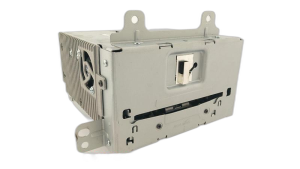
No. In the 2013-2016 Encore, the 'radio' (tuner and amplifier) is a separate silver box, the 'screen' is the display, the 'HMI module' is the computer, and this 'audio control panel' is the button interface. They are all separate components.
Technical Specifications
OEM Part Numbers: 95052533 95052538 95383984
Designed for 2013-2016 Buick Encore with 7-inch IntelliLink display (RPO UFU). Not compatible with navigation-equipped models.
We Have This Part in Stock





The information in this article is provided for general reference and educational purposes only. Vehicle specifications, procedures, and part compatibility can vary by production date, trim level, and region. Always consult your vehicle's factory service manual and verify part numbers before purchasing or performing repairs. Safety-critical components such as airbags, seat belts, and braking systems should be installed by a qualified professional.
- Buick Encore: