

2022-2024 BMW X3 & X4 iDrive Controller: A Buyer's Guide to Replacement and Programming
This guide covers the common failures, replacement costs, and critical programming requirements for the iDrive controller in the 2022-2024 BMW X3 and X4.
- This part is NOT plug-and-play. Any replacement controller, new or used, requires professional programming and coding to your vehicle's VIN.
- Failures are often caused by liquid spills, but can also be due to internal electronic issues. Symptoms include unresponsive buttons and system freezes.
- Before replacing the controller, try a simple iDrive system reboot by holding the volume knob for 30 seconds to rule out a software glitch.
- When buying a used part, verify the exact part number for your car's options and purchase from a seller with a warranty.
Symptoms of a Failing iDrive Controller
When the iDrive controller begins to fail, it can disrupt your ability to control many of the vehicle's essential comfort and convenience features. Symptoms can range from minor annoyances to a complete loss of infotainment control.
- Unresponsive Controls: The rotary knob may spin freely without registering any input, or the buttons may not respond when pressed.
- Intermittent Functionality: The controller might work correctly when the car is cold but fail as the interior warms up, suggesting an issue with internal electronics like solder joints.
- System Freezing or Rebooting: A faulty controller can sometimes cause the entire iDrive system to freeze, crash, or reboot unexpectedly.
- "No Sources Available" Message: Some owners report seeing a "No sources available" message and losing all audio, including turn signal clicks and parking sensor beeps. While this is often a software glitch in the main head unit, it can be mistaken for a controller issue.
- Fault Codes: A diagnostic scan may reveal specific fault codes related to the controller module (often designated as ZBE). Common codes include communication errors or internal faults. A code like B7F87B indicates a configuration mismatch between the audio system and the head unit, which often happens after an incorrect replacement.
Pro Tip: Before assuming the controller is bad, try rebooting the iDrive system. Press and hold the main volume knob for 30-40 seconds until the screen goes blank and restarts. This can resolve many software-related glitches that mimic hardware failure.
Known Issues, Recalls, and TSBs
As of mid-2024, there are no specific recalls issued by the National Highway Traffic Safety Administration (NHTSA) for the iDrive controller unit on the 2022-2024 BMW X3 or X4. However, these vehicle models have been subject to other recalls that owners should be aware of:
- Engine Starter Overheating: A recall was issued for certain 2021-2024 X3 and X4 models where the engine starter could overheat, posing a fire risk.
- Rear Door Locks: Some 2022-2024 X3 models were recalled for second-row door locking modules that did not comply with federal safety standards.
- Transmission Control Unit: A recall noted that the transmission mechatronics module could leak fluid, potentially causing a loss of power.
While not directly related to the iDrive controller, these recalls highlight the electronic complexity of modern BMWs. Many owner complaints about audio and infotainment issues on forums are often traced back to software bugs that are addressed by dealer-installed software updates.
Programming and Calibration: The Most Critical Step
Warning: A replacement iDrive controller, whether new or used, will not function correctly without being programmed to your specific vehicle. This is the single most important fact to understand before purchasing this part.
The iDrive controller is a coded module, meaning it is tied to the vehicle's VIN and its specific equipment list. After physical installation, the module must be electronically configured to communicate with the rest of the car. Failure to do so will result in fault codes, limited functionality, or the controller not working at all.
This process, often called coding or programming, can be performed by:
- A BMW dealership service center.
- An independent repair shop specializing in European vehicles that has the necessary diagnostic tools like Autologic, ISTA, or E-Sys.
- Remote coding services that guide you through the process using a laptop and a special cable.
Simply swapping the part is not enough. The cost of programming should be factored into the total repair cost.
Buying a Used Audio Control Panel: What to Look For
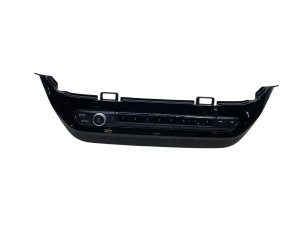
Purchasing a used OEM iDrive controller is a cost-effective way to fix a broken unit. Since these are electronic modules with a low mechanical failure rate (aside from liquid spills), a used part from a reputable source is often a reliable choice. Here’s what to check:
- Verify the Part Number: The most crucial step is to match the part number exactly. There are different controllers for vehicles with different options (e.g., with or without Parking Assistance System Plus). The primary part numbers are 61315A47C38 and its predecessor, 61317949334. Always confirm compatibility with the seller using your vehicle's VIN.
- Inspect for Physical Damage: Check photos carefully for scratches, deep scuffs, or signs of liquid damage around the buttons and rotary knob. A controller from a vehicle that suffered a liquid spill is a significant risk.
- Check Button and Knob Feel: If possible, ask the seller to confirm that all buttons click properly and the knob rotates and clicks without sticking.
- Buy from a Reputable Source: Purchase from an auto recycler that offers a warranty and a return policy. This protects you if the part is dead on arrival.
- Factor in Programming Costs: Remember that the price of the used part is not the final cost. You will need to pay for professional coding to make the part work in your car.
Replacement Cost Breakdown
The cost to replace an iDrive controller can vary significantly based on the parts and labor source. The physical replacement is relatively simple for a DIYer, but the mandatory programming adds to the total cost.
| Item | Estimated Cost | Notes |
|---|---|---|
| New OEM Controller | $750 - $1,050 | Purchased from a BMW dealership parts department. |
| Used OEM Controller | $75 - $200 | Commonly found on online marketplaces like eBay. |
| Shop Labor (Installation) | $100 - $150 | Estimated 0.5 - 1.0 hour to remove trim and swap the unit. |
| Shop Labor (Programming) | $150 - $350 | Typically 1-2 hours of labor at a dealer or specialist shop. Some offer flat-rate coding services. |
Frequently Asked Questions (FAQ)
Can I replace the iDrive controller myself?
Yes, the physical replacement is straightforward for someone with basic DIY skills. It involves using plastic trim tools to carefully pry up the center console trim, disconnecting a few wiring harnesses, and removing three T20 Torx screws. However, the vehicle will need to be taken to a dealer or specialist for programming after the new part is installed.
Does a used iDrive controller need to be programmed?
Yes, absolutely. Every iDrive controller, new or used, must be coded to the specific vehicle it is installed in. It is not a plug-and-play part. The module needs to be matched to your car's VIN and option list to function correctly and avoid setting fault codes.
What is the difference between part numbers 61315A47C38 and 61317949334?
Part number 61315A47C38 is a newer part that supersedes or replaces the older 61317949334. While they may be interchangeable in some cases, it is critical to verify the correct part number for your vehicle's specific VIN and options, as there are variations for features like advanced parking systems.
My iDrive screen is blank and the controller doesn't work. Is the controller bad?
It's possible, but not guaranteed. A blank screen or total system failure is often caused by the main head unit (the computer behind the screen), not the controller itself. A common first step is to try a system reboot by holding the volume knob down for 30 seconds. If the problem persists, a professional diagnosis is needed to determine if the fault lies with the controller, the head unit, or the wiring between them.
Technical Specifications
OEM Part Numbers: 61315A47C38 61317949334
This module is referred to as the ZBE (Zentrale Bedieneinheit) in BMW technical literature. It communicates with the head unit over the K-CAN (Body CAN bus) network.
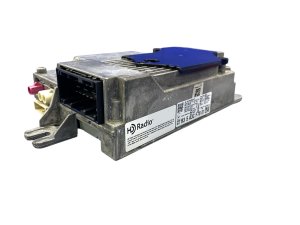
We Have This Part in Stock



The information in this article is provided for general reference and educational purposes only. Vehicle specifications, procedures, and part compatibility can vary by production date, trim level, and region. Always consult your vehicle's factory service manual and verify part numbers before purchasing or performing repairs. Safety-critical components such as airbags, seat belts, and braking systems should be installed by a qualified professional.
- BMW X3:
- BMW X4: