

2011-2012 BMW 5-Series, M5 & ActiveHybrid 5 Audio Control Panel: A Guide to Failures, Part Numbers, and Replacement
Diagnose failing buttons and CD drives, and learn how to find the exact replacement audio control panel for your BMW F10-platform vehicle's specific options.
- This audio panel is only a control interface; it is NOT the main radio computer (which is called the CIC Head Unit).
- Replacing this panel is a plug-and-play job and does NOT require expensive dealer programming or coding.
- The most common failures are cosmetic (peeling buttons) and a faulty CD drive, neither of which makes the car undrivable.
- You MUST match the BMW part number from your original unit to ensure the replacement is compatible with your car's specific options.
Is it the Control Panel or the Head Unit?
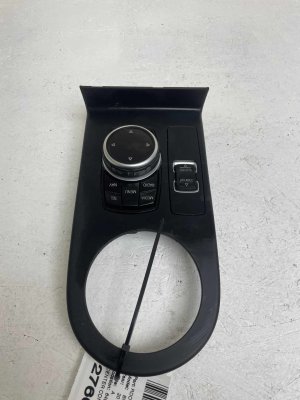
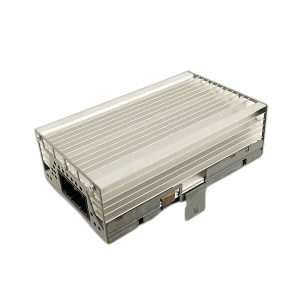
Before diagnosing problems, it's crucial to know the difference between the Audio Control Panel and the main infotainment computer, or Head Unit. The Audio Control Panel is the part you see and touch in the dash, with the buttons and CD slot. The Head Unit (in these models, the CIC) is a separate computer box located behind the dash that processes everything. A failure in one does not mean the other is bad.
- Control Panel Failure: Symptoms are usually isolated to the panel itself, like a single button not working, a peeling button, or the CD player malfunctioning. The iDrive screen will likely still work correctly.
- Head Unit (CIC) Failure: Symptoms are more severe, such as the entire iDrive system rebooting constantly, a blank screen, or total loss of audio from all sources.
This guide focuses exclusively on the Audio Control Panel that fits the 2011-2012 BMW 528i, 2011-2012 BMW 550i, 2011-2012 BMW 535i, 2012 BMW M5, and 2012 BMW ActiveHybrid 5.
Common Failure Symptoms
Peeling and Worn Buttons
By far the most common issue with these panels is the cosmetic failure of the button surfaces. The soft-touch black coating on the radio preset buttons, volume knob, and the adjacent climate control buttons can peel or wear away from use and exposure to oils from skin. This exposes the white plastic underneath, which can be especially noticeable at night when the backlighting shines through. While this doesn't affect the button's function, it makes the interior look aged. Fortunately, there are repair kits with decal stickers or individual replacement plastic buttons available.
Unresponsive Buttons or Faulty Volume Knob
Physical wear can lead to buttons that no longer click or respond when pressed. The volume knob can also fail, either by not registering turns, jumping volume levels erratically, or feeling loose and wobbly. A wobbly knob can sometimes be caused by broken internal plastic mounting points, which can occasionally be repaired with a strong adhesive or hot glue by a skilled DIYer.
CD/DVD Drive Malfunctions
The integrated CD/DVD player can fail in several ways. You might experience the unit refusing to accept a disc, failing to eject a disc that is already inside, or being unable to read discs, resulting in errors on the iDrive screen. Sometimes, a failing drive is an early symptom of a larger problem with the entire CIC head unit, especially if it's accompanied by other system-wide issues like random reboots.
Compatibility Warning: Fitment for this control panel is highly dependent on your vehicle's factory options. Different part numbers are used for vehicles with features like ceramic control knobs versus the standard plastic knobs. You must verify the part number on your original unit before ordering a replacement.
Buying a Used Audio Control Panel
Given that new OEM units can be expensive or discontinued, a quality used OEM panel is often the best solution. Here’s what to look for:
- Match the Part Number: This is the most important step. Remove your existing unit to find the BMW part number printed on the sticker. Match it exactly. Part numbers for this unit include 61319230047 and 61319261814, but many other variations exist depending on options.
- Inspect the Buttons: Look closely at photos for any signs of peeling or wear on the button surfaces. Since this is the most common failure, try to find a unit from a lower-mileage vehicle or one that shows minimal wear.
- Check the Knobs: Ask the seller if the volume and selection knobs feel solid and click properly. A loose knob could indicate broken internal mounts.
- Why Used OEM is Best: There are virtually no new aftermarket versions of this complete panel. A used original BMW part ensures perfect fit, finish, and electronic compatibility without the need for programming.
Programming and Installation Requirements
One of the most common questions is whether a replacement audio control panel needs to be programmed by a dealer. The answer is a definitive no.
Swapping the Audio Control Panel (with CD drive) is a plug-and-play procedure and does NOT require any coding or programming.
However, if you were to replace the main CIC Head Unit computer, that module would require professional programming to pair it to your vehicle's VIN and enable features like navigation and voice control. It is vital not to confuse these two separate components.
Replacement Guide Overview
Replacing the audio control panel is a manageable DIY job that typically takes under an hour.
- Required Tools: Plastic trim removal tools (pry tools) and a T20 Torx screwdriver.
- Disconnect Battery: As a safety precaution, it's recommended to disconnect the negative battery terminal.
- Remove Dash Trim: Using a plastic pry tool, carefully pry away the long decorative trim piece that runs across the passenger side of the dashboard and surrounds the center air vents. It is held in by clips.
- Unscrew the Unit: With the trim removed, you will see the T20 Torx screws that secure the entire climate/audio control faceplate to the dashboard. Remove these screws.
- Disconnect and Remove: Gently pull the entire assembly forward and disconnect the electrical connectors from the back of the audio panel and the climate control module.
- Separate the Panels: The audio control panel and the climate control panel are typically screwed together. Place the assembly on a soft surface and remove the small screws holding the two units together to separate them.
- Install New Unit: Assemble your replacement audio panel with your original climate panel and follow the steps in reverse to install it in the vehicle.
Cost Comparison
| Part Type | Estimated Cost |
|---|---|
| New OEM | $400 - $600+ (if available) |
| New Aftermarket | Not commonly available |
| Used OEM | $75 - $250 |
| Shop Labor | $100 - $200 |
Known Recalls and Service Bulletins
As of this writing, there are no specific recalls or Technical Service Bulletins (TSBs) from the NHTSA that directly address failures of the audio control panel itself for these vehicles. There are recalls for other components on these models, such as a driveshaft CV joint, but none pertain to the radio interface. Any issues with the panel are generally handled as standard, non-recall repairs.
Frequently Asked Questions (FAQ)
Does a replacement audio control panel need to be programmed?
No. If you are only replacing the panel with the CD slot and preset buttons, it is a plug-and-play part and does not require any dealer programming or coding.
Can I just replace the worn-out buttons instead of the whole unit?
Yes. For the common issue of peeling buttons, you can purchase and install individual replacement buttons or apply adhesive-backed decals to restore the original look without replacing the entire electronic unit.
What is the difference between the Audio Control Panel and the CIC Head Unit?
The Audio Control Panel is the interface in your dash with the buttons and CD slot. The CIC Head Unit is the car's main infotainment computer, a separate metal box hidden behind the dash that runs the software for navigation, music, and vehicle settings.
Will replacing this panel fix my iDrive screen from constantly rebooting?
Almost certainly not. A constantly rebooting iDrive system is a classic symptom of a failing main CIC Head Unit, not the control panel.
Will a panel from a 528i work in an M5?
It might, but only if the part numbers match exactly. Compatibility is determined by the options installed on the car (like standard vs. ceramic knobs), not the engine or trim level. Always verify your original part number.
Technical Specifications
OEM Part Numbers: 61319230047 61319261814 9241241 61319328425
Communicates with the CIC Head Unit via the MOST (Media Oriented Systems Transport) fiber optic bus.
We Have This Part in Stock





The information in this article is provided for general reference and educational purposes only. Vehicle specifications, procedures, and part compatibility can vary by production date, trim level, and region. Always consult your vehicle's factory service manual and verify part numbers before purchasing or performing repairs. Safety-critical components such as airbags, seat belts, and braking systems should be installed by a qualified professional.
- BMW 528i:
- BMW 550i:
- BMW 535i:
- BMW M5:
- BMW ActiveHybrid 5:
- 🛍️ Shop This Part
- Is it the Control Panel or the Head Unit?
- Common Failure Symptoms
- Peeling and Worn Buttons
- Unresponsive Buttons or Faulty Volume Knob
- CD/DVD Drive Malfunctions
- Buying a Used Audio Control Panel
- Programming and Installation Requirements
- Replacement Guide Overview
- Cost Comparison
- Known Recalls and Service Bulletins
- Frequently Asked Questions (FAQ)
- 🎟️ Get 5% Off