

2016-2018 Audi A6, S6, S7, RS7 & A7 MMI Control Panel: Spills, Faults, and Programming
This guide covers the common failures of the MMI audio control panel in the Audi C7.5 platform, with a focus on liquid damage, replacement, and the critical issue of Component Protection.
- This MMI control panel is subject to Component Protection, an anti-theft system. A used replacement part MUST be programmed by a dealer or specialist with online access to function correctly.
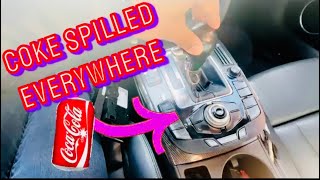
- Liquid spills are the most common cause of failure due to the panel's location next to the cup holders. Even a small spill can cause permanent damage.
- Physical replacement is simple and DIY-friendly, requiring only trim tools and about an hour of work.
- Verify the part number (4G1919610F or 4G1919612Q) and ensure your car has the MMI Navigation plus system (option I8H) before buying.
Symptoms of a Failing MMI Control Panel
Failure of the MMI control panel can manifest in several ways, often starting as an annoyance and progressing to a complete loss of infotainment control. Because of its location next to the cup holders, many failures are caused by liquid spills.
- Unresponsive or Sticky Buttons: This is the most common symptom, frequently caused by sugary drinks like coffee or soda spilling into the unit. The liquid dries, leaving a sticky residue that prevents buttons from moving freely or making contact.
- Erratic Behavior: The system might randomly switch between functions (e.g., from Radio to Nav), the cursor may move on its own, or button presses may result in the wrong action. This can be caused by liquid damage creating short circuits on the internal circuit board.
- No Response or Power: The entire panel may seem dead, with no lights and no response from any button or the control dial. This can indicate a complete internal failure or a blown fuse, sometimes triggered by a short circuit.
- MMI Screen Shuts Off: In some cases, a fault in the control panel can cause the main MMI display to shut down or fail to turn on, as it disrupts communication on the vehicle's data bus network.
- VCDS/OBD-II Fault Codes: A diagnostic scan may reveal fault codes related to the Information Electronics control module (J794, address 5F) or the control head itself (E380). Codes like U1014 00 (Control Module Incorrectly Coded) can point to issues, especially after a replacement attempt.
Warning: Liquid spills are the number one killer of these MMI control panels. Even a small amount of water, coffee, or soda can seep past the buttons and corrode the sensitive electronics inside. Warranty repairs are often denied if evidence of a liquid spill is found.
Known Issues, TSBs, and Recalls
For the 2016-2018 model years, there are no specific recalls or widespread Technical Service Bulletins (TSBs) directly targeting the physical MMI control panel for defects. Most issues are related to software glitches in the broader MMI system or are caused by external influence like spills. However, it's important to be aware of the following:
- Liquid Damage: As mentioned, this is the most prevalent issue. The design places the delicate electronics directly in the line of fire from the cup holders.
- Software Issues: Some MMI problems, like freezing or unavailable features, can be caused by software bugs in the main J794 information module, not the control panel itself. A dealer may need to perform a software update.
- Component Protection: This is not a failure, but a feature that becomes a major issue during replacement. It is an anti-theft system that locks the control unit to the original vehicle's VIN.
Programming, Coding, and Component Protection
This is the most critical section for anyone considering a replacement, especially with a used part.
The MMI control panel is part of Audi's "Component Protection" system. This is an anti-theft measure that electronically links the control panel to the car it was originally installed in. If you install a used control panel from another vehicle, Component Protection will be activated.
When Component Protection is active, you will experience limited functionality. Typically, the audio will be muted, and a message may appear on the MMI screen. The part is not broken; it simply needs to be adapted to your vehicle by an authorized facility.
🎬 Watch what happens when MMI component protection failsRemoving Component Protection requires:
- An Audi-specific diagnostic tool like ODIS (Offboard Diagnostic Information System).
- An online connection to Audi's factory servers (known as GEKO access).
- A technician with the proper authorization to perform the adaptation.
An Audi dealer can always perform this service. Some high-end independent European auto shops may also have the necessary tools and subscriptions. This service is not free and can cost several hundred dollars. It is NOT possible to remove Component Protection with standard tools like VCDS or by simply swapping parts.
Pro Tip: Before buying a used MMI control panel, call your local Audi dealer or a trusted independent specialist. Confirm they are willing and able to remove Component Protection on a customer-supplied used part and ask for a price quote. Some shops may be hesitant or have specific policies about this.
Replacement Overview
Physically replacing the MMI control panel is a straightforward job that is feasible for a DIY mechanic with basic tools. The entire process takes less than an hour.
- Tools Needed: Plastic trim removal tools are essential to avoid scratching the wood or aluminum trim.
- Remove Shifter Boot: Gently pry the gear selector boot upwards to unclip it from the console.
- Pry Up the Panel: Using trim tools, carefully pry the MMI control panel up. It is held in by four metal clips at the corners, not screws. Start from one edge and work your way around.
- Disconnect Wiring: Once the panel is loose, lift it enough to access the four electrical connectors underneath. Each connector has a small tab that must be depressed to release it. Be gentle, as these connectors can be brittle.
- Installation: Installation is the reverse of removal. Connect the four wiring harnesses, ensuring they click into place. Align the panel and press down firmly at the corners until the clips snap into place.
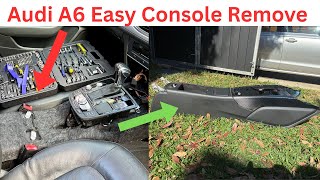
A full video of the console removal process can be a helpful guide.
🎬 Watch this step-by-step console removal videoBuying a Used Audio Control Panel
A used OEM control panel is an excellent, cost-effective alternative to a new part from the dealer, especially since high-quality aftermarket options are nonexistent. However, you must be a careful shopper.
- Verify Part Numbers: Ensure the part number matches what your vehicle requires. The primary part numbers are 4G1919610F and its predecessor, 4G1919612Q. The 'F' version replaces the 'Q' version. Always confirm fitment for your specific vehicle and options.
- Check Compatibility: This panel is for vehicles with the MMI Navigation plus system (option code I8H), which includes the large touchpad. It will not work in a car with the basic MMI system.
- Inspect for Liquid Damage: This is crucial. Ask the seller for clear, high-resolution photos of the top surface and, if possible, the underside. Look for any signs of corrosion, sticky residue around the buttons, or discoloration on the circuit board. Avoid any unit with visible signs of a spill.
- Factor in Programming Costs: Remember that a used unit WILL require a trip to a dealer or specialist to have Component Protection removed. Factor this cost (typically $300-$500) into the total price.
- Why Used OEM is Best: For a complex electronic module like this, a used OEM part is far superior to a cheap aftermarket knock-off. The fit, finish, button feel, and electronic compatibility of a genuine Audi part are guaranteed, whereas aftermarket versions often have issues with quality and function.
Cost Comparison
| Part Type | Estimated Cost |
|---|---|
| New OEM (Dealer) | $1,300 - $1,800 |
| Used OEM (Recycled) | $250 - $600 |
| Shop Labor (Replacement) | $100 - $200 |
| Shop Labor (Component Protection Removal) | $300 - $500 |
Frequently Asked Questions (FAQ)
Do I absolutely have to go to the dealer to program a replacement MMI panel?
Yes, a visit to a dealer or a qualified independent specialist with Audi online access is mandatory. The Component Protection system cannot be bypassed with DIY tools. When you install a used part, it will be in a locked state with limited function until it is adapted to your car's VIN online.
My buttons are just sticky from a coffee spill. Can I clean it instead of replacing it?
Sometimes, yes. If the issue is purely mechanical stickiness and the electronics are not damaged, you may be able to fix it. This involves removing the unit, carefully disassembling it, and cleaning the circuit board and button contacts with electronics cleaner or 99% isopropyl alcohol. However, if the liquid caused short circuits, cleaning may not be enough, and replacement will be necessary.
What is the difference between part number 4G1919610F and 4G1919612Q?
Part number 4G1919610F is a newer revision that supersedes or replaces the older 4G1919612Q part number. For the specified 2016-2018 vehicles, they are generally interchangeable, but it is always best to use the newest revision (4G1919610F) if possible.
Can I fix a non-working MMI by doing a system reset?
A system reset can fix software glitches, but it cannot fix a hardware failure. If your panel is unresponsive due to a software freeze, a reset is a good first step. You can perform a reset by pressing and holding three buttons simultaneously: the Menu button, the central control knob, and the upper-right function button next to the knob. If this doesn't solve the problem, you likely have a hardware issue with the panel itself.
Helpful Videos
Technical Specifications
OEM Part Numbers: 4G1919610F 4G1919612Q
Designed for vehicles with MMI Navigation plus system (option code I8H). Communicates with Information Electronics control module J794. Subject to Audi Component Protection.
We Have This Part in Stock



The information in this article is provided for general reference and educational purposes only. Vehicle specifications, procedures, and part compatibility can vary by production date, trim level, and region. Always consult your vehicle's factory service manual and verify part numbers before purchasing or performing repairs. Safety-critical components such as airbags, seat belts, and braking systems should be installed by a qualified professional.
- Audi A6:
- Audi S6:
- Audi S7:
- Audi RS7:
- Audi A7 Quattro: