

Audi A4, A5, Q5, S4 & SQ5 MMI Control Panel Guide (2009-2017): Spills, Sticky Buttons & Replacement
Diagnose unresponsive buttons and learn about the critical 'Component Protection' programming that may be required after replacing your MMI control panel.
- The #1 cause of failure is liquid spills, which make buttons sticky or cause short circuits.
- A used replacement panel will almost certainly trigger 'Component Protection,' an anti-theft feature that must be removed by a dealer or specialist with online access to Audi servers.
- You MUST match the part number exactly. Part number 8T0919609F is for base audio systems without keyless entry.
- The physical replacement is easy for DIY, but you must budget for professional programming afterward.
Symptoms of a Failing MMI Control Panel
When the MMI control panel begins to fail, it can make using your vehicle's infotainment system frustrating or impossible. Symptoms are almost always related to the physical buttons and knobs on the console.
- Sticky or Unresponsive Buttons: Buttons may become hard to press, fail to register a press, or get stuck in the down position. This is the most common symptom, often caused by liquid spills.
- Erratic Scrolling or Jumping: When using the main rotary knob to navigate menus, the on-screen selection may jump around erratically, move in the opposite direction of your input, or not move at all. The same issue can happen with the volume knob.
- No Power or Backlighting: The entire panel may appear dead, with no lights on the buttons and no response from any input. This can indicate a failure of the panel itself or a break in the fiber optic data bus that connects the MMI system components.
- "Ghost Inputs": The system may act on its own, such as randomly navigating menus, as if a button is being pressed repeatedly.
Common Causes of Failure
The vast majority of MMI control panel failures are caused by one single thing: liquid damage. Its location on the center console makes it extremely vulnerable to spills from coffee, soda, water, or cleaning products.
Even a small amount of liquid can seep between the buttons and reach the delicate circuit board underneath. Sugary drinks are especially damaging, as they leave a sticky residue that gums up the button mechanisms and can corrode the electronic contacts. In some cases, the failure isn't immediate but happens weeks later as corrosion slowly damages the internal components.
Warning: Do not attempt to clean a sticky or malfunctioning unit with more liquid like Windex. Use only a dedicated, plastic-safe electronics contact cleaner and ensure the vehicle is powered off completely before application. For severe spills, the unit must be removed and disassembled for proper cleaning, though replacement is often more effective.
Diagnosing the Issue
If your entire MMI system is dead (black screen, no audio), the problem might not be the control panel itself. Audi's MMI system uses a fiber optic loop, often called the MOST bus, to connect components like the radio, amplifier, and control panel. If one module in this loop fails, the entire system goes down.
A common diagnostic trouble code (DTC) for this situation is 00384 - Optical Databus Open Circuit. A technician can use a fiber optic bypass loop to temporarily remove each module from the loop one by one. When the system comes back to life, the bypassed module is the one that has failed. If bypassing other modules doesn't solve the problem, the control panel itself is a likely culprit.
Programming and Component Protection: The #1 Buyer Trap
This is the most critical information for anyone considering a replacement. Most electronic modules in modern Audis are protected by a system called Component Protection (CP). This is an anti-theft feature that links a module to the car's original Vehicle Identification Number (VIN).
When you install a used MMI control panel from another vehicle, it will likely trigger Component Protection. When CP is active, the part may have limited or no functionality. For example, you might have control but no audio from the speakers, and a "Component Protection Active" message may appear on the screen.
Removing Component Protection is not a DIY job.
- It requires a special diagnostic tool (ODIS) with a live online connection to Audi's factory servers.
- A standard VCDS (VAG-COM) tool from Ross-Tech cannot remove Component Protection.
- You will need to take the vehicle to an Audi dealer or a qualified independent specialist who has the proper equipment and subscription to perform the adaptation.
Pro Tip: Before buying a used panel, call your local Audi dealer and independent European auto shops. Ask for the cost to "remove Component Protection from an MMI control module." Factor this cost into your total repair budget.
Buying a Used Audio Control Panel
A used OEM panel is a cost-effective alternative to a brand-new unit, but careful purchasing is key. Here’s what to look for:
- Verify the Part Number: This is essential. The part number is printed on a sticker on the unit. You must match it to your original part. The primary part number for the vehicles covered in this guide is 8T0919609F (or 8T0919609FWFX). This is for vehicles without a premium sound system (like Bang & Olufsen) and without keyless entry.
- Check for Incompatible Versions: If your car has premium audio or keyless entry, you will likely need a different part number, such as 8T0919611L. Installing the wrong version will result in it not working correctly.
- Physical Inspection: If buying in person, check the buttons for any stickiness or resistance. Look for any signs of corrosion or liquid residue on the housing and connectors.
- For 2017 Q5/SQ5 Models: This part fits vehicles from the '8R' platform generation. For 2017 models, this corresponds to vehicles that have 'FP' as the 7th and 8th digits of the VIN.
- Budget for Programming: Remember that you will almost certainly have to pay for Component Protection removal. A $75 used part can easily turn into a $300+ repair once programming costs are included.
Replacement Process Overview
Physically swapping the MMI control panel is a relatively simple DIY job that requires basic trim removal tools. The process generally takes less than an hour.
- Use a plastic trim tool to carefully pry up the gear shifter boot.
- Once the boot is lifted, you can gain access to the edges of the MMI control panel.
- The panel is held in by four metal clips, one at each corner. There are no screws.
- Carefully pry upwards on the panel, being cautious not to damage the surrounding wood or metal console trim.
- Once loose, lift the panel enough to access and disconnect the four electrical connectors on the underside.
- Installation is the reverse of removal. Connect the new panel and press it firmly into place until the clips engage.
Known Issues, TSBs, and Recalls
There are no specific recalls or widespread Technical Service Bulletins (TSBs) for the failure of this exact MMI control panel. However, Audi has issued recalls for other electronic modules failing due to liquid ingress. For example, a recall was issued for later model Q5/SQ5 vehicles where liquid spills in the rear seat could damage the main gateway control module located underneath. This history underscores the sensitivity of Audi electronics to moisture and why dealers are often hesitant to cover liquid-damaged components under warranty.
Cost of Replacement
The cost can vary dramatically depending on whether you buy a new or used part and who does the installation.
| Part Type | Estimated Cost |
|---|---|
| New OEM | $850 - $1,150 |
| Used OEM | $50 - $150 |
| Shop Labor (Physical Swap) | $100 - $250 |
| Shop Labor (Component Protection Removal) | $150 - $350 |
Frequently Asked Questions (FAQ)
Does a replacement MMI control panel have to be programmed?
Almost certainly, yes. When installing a used unit, the vehicle's anti-theft system, known as Component Protection, will likely activate. This requires a trip to an Audi dealer or a specialist with the correct online tools to adapt the 'new' part to your car's VIN.
Can I replace the MMI control panel myself?
Yes, the physical replacement is a straightforward DIY job that involves removing trim pieces and unclipping the old unit. However, you will still need to take the car to a professional for the final electronic programming to remove Component Protection.
My buttons are just sticky. Can I clean them?
You can try. With the car off, you can sparingly spray a plastic-safe, residue-free electronics cleaner into the button gaps and work the buttons to free them up. However, this is often a temporary fix. For a proper cleaning, the unit must be removed and disassembled, but at that point, replacement with a good used unit is often easier.
What happens if I ignore a failing MMI control panel?
You will lose the ability to control your infotainment system. This means no access to navigation, media, radio, or other vehicle settings via the center console. While the car remains drivable, it can be a significant inconvenience. In some cases, a short-circuiting panel could potentially cause other electrical issues, though this is less common.
Technical Specifications
OEM Part Numbers: 8T0919609F 8T0919609FWFX
This is the control interface for the Audi MMI 3G system. It connects to the vehicle's CAN and MOST (fiber optic) networks. This specific part number is for vehicles without premium sound or keyless entry.
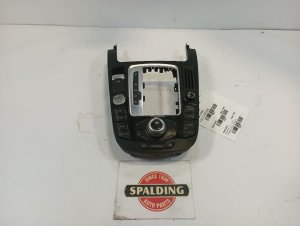
We Have This Part in Stock



The information in this article is provided for general reference and educational purposes only. Vehicle specifications, procedures, and part compatibility can vary by production date, trim level, and region. Always consult your vehicle's factory service manual and verify part numbers before purchasing or performing repairs. Safety-critical components such as airbags, seat belts, and braking systems should be installed by a qualified professional.
- Audi A4:
- Audi S4:
- Audi A5:
- Audi Q5:
- Audi SQ5:
- 🛍️ Shop This Part
- Symptoms of a Failing MMI Control Panel
- Common Causes of Failure
- Diagnosing the Issue
- Programming and Component Protection: The #1 Buyer Trap
- Buying a Used Audio Control Panel
- Replacement Process Overview
- Known Issues, TSBs, and Recalls
- Cost of Replacement
- Frequently Asked Questions (FAQ)
- 🎟️ Get 5% Off