

Mazda Audio Module (2019-2025): Fixing Black Screens, No Sound, and Replacement Guide
This guide covers common failures, software resets, TSBs, and programming requirements for the audio control module in modern Mazda 3, CX-30, CX-50, CX-90, and MX-30 EV models.
- Many common issues like black screens or freezing are software-related and can be fixed with a hard reset (holding Music + Nav + Mute).
- A known TSB for no audio/static on Mazda 3 and CX-30 models points to a loose pin in the module's connector, which is a simple fix.
- When replacing the module, using a compatible used OEM part number often works without requiring expensive dealer programming.
- If programming is needed, some independent shops have the required Mazda-specific software, so a dealer visit is not your only option.
First Steps: Software Resets and Updates

Before assuming the hardware has failed, many issues with the Mazda Connect system can be resolved with a software reset or update. These steps are simple and should always be your first diagnostic approach.
System Hard Reset
If your screen is frozen, black, or constantly rebooting, a hard reset can often fix the problem. This forces the Connectivity Master Unit (CMU) to restart, clearing temporary glitches without erasing your personal settings.
- Turn the vehicle's ignition on (the engine can be on or off).
- Press and hold three buttons on the center console simultaneously: Music + Navigation + Mute/Volume Knob.
- Continue holding the buttons for approximately 10-20 seconds.
- The screen will go black and the system will reboot, displaying the Mazda logo.
Pro Tip: Sometimes, just turning the car off for a few minutes and starting it again can resolve temporary glitches, especially with intermittent black screens. If the hard reset doesn't work, you can also try disconnecting the vehicle's negative battery terminal for a few minutes to force a full power cycle of all modules.
Software Updates
Mazda frequently releases software updates to fix bugs related to audio, connectivity, and system stability. You can check for updates in the 'Settings' menu on the infotainment screen. In many cases, a dealer can update the software to resolve known issues, which is often the first step they will take. For older models, it was possible for users to perform updates via a USB drive, but for the newest vehicles covered here, a dealer visit is the most reliable method.
Symptoms of a Failing Audio Control Module

When the CMU begins to fail, it can cause a variety of symptoms. While some issues can be caused by other components like the amplifier or wiring, these are the most common signs of a faulty module.
- Black or Blank Screen: The display may not turn on at all, even though you can still hear audio playing. In some cases, the backup camera may still work while the rest of the system is black.
- Constant Rebooting: The system gets stuck in a loop where it shows the Mazda logo, tries to start, and then shuts down and restarts repeatedly.
- No Audio or Static: You may experience a complete loss of sound from all speakers, or intermittent static and popping noises. This can sometimes be triggered by tapping on the dashboard near the screen.
- Frozen or Unresponsive System: The screen is on but does not respond to touch inputs or the commander knob.
- Bluetooth and CarPlay/Android Auto Dropouts: Your phone may frequently disconnect or fail to connect at all.
- Controls Not Working: The volume knob or steering wheel controls may stop responding.
Known Issues, TSBs, and Recalls

Several Technical Service Bulletins (TSBs) and recalls have been issued for the vehicles covered by this guide, many related to software and audio system performance.
TSB for No Audio/Static (2019-2024 Mazda 3 & CX-30)
Mazda issued a service alert (SA-021-24) for an issue where customers experience intermittent no sound or static from the speakers. The TSB notes this can sometimes be reproduced by tapping on the dash. The cause is often a specific electrical pin (Pin 6F) backing out of its connector at the back of the CMU. This can trigger Diagnostic Trouble Codes (DTCs) U0186:08 (Communication error with audio amplifier) and U2145:08 (Communication error with remote tuner). The fix involves reseating the pins in the connector, not replacing the entire module.
Software-Related Recalls (2024-2025 CX-90 & 2025 CX-70)
Recall Notice: Mazda has issued multiple software-related recalls for the CX-90 and CX-70. While not all are for the audio module itself, they involve reprogramming various control units. For example, NHTSA recall 24V-814 addresses software that could cause the defroster, 360-degree camera, and other systems to fail on startup. Other recalls (24V-815, 24V-816, 24V-817) address software that could lead to a loss of drive power. The fix for all of these is a software update performed by a Mazda dealer, free of charge.
Buying a Used Audio Control Module: What to Look For
Given the high cost of a new CMU from the dealer, a quality used OEM module is often the most cost-effective solution. Here’s what to check to ensure you get the right part.
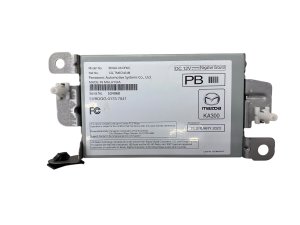
- Verify the Part Number: This is the most critical step. While multiple part numbers may be compatible, you must match them carefully. A great strategy is to remove your old unit, get the part number off its sticker, and then call a Mazda dealer's parts department. Ask them for a list of all compatible or superseding part numbers for your vehicle's VIN. This gives you a wider range of numbers to search for in the used market.
- Check Satellite Radio Compatibility: The initial data for this part notes that it is for vehicles equipped with satellite radio. Ensure the donor vehicle from which the used part was sourced had the same audio options as your car.
- Inspect Connectors: Before purchasing, examine photos of the unit's electrical connectors. Look for any bent, corroded, or pushed-out pins. Given the TSB about a loose pin, pay close attention to the main harness connector.
- Why Used OEM is a Good Choice: For complex electronics like a CMU, a used original Mazda part is generally more reliable than a new, unbranded aftermarket unit (which are rare for this component anyway). The used OEM part was designed to integrate perfectly with your vehicle's other systems. Reputable sellers of used parts often provide a warranty.
Programming and Installation Requirements

This is the number one question for any electronic module replacement. For the Mazda CMU, the answer is: it depends.
In many cases, if you replace a faulty CMU with a used one that has a compatible part number, the unit can be plug-and-play and will not require programming. The vehicle will start and the infotainment system will function. However, for full compatibility and to ensure all features work correctly, programming may sometimes be necessary.
Warning: This is not a DIY-friendly programming task. It requires proprietary Mazda diagnostic software (MDARS) and a subscription. While a Mazda dealer can always perform this service, some independent repair shops that specialize in European and Asian vehicles may also have the necessary tools and subscriptions. If you install a used module and find that some features aren't working, a trip to a dealer or a qualified independent shop for programming will likely be required.
Cost to Replace a Mazda Audio Control Module
| Part/Service | Estimated Cost |
|---|---|
| New OEM Module | $1,200 - $1,600 |
| Used OEM Module | $150 - $450 |
| Remanufactured Module | $200 - $400 |
| Shop Labor (Installation & Programming) | $150 - $300 |
Note: Prices are estimates and can vary based on location, vehicle model, and part availability.
Frequently Asked Questions (FAQ)
What's the first thing I should try if my Mazda screen is black?
The very first thing you should try is a hard reset. Press and hold the Music, Navigation, and Mute/Volume buttons on the center console for 10-20 seconds until the system reboots. This simple step fixes a majority of temporary software glitches.
Do I have to go to a Mazda dealer to program a replacement module?
Not necessarily. While a dealer can always do it, some independent auto repair shops have the subscriptions and tools required to program Mazda modules. However, it is not something a typical DIY mechanic or locksmith can do. If you use a compatible used part number, you may not need programming at all.
Can I just update the software instead of replacing the module?
Yes, if the problem is a known software bug. Mazda has issued numerous software updates to fix infotainment problems. If your module is physically damaged (e.g., from water intrusion or internal failure), a software update will not fix it. A dealer or qualified shop can determine if an update is available and applicable to your issue.
Will a module from a different Mazda model work in my car?
It is not recommended. Even if the module looks identical and fits, it may have different hardware or software intended for another vehicle's specific options (e.g., Bose vs. standard audio, different screen size). Always use a part number that is verified as compatible with your specific vehicle's VIN.
Affected Vehicles & Part Numbers

This Audio Control Module / Connectivity Master Unit is shared across several Mazda models built on the same modern platform.
Vehicle Fitment:
- 2022-2025 Mazda CX-90
- 2019-2024 Mazda 3
- 2020-2024 Mazda CX-30
- 2023-2025 Mazda CX-50
- 2022-2023 Mazda MX-30 EV
Known OEM Part Numbers:
BDGG66DR0, BDGG66DR0D, BDGG66DR0F, BDTT66DR0, BDTT66DR0C, VA4066DR0D
Always verify the part number from your original unit or with a dealer using your VIN before purchasing a replacement.
Technical Specifications
OEM Part Numbers: BDGG66DR0 BDGG66DR0D BDGG66DR0F BDTT66DR0 BDTT66DR0C VA4066DR0D
This module is also known as the Connectivity Master Unit (CMU). It is the central computer for the Mazda Connect infotainment system.
We Have This Part in Stock

The information in this article is provided for general reference and educational purposes only. Vehicle specifications, procedures, and part compatibility can vary by production date, trim level, and region. Always consult your vehicle's factory service manual and verify part numbers before purchasing or performing repairs. Safety-critical components such as airbags, seat belts, and braking systems should be installed by a qualified professional.
- Mazda CX-90:
- Mazda 3:
- Mazda CX-30:
- Mazda CX-50:
- Mazda MX-30 EV:
- 🛍️ Shop This Part
- First Steps: Software Resets and Updates
- System Hard Reset
- Software Updates
- Symptoms of a Failing Audio Control Module
- Known Issues, TSBs, and Recalls
- TSB for No Audio/Static (2019-2024 Mazda 3 & CX-30)
- Software-Related Recalls (2024-2025 CX-90 & 2025 CX-70)
- Buying a Used Audio Control Module: What to Look For
- Programming and Installation Requirements
- Cost to Replace a Mazda Audio Control Module
- Frequently Asked Questions (FAQ)
- Affected Vehicles & Part Numbers
- Vehicle Fitment:
- Known OEM Part Numbers:
- 🎟️ Get 5% Off