

2021-2022 Mazda Audio Control Module: Rebooting, Black Screens & Replacement Guide
This guide covers common failures, part number compatibility, and the critical programming requirements for the audio control module in 2021-2022 Mazda CX-5, CX-9, 6, and MX-5 Miata models.
- A failing Audio Control Module (CMU) commonly causes black screens, constant rebooting, and system freezes.
- A replacement module, new or used, MUST be programmed by a Mazda dealer to your vehicle's VIN.
- Before replacing the unit, try a system reset (Mute+Nav+Back) and remove the navigation SD card, as these can sometimes resolve the issue.
- Part number compatibility is critical. Verify the part number matches your vehicle's screen size and connectivity features (wired vs. wireless).
What is the Audio Control Module / CMU?

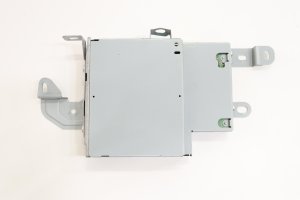
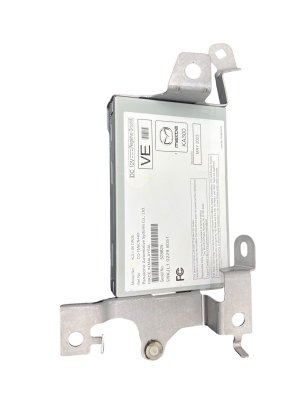
In these Mazda vehicles, the part often listed as the "Audio Control Module" is more accurately called the Connectivity Master Unit, or CMU. It's a silver box, typically mounted behind the dashboard display screen, that acts as the computer for your entire infotainment system. It controls the radio, navigation, phone connectivity, and vehicle settings you access through the main screen. When this unit fails, it can make many of the car's features unusable.
Symptoms of a Failing Audio Control Module

A failing CMU can cause a wide range of frustrating issues. Since it controls the entire infotainment system, symptoms are usually obvious and disruptive. Here are the most common problems owners report:
- Constant Rebooting: The system gets stuck in a loop where the Mazda logo appears, the system tries to load, and then it crashes and restarts. This can happen every few minutes or continuously.
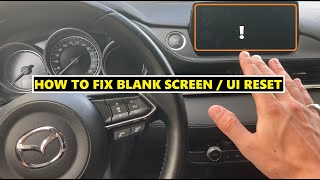
- Black or Blank Screen: The screen goes completely black and unresponsive, even though you might still hear audio from the radio or a connected phone. Sometimes the backup camera will still work, but nothing else.
- Freezing or Lagging: The system becomes extremely slow, freezes on a particular screen, or stops responding to inputs from the commander knob or buttons.
- No Audio: The display may appear to work correctly, showing that music is playing, but no sound comes from the speakers. The volume knob may also become unresponsive.
- Connectivity Problems: Apple CarPlay or Android Auto may fail to connect, disconnect randomly, or cause the entire system to crash.
- "Display is too hot" Message: Some owners of the 2021 Mazda 6 have reported a persistent, false overheating message on the display, even in cool weather. In one documented case, replacing the CMU did not solve the problem, suggesting the issue could also be with the display unit itself.
Pro Tip: Before assuming the CMU has failed, try a system reset. With the car's ignition on (but engine off), press and hold the Mute + Nav + Back buttons simultaneously for about 10 seconds until the screen reboots. 🎬 Watch: How to perform this quick reset procedure Also, try removing the navigation SD card from its slot; a faulty or corrupt SD card is a known cause of rebooting issues.
Known Issues, Recalls, and Technical Service Bulletins (TSBs)

While no specific recalls target this exact module for these model years, Mazda has issued several TSBs related to infotainment system behavior that can help in diagnosis.
- TSB SA-027/21: Addresses troubleshooting for Mazda Connect symptoms like blank screens and rebooting. For 2021-2022 CX-5 and CX-9 models, it recommends updating the CMU software to version 7000C0A-NA03_11038 or later to fix some rebooting issues. If the update doesn't work, the TSB may recommend replacing the CMU.
- TSB for Customization Settings: A TSB for 2021 CX-5 and CX-9 models with the 10.25-inch display notes that some vehicle customization settings may disappear. This is caused by software in the Gateway Unit (GWU) and requires a dealer software update to fix.
- Faulty Navigation SD Card: A common issue across many Mazda models is a faulty navigation SD card causing the CMU to get stuck in a reboot loop. Removing the SD card is a quick way to check if it's the source of the problem.
Buying a Used Audio Control Module: What You MUST Know

Replacing a failed CMU with a used unit can save a significant amount of money, but there are critical details you must be aware of to avoid buying an expensive paperweight.
1. Programming is Required (Dealer Visit Likely)
Warning: A used Audio Control Module (CMU) cannot be simply swapped from one vehicle to another. These modules are linked to the vehicle's original VIN for feature configuration and anti-theft purposes. After installation, the module must be programmed by a Mazda dealer using their proprietary Mazda Diagnostic and Repair System (MDARS). Most independent shops do not have access to this software. Without proper programming, features like navigation, certain vehicle settings, or even the audio system itself may not function.
2. Match Part Numbers Carefully
The list of part numbers for this module is long and confusing because they represent different hardware revisions and vehicle configurations.
- The initial prompt and search results show many part numbers in the TC3M-66-9C0x series. These are the primary units for the vehicles in this guide.
- The letters at the end (e.g., A, B, F, G) typically indicate hardware or software revisions. When buying used, it's best to match your original part number exactly or get a later revision (e.g., replacing a 'C' with a 'G').
- Crucial Warning: The initial data specified this module is for vehicles *without wireless connectivity*. The 2021-2022 model years were a transition period. The 2021 MX-5 Miata Grand Touring, for example, gained wireless Apple CarPlay. Ensure the part you are buying matches your vehicle's specific connectivity features (wired vs. wireless). Dealer parts catalogs often note "Order By VIN" for this reason.
- CX-5 Screen Size: For the 2021 CX-5, fitment may depend on whether your vehicle has the standard 8-inch screen or the larger 10.25-inch screen. The modules are likely different. A separate module (TC3M-66-UU0B) is listed for the 10.25-inch display with the 360-degree view monitor, indicating these systems are distinct. Always verify compatibility with your specific screen size.
3. Physical Inspection of a Used Unit
When you receive a used CMU, inspect it for any signs of damage. Check that all connector pins are straight and clean. Look for any signs of water damage or corrosion on the casing, as this could indicate it came from a flood-damaged vehicle and will likely fail. Reputable sellers of used parts often provide a short warranty to ensure the part is functional.
Cost of Replacing an Audio Control Module
Replacing the CMU can be expensive, especially when buying new from a dealer. A used module offers significant savings, but remember to factor in the cost of dealer programming.
| Part/Service | Estimated Cost | Notes |
|---|---|---|
| New OEM (Dealer) | $1,000 - $1,400+ | Price for the part only. Part number KPF1-66-9C0F is listed at over $1,300 by some online dealers. |
| Used OEM (Recycled) | $90 - $250 | Prices vary based on source and condition. |
| Remanufactured/Repair Service | $150 - $300 | Services exist that repair your existing module, which avoids programming issues. |
| Shop Labor (Installation) | $100 - $200 | Typically 0.5 to 1.0 hour of labor to access and swap the unit. |
| Shop Labor (Programming) | $125 - $250 | This is a separate, required step at a Mazda dealer. Labor rates are often around $150/hr. |
Frequently Asked Questions (FAQ)
Can I install a used Audio Control Module myself?
Yes, the physical installation is straightforward for a DIYer with experience removing dashboard trim. The module is usually located directly behind the main display screen. However, the vehicle will need to be taken to a Mazda dealer for programming after the physical swap is complete.
Will a used module from a higher trim level give me new features like navigation?
Possibly, but it's not guaranteed. The features are enabled during the VIN-specific programming process at the dealer. If your vehicle did not originally come with navigation, the dealer's system may not allow them to enable it, even if the replacement hardware supports it. It's best to assume you will only retain the features your vehicle originally had.
My screen is black. Is it the CMU or the screen itself?
It's more often the CMU. A common failure mode is a black screen where audio still works. First, try a hard reset (Mute+Nav+Back). Also, Mazda notes that the screen can be turned off by pressing and holding the volume knob; try pressing it first to see if it was accidentally turned off. If these simple checks don't work, the CMU is the most likely culprit.
Can an independent mechanic or a locksmith program the new module?
It is highly unlikely. Programming modern Mazda modules requires a subscription to Mazda's proprietary software (MDARS), which most independent shops and locksmiths do not have. You should plan for a mandatory dealer visit for this part.
Helpful Videos
Technical Specifications
OEM Part Numbers: KPF1-66-9C0F TC3M-66-9C0 TC3M-66-9C0A TC3M-66-9C0B TC3M-66-9C0C TC3M-66-9C0D TC3M-66-9C0F TC3M-66-9C0G TC3M669C0A TC3M669C0B TC3M669C0G TC3P669C0N
Also known as the Connectivity Master Unit (CMU). Controls the Mazda Connect infotainment system. Requires dealer programming (MDARS) upon replacement.
We Have This Part in Stock



The information in this article is provided for general reference and educational purposes only. Vehicle specifications, procedures, and part compatibility can vary by production date, trim level, and region. Always consult your vehicle's factory service manual and verify part numbers before purchasing or performing repairs. Safety-critical components such as airbags, seat belts, and braking systems should be installed by a qualified professional.
- Mazda CX-9:
- Mazda CX-5:
- Mazda 6:
- Mazda MX-5 Miata:
- 🎬 Helpful Videos
- 🛍️ Shop This Part
- What is the Audio Control Module / CMU?
- Symptoms of a Failing Audio Control Module
- Known Issues, Recalls, and Technical Service Bulletins (TSBs)
- Buying a Used Audio Control Module: What You MUST Know
- 1. Programming is Required (Dealer Visit Likely)
- 2. Match Part Numbers Carefully
- 3. Physical Inspection of a Used Unit
- Cost of Replacing an Audio Control Module
- Frequently Asked Questions (FAQ)
- 🎟️ Get 5% Off