

2017-2023 Mazda CX-5 Audio Amplifier: Your Guide to Solving 'No Sound' Issues (Non-Bose)
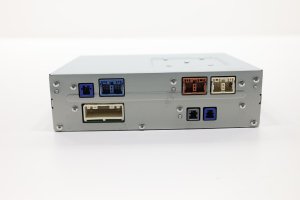
This guide covers the diagnosis, replacement, and compatibility of the standard audio control module (amplifier) for the 2017-2023 Mazda CX-5, a common fix for when your radio works but no sound comes out.
- This amplifier is for the standard NON-BOSE system only; they are not interchangeable.
- Replacement is PLUG-AND-PLAY. No dealer programming or VIN matching is required.
- The most common failure symptom is a working radio screen but total silence from the speakers.
- If your screen is rebooting, the problem is likely the navigation SD card, NOT the amplifier.
Is This the Right Part? Standard vs. Bose Premium Audio

Warning: This audio amplifier is ONLY for vehicles with the standard, non-premium sound system. It is not compatible with vehicles equipped with the Bose premium audio system, which uses a different amplifier with different wiring and programming. Before purchasing, verify which system your vehicle has. The easiest way to check is to look for the 'Bose' logo on the speaker grilles in the doors or on the dashboard.
Symptoms of a Failing Audio Control Module

When the audio amplifier fails, the symptoms are usually straightforward. The most common sign is a complete loss of sound from all speakers. You might notice:
- The infotainment screen turns on and functions normally, allowing you to change stations or select media sources, but no audio is produced.
- The volume control knob or steering wheel buttons do not bring up the volume bar on the screen.
- Sudden silence after hearing a 'pop' from the speakers.
- Sound only playing from one side of the vehicle.
- Distorted or crackling audio that is not related to a specific speaker.
Pro Tip: A common cause of failure is water damage due to the amplifier's location on the floor under the passenger seat. Spilled drinks or water leaking into the cabin can short out the module. When inspecting a potential failure, check the module and its connectors for any signs of corrosion or moisture.
Is Your Infotainment System Rebooting? It's Probably Not the Amplifier

A very common issue in Mazda vehicles is the infotainment system constantly rebooting, especially in cold weather. Many owners mistakenly believe this is a major radio or amplifier failure. However, this problem is almost always caused by a faulty navigation SD card. Mazda has issued Technical Service Bulletins (TSBs), such as 09-015/20, for this exact problem. The fix is to replace the navigation SD card, not the audio amplifier. If your screen is turning off and on, address the SD card first.
Programming and Installation Requirements

No Programming Required: Plug and Play
A replacement Audio Control Module for the 2017-2023 Mazda CX-5 does not need to be programmed or flashed to the vehicle. It is a plug-and-play component. As long as you have the correct part number for your vehicle's sound system (Standard, not Bose), you can simply swap the modules. The vehicle's anti-theft and immobilizer systems are not linked to this amplifier. This makes replacement a straightforward task for DIY mechanics and independent shops, with no dealer visit required.
Known Issues, TSBs, and Recalls
While there are no major recalls specifically for the standard audio amplifier on the 2017-2023 CX-5, it's important to be aware of related service bulletins that can cause similar symptoms.
- TSB 09-015/20 & 09-001/18: Addresses the Mazda Connect system rebooting or going black in cold temperatures. The cause is a faulty navigation SD card, not the amplifier.
- Firmware Glitches: Some audio issues, like sound cutting out from one side when adjusting volume, have been traced to bugs in the Mazda Connect firmware. A dealer may be able to fix this with a software update.
Buying a Used Audio Control Module: What to Look For

Given the high cost of a new OEM amplifier, a used unit from a reputable recycler is an excellent value. Since the part is plug-and-play, it's a low-risk repair.
- Verify Compatibility: Double-check that your CX-5 has the standard, non-Bose audio system. A used amplifier from a Bose system will not work.
- Match the Part Number: While there are several compatible part numbers, it's always best to match yours exactly if possible. The K123- series and KGC2- series are for the standard system. Part numbers ending in A, B, etc., are typically newer revisions and are interchangeable with the base number.
- Inspect for Water Damage: This is the #1 killer of these modules. Before buying, inspect photos for any signs of corrosion (white or green crust) on the aluminum case or, more importantly, on the electrical connector pins. Do not buy a module that shows any sign of moisture damage.
- Buy from a Reputable Source: Purchase from sellers who offer a warranty and have good reviews. This provides protection in case you receive a defective part.
Cost Comparison
| Part Type | Estimated Cost |
|---|---|
| New OEM | $800 - $1,250 |
| New Aftermarket | Not commonly available |
| Used OEM | $50 - $150 |
| Remanufactured | Not commonly available |
| Shop Labor | $100 - $200 |
Frequently Asked Questions (FAQ)
Where is the audio amplifier located on a 2017-2023 Mazda CX-5?
The amplifier for both the standard and Bose systems is located under the front passenger seat, typically beneath a black plastic cover. You may need to unbolt the seat and tilt it back to gain full access.
Does a replacement Mazda CX-5 audio amplifier need to be programmed by a dealer?
No. For the 2017-2023 CX-5, the audio amplifier is a plug-and-play part. It does not require any special programming, flashing, or VIN-locking.
My infotainment screen keeps rebooting. Will replacing the amplifier fix this?
No, almost certainly not. The common cause for a rebooting Mazda Connect screen, especially in cold weather, is a faulty navigation SD card. Replacing the amplifier will not solve this issue. Refer to Mazda TSB 09-015/20.
Can I upgrade to the Bose system by just swapping the amplifier?
No. The Bose system uses a different amplifier, additional speakers, different wiring, and different software logic in the head unit. A simple amplifier swap is not possible and will not work.
Technical Specifications
OEM Part Numbers: K12366A20 K12366A20A K12366A20B KGC266A20 KGC266A20A KGC266A20B
Location: Under front passenger seat. Compatibility: Standard non-Bose audio system only. Programming Required: No.
We Have This Part in Stock



The information in this article is provided for general reference and educational purposes only. Vehicle specifications, procedures, and part compatibility can vary by production date, trim level, and region. Always consult your vehicle's factory service manual and verify part numbers before purchasing or performing repairs. Safety-critical components such as airbags, seat belts, and braking systems should be installed by a qualified professional.
- Mazda CX-5:
- 🛍️ Shop This Part
- Is This the Right Part? Standard vs. Bose Premium Audio
- Symptoms of a Failing Audio Control Module
- Is Your Infotainment System Rebooting? It's Probably Not the Amplifier
- Programming and Installation Requirements
- No Programming Required: Plug and Play
- Known Issues, TSBs, and Recalls
- Buying a Used Audio Control Module: What to Look For
- Cost Comparison
- Frequently Asked Questions (FAQ)
- 🎟️ Get 5% Off