

2018 Lincoln Navigator Audio Control Module & Screen Failure: A Buyer's Guide
This guide covers the common failures, programming needs, and critical part number matching for the 2018 Navigator's central infotainment system.
- Compatibility is critical: You MUST match the engineering ID number (e.g., JL7T-18E245-AD) on the part sticker exactly.
- Programming is required: A replacement module is not plug-and-play and must be programmed to your vehicle's VIN to work correctly.
- Repair is an option: Sending your original module for repair can be cost-effective and avoids the need for reprogramming.
- Check for software updates first: Many performance issues can be fixed with a software update (TSB 20-2255), potentially saving you from buying a new part.
Understanding the Navigator's Infotainment System: ACM vs. APIM
When diagnosing issues with your 2018 Navigator's radio or screen, it's crucial to understand that two main components work together: the Audio Control Module (ACM) and the Accessory Protocol Interface Module (APIM). While they are housed in the same assembly behind the touchscreen, they have different jobs and different failure symptoms.
- APIM (Accessory Protocol Interface Module): This is the computer that runs the SYNC 3 software. If your screen is black, frozen, unresponsive, or you're having issues with navigation, Bluetooth, or Apple CarPlay, the APIM is the most likely culprit.
- ACM (Audio Control Module): This is the radio and amplifier brain. If your screen works fine but you have no sound, popping noises, static, or audio cutting in and out, the ACM is the probable cause.
Because these parts are integrated into the same front control panel, many repair shops and DIYers replace the entire unit. This guide will help you diagnose the problem and find the correct replacement part.
Common Symptoms of a Failing Audio Control Module or APIM
Symptoms can range from minor annoyances to a complete loss of screen and climate control functions. Here are the most common issues owners report:
- Black or Unresponsive Touchscreen: The screen may go completely black or fail to respond to touch. Sometimes a system reset can temporarily fix this, but a recurring black screen often points to a failing APIM.
- No Audio: The radio and all other audio sources may be completely silent, even though the screen appears to be working normally. This is a classic sign of an internal ACM failure.
- Popping, Crackling, or Static from Speakers: Loud, unwanted noises from the speakers, sometimes even when the radio is off, indicate a problem within the ACM or the external amplifier.
- Audio Cuts In and Out: Sound may work intermittently, cutting out randomly during driving.
- HVAC Control Issues: Because the climate controls are integrated into the touchscreen interface, an APIM failure can lead to an inability to adjust temperature, fan speed, or vents.
- Constant System Reboots: The SYNC 3 system may get stuck in a reboot loop, showing the Lincoln logo repeatedly without ever fully loading.
- Bluetooth and Apple CarPlay/Android Auto Connectivity Failure: The system may fail to pair with phones or frequently drop connections.
Known Issues, TSBs, and Recalls
While there are no widespread recalls for catastrophic ACM or APIM failure on the 2018 Navigator, Ford has issued several Technical Service Bulletins (TSBs) and software-related recalls that address performance issues.
- TSB 20-2255: This bulletin addresses a wide range of SYNC 3 performance concerns, including display issues, inoperative navigation, voice recognition problems, and dropped phone connections. The fix is a software update for the APIM. Ford noted that many APIMs were being replaced when only a software update was needed, so this should be a primary diagnostic step.
- Recall 25C18 (NHTSA 25V338): This recall was issued because a previous software update was performed incorrectly on some vehicles, causing the seat belt warning chime (which is played through the audio system) to not function correctly. The remedy is for a dealer to properly update the Audio Control Module software.
- Preliminary Troubleshooting: Before assuming the hardware has failed, try a system reset. Press and hold the audio power button and the 'seek forward' button simultaneously for about 10 seconds until the screen goes black. This can often resolve temporary software glitches.
Warning: Many symptoms, like a black screen or system lag, can be caused by outdated software. Always check for available SYNC updates or perform the software update outlined in TSB 20-2255 before replacing expensive hardware.
Programming and Installation Requirements
Replacing the audio control unit in a 2018 Navigator is not a simple plug-and-play operation. Programming is required to ensure all features work correctly with your specific vehicle.
- VIN Programming: The replacement module (specifically the APIM) must be programmed to your vehicle's VIN. This process configures the unit for your Navigator's specific options, such as the Revel audio system, navigation, and camera settings.
- Who Can Program It?
- Ford/Lincoln Dealer: A dealer can program a new or used module using their Integrated Diagnostic System (IDS) software. This is the most straightforward but often most expensive option.
- DIY with FORScan: Tech-savvy owners can use a tool called FORScan with a compatible OBD-II adapter to program a replacement module themselves. This requires saving the configuration data from your old module before removing it.
- Independent Shops & Online Services: Many independent shops with the right tools can perform the programming. Additionally, some online sellers offer mail-in programming services or sell pre-programmed units.
Pro Tip: The easiest way to avoid programming headaches is to have your original module repaired. Several mail-in services can fix the internal components of your factory ACM or APIM. Since the module is original to your vehicle, it retains its programming and is plug-and-play upon return.
Buying a Used Audio Control Module Assembly
Purchasing a used module can save you a significant amount of money, but careful selection is key to avoiding compatibility problems.
- Match the Engineering ID Number EXACTLY: This is the most important rule. On the white sticker on the module, you will find an ID number that looks like JL7T-18E245-AD. The last two letters (the suffix) are critical. Suffixes like 'AD', 'AE', 'JA', 'FD', etc., denote different hardware and software configurations for different vehicle options. A mismatch can result in non-working features.
- Inspect for Damage: Check the photos carefully for any signs of physical damage, especially to the connectors. Water intrusion is a known cause of failure for electronic modules, so look for any hint of corrosion.
- Buy from a Reputable Source: Purchase from a seller who provides the VIN of the donor vehicle. This can sometimes help in verifying the original features and compatibility. Reputable sellers will also offer a warranty.
- Why Used OEM is a Good Choice: For a complex, integrated part like this, a used OEM module is often a better choice than a new aftermarket unit. OEM parts guarantee the correct fit and are designed to work seamlessly with the vehicle's other systems, provided they are programmed correctly.
Cost Comparison for 2018 Navigator Audio Module Replacement
| Part/Service | Estimated Cost | Notes |
|---|---|---|
| New OEM Assembly (Dealer) | $900 - $1,400 | Part cost only. Does not include labor or programming. |
| Used OEM Assembly | $250 - $600 | Price varies greatly by part number and condition. Requires programming. |
| Mail-in Repair Service | $200 - $500 | Repairs your original unit. Typically no programming needed. |
| Shop Labor & Programming | $150 - $400 | Includes diagnosis, installation, and programming of a replacement unit. |
Frequently Asked Questions (FAQ)
Does a replacement audio module need to be programmed?
Yes, absolutely. A replacement module must be programmed to your vehicle's VIN to enable the correct features for your trim level, such as the correct audio system (standard or Revel), navigation, and camera systems. Failure to program it will result in lost functionality.
Can I fix the black screen by just replacing a fuse?
It's unlikely, but always worth checking. A software glitch is a more common cause for a temporary black screen. Try performing a soft reset first by holding the power and seek-forward buttons. If the screen remains black, the APIM module has likely failed internally.
What is the difference between the JL7T-18E245-AD and JL7T-18E245-AE part numbers?
The final two letters ('AD', 'AE', 'JA', etc.) on the engineering part number denote specific hardware or software revisions, often tied to different vehicle options or production date changes. While they may look identical, using a module with a different suffix than your original can cause compatibility issues. It is critical to match the full engineering ID number when buying a used part.
Can I upgrade a non-navigation unit to one with navigation?
Yes, this is a popular upgrade. It requires replacing the APIM module with a navigation-enabled version and programming it to your vehicle. Several specialized vendors sell kits or pre-programmed modules specifically for this purpose.
Technical Specifications
OEM Part Numbers: JL7T18E245AD JL7T18E245AE JL7Z-18842-AD JL7Z18842AD JL7T-18E245-JA JL7T-18E245-FD JL7T-18E245-FE JL7Z-18842-EC JL7Z-18842-GA JL7Z-18842-HA
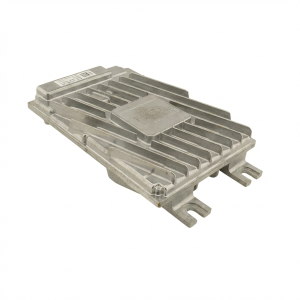
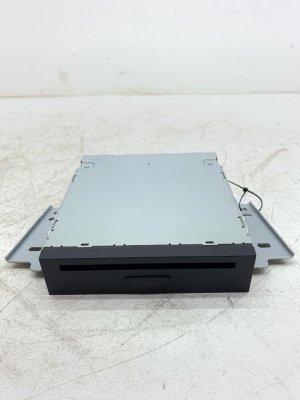
This assembly integrates the Audio Control Module (ACM) and the Accessory Protocol Interface Module (APIM) for the SYNC 3 system. It controls audio, display, navigation, and HVAC functions.
We Have This Part in Stock





The information in this article is provided for general reference and educational purposes only. Vehicle specifications, procedures, and part compatibility can vary by production date, trim level, and region. Always consult your vehicle's factory service manual and verify part numbers before purchasing or performing repairs. Safety-critical components such as airbags, seat belts, and braking systems should be installed by a qualified professional.
- Lincoln Navigator:
- 🛍️ Shop This Part
- Understanding the Navigator's Infotainment System: ACM vs. APIM
- Common Symptoms of a Failing Audio Control Module or APIM
- Known Issues, TSBs, and Recalls
- Programming and Installation Requirements
- Buying a Used Audio Control Module Assembly
- Cost Comparison for 2018 Navigator Audio Module Replacement
- Frequently Asked Questions (FAQ)
- 🎟️ Get 5% Off