

2016-2019 Honda Pilot Audio Screen Problems: The MOST Bus & Module Guide
This guide explains the common causes of popping speakers, black screens, and network errors, focusing on the MOST bus network issue and the role of the media hub module.
- The most common audio issues (popping, black screens) are caused by a known loose connection in the MOST bus network, not necessarily a failed module.
- Honda issued TSB 20-058 and a warranty extension for some model years to fix the MOST network connection issue.
- Before replacing any hardware, always perform a soft reset (hold power button) and a factory data reset to rule out software glitches.
- If you replace the main radio/display unit with a used part, you will need the anti-theft code from the donor vehicle, which can be very difficult to obtain.
Symptoms of Failure

Problems with the audio system in the 2016-2019 Honda Pilot can range from minor annoyances to complete system failure. While the media hub module can fail, many widespread symptoms are actually caused by a different, well-documented issue with the vehicle's communication network.
Most Common: Popping, Crackling, Black Screens, and 'Network Loss' Message
The most widely reported issue is a loud popping or crackling sound from the speakers, which can occur even when the audio system is turned off. This is often accompanied by the main display screen freezing, going black, or rebooting unexpectedly. You may also see a "Network Loss" message on the screen.
Cause: Honda has identified the cause of these specific symptoms as a poor connection in the Media Oriented Systems Transport (MOST) bus network. This network is like a data highway for all your audio and visual components. A loose connector anywhere in the chain can disrupt communication, leading to these errors. This is not necessarily a failure of the audio module itself, but of the connectors linking the system together. Honda released Technical Service Bulletin (TSB) 20-058 to address this by having technicians install improved FAKRA connectors and service cords.
Gradual Static or Noise That Worsens When Hot
Some owners, particularly of 2016 models, have reported a different symptom where static gradually builds in the audio over the course of a 15-30 minute drive, eventually becoming overwhelming. This happens regardless of the audio source (Radio, Bluetooth, etc.). This has been anecdotally linked to a failing cooling fan inside the main audio unit (head unit), causing components to overheat.
USB / Auxiliary Ports Not Working or Not Charging
If your primary problem is that devices connected to the USB ports are not recognized, won't charge, or Apple CarPlay/Android Auto won't launch, the Media Hub Communication Module itself is the most likely culprit. Since this module's main job is to handle those physical connections, a failure here directly impacts port functionality.
Diagnosis: Is It the Module, a Connection, or Just a Glitch?

Before spending money on parts, follow these diagnostic steps.
Step 1: Perform a System Reset
Software glitches can cause many of the same symptoms as a hardware failure. Try these two resets first:
- Soft Reset: With the vehicle running, press and hold the audio system's power/volume knob for about 5-10 seconds. The system should ask if you want to reboot. This is a simple restart and will not erase your personal settings.
- Factory Data Reset: If a soft reset doesn't work, you can perform a factory data reset. Go to Settings > System > and scroll to find 'Factory Data Reset'.
Warning: This will erase all your personal data, including saved radio presets, Bluetooth phone pairings, and navigation history.
Step 2: Check Fuses
A blown fuse can cause a total loss of power to the unit. Check the fuse boxes (both in the engine bay and inside the cabin) for any fuses related to the audio system, radio, or accessory power.
Step 3: Understanding the TSB for Popping and Cracking
If your main symptom is the popping/crackling noise, the issue is almost certainly the MOST bus connection problem. Honda issued TSB 20-058 for 2019-2021 models and a warranty extension for certain 2019-2020 Pilots to cover this repair. Even if your vehicle is older, this is the known cause. The repair involves installing updated connectors on the network wiring and is best performed by a dealer or a technician familiar with the procedure.
Buying a Used Audio Control Module (Media Hub)

If your diagnosis points to a faulty media hub (e.g., dead USB ports), a used OEM part is a cost-effective option. Here’s what you need to know.
Anti-Theft Code Warning: While the media hub itself may not require a code, if you are replacing the entire head unit (the main screen and radio assembly), you WILL need an anti-theft code. This code is tied to the VIN of the vehicle the radio came FROM, not your vehicle. Obtaining this code for a used part from a salvage yard can be very difficult, often making the replacement impossible without a trip to the dealer. Be certain which component has failed before buying parts.
- Verify the Part Number: Ensure the part number on the used module exactly matches your original. The most common part numbers are 39090-TG7-A01 and 39090-TG7-AA02. Different trim levels may use different parts, so a visual match is not enough.
- Inspect the Connectors: When you receive the part, carefully inspect all electrical connector pins. Look for any signs of corrosion (green or white powder), moisture, or physical damage. A part with damaged pins is useless.
- Why Used OEM is a Good Choice: For a component like this that is part of a complex vehicle network, a used OEM part is generally more reliable than a new aftermarket alternative (if any exist). It is designed to communicate flawlessly with the rest of your Pilot's systems.
Known Issues, TSBs, and Warranty Extension

The audio system issues in this generation of Pilot are well-documented.
- TSB 20-058: Addresses popping/crackling speakers, no sound, network loss messages, and display issues on 2019-2021 models by replacing faulty MOST bus network connectors. This is the primary fix for the most common complaints.
- Warranty Extension (21-012): For certain 2019-2020 Pilot models (All except LX), Honda extended the warranty to cover the repairs outlined in the TSB. This acknowledges the widespread nature of the MOST bus connector problem.
- Class Action Lawsuits: Multiple class-action lawsuits were filed against Honda regarding these infotainment system defects, covering symptoms like freezing, black screens, and distracting noises.
Cost Breakdown
If you need to replace the media hub module, here are the estimated costs:
| Part Type | Estimated Cost |
|---|---|
| New OEM | $250 - $370 |
| New Aftermarket | Not commonly available |
| Used OEM | $75 - $120 |
| Shop Labor | $150 - $250 |
Frequently Asked Questions (FAQ)
Why do my speakers make a loud popping noise even when the radio is off?
This is the classic symptom of a loose connection on the MOST bus network. The noise is an electrical interference/communication error, not traditional audio feedback, which is why it can happen when the system is seemingly off. The fix is typically to have the connector service procedure from TSB 20-058 performed.
Is there a recall for the audio system problems?
There is no official safety recall for this issue. However, Honda has acknowledged the problem through multiple Technical Service Bulletins (TSBs) and a warranty extension program for specific model years, which directs dealers on how to perform a free repair for eligible vehicles.
Can I fix the black screen myself?
You might be able to. Before replacing any parts, always try a soft reset by holding the audio power button for 10 seconds. If that fails, try a factory data reset through the settings menu. Sometimes these software resets can resolve freezing or black screen issues temporarily or even long-term.
Do I need to program a replacement audio module?
The simple Media Hub (with the USB ports) may not require programming, but it's possible a dealer would need to initialize it to ensure it communicates correctly with the network. However, if you replace the main head unit/radio, you will absolutely have to deal with the anti-theft code, which is linked to the donor car's VIN and can be a major obstacle.
Technical Specifications
OEM Part Numbers: 39090-TG7-A01 39090-TG7-AA02
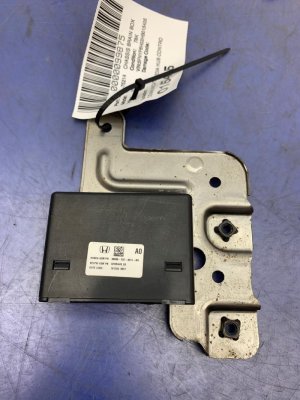
Component of the MOST (Media Oriented Systems Transport) bus network. Located in the center console media hub.
We Have This Part in Stock





The information in this article is provided for general reference and educational purposes only. Vehicle specifications, procedures, and part compatibility can vary by production date, trim level, and region. Always consult your vehicle's factory service manual and verify part numbers before purchasing or performing repairs. Safety-critical components such as airbags, seat belts, and braking systems should be installed by a qualified professional.
- Honda Pilot:
- 🛍️ Shop This Part
- Symptoms of Failure
- Most Common: Popping, Crackling, Black Screens, and 'Network Loss' Message
- Gradual Static or Noise That Worsens When Hot
- USB / Auxiliary Ports Not Working or Not Charging
- Diagnosis: Is It the Module, a Connection, or Just a Glitch?
- Step 1: Perform a System Reset
- Step 2: Check Fuses
- Step 3: Understanding the TSB for Popping and Cracking
- Buying a Used Audio Control Module (Media Hub)
- Known Issues, TSBs, and Warranty Extension
- Cost Breakdown
- Frequently Asked Questions (FAQ)
- 🎟️ Get 5% Off