

2017 Acura MDX Audio Control Module 39050-TZ5-A31: A Buyer's Guide to Failures and Compatibility
This guide details the common failures, critical compatibility checks, and replacement process for the audio control unit in the 2017 MDX with the Advance Package.
- Compatibility is extremely specific: this part only fits the 2017 MDX with Advance Package and Navigation, but NO Rear Entertainment System.
- You must match the OEM part number exactly: 39050-TZ5-A31.
- Common failure symptoms include blank screens, no audio, and unresponsive controls.
- It is unclear if dealer programming is required after installation, so budget for a potential dealer visit.
- Before replacing the part, try disconnecting the battery for 30-60 minutes to perform a system reset, which can sometimes fix software glitches.
Symptoms of a Failing Audio Control Module
A faulty audio control module in a 2017 Acura MDX can cause a range of frustrating electrical issues. Since it's the central command unit for the infotainment system, its failure often makes the entire system seem dead. Owners on forums like Acurazine have reported several common symptoms.
- Blank or Unresponsive Screens: Both the upper navigation screen and the lower touchscreen may go black or freeze, failing to respond to any input.
- No Audio Output: Complete loss of sound from all sources, including the radio (FM/AM/SiriusXM), Bluetooth, and any connected media devices.
- Unresponsive Controls: The physical knobs and buttons on the module, as well as steering wheel controls, may stop working. The volume can get stuck at a certain level and cannot be adjusted.
- Sudden "Pop" then Silence: Some owners have reported hearing a distinct "pop" sound from the speakers, immediately followed by a total loss of audio.
- Inability to Adjust Settings: Audio settings like bass, treble, balance, and fader become inaccessible or revert immediately if an adjustment is attempted.
Pro Tip: Before assuming the module has failed, try a system reboot. Disconnecting the vehicle's battery for 30 to 60 minutes can sometimes resolve temporary software glitches causing these symptoms. If the problem returns, it's more likely a hardware failure in the control module or another part of the audio system.
Known Issues, TSBs, and Recalls
As of mid-2026, there are no specific recalls or Technical Service Bulletins (TSBs) from Acura or the NHTSA that directly address the failure of the 39050-TZ5-A31 audio control module in the 2017 MDX. However, it's worth noting that Acura has issued TSBs for newer MDX models (2022-23) that exhibit similar symptoms like popping sounds and blank displays. In those cases, the issue was traced to faulty FAKRA cable connectors in the audio network. While not directly applicable, this suggests that wiring and connectors can be a weak point in the overall system and may be worth inspecting during diagnosis.
Buying a Used Audio Control Module
Purchasing a used audio control module is a cost-effective way to restore your infotainment system. However, careful verification is essential to avoid buying an incompatible part.
1. Match the Part Number Exactly
The most critical step is to match the OEM part number precisely. For this specific application, you must find a unit with part number 39050-TZ5-A31 (or 39050TZ5A31) printed on the identification label. Even modules that look identical can have different internal software or wiring designed for other trim levels.
2. Verify Vehicle Options
Warning: This is a common compatibility trap. Part number 39050-TZ5-A31 is specifically for the 2017 Acura MDX with the Advance Package and Navigation, but WITHOUT the Rear Entertainment System (RES/DVD). It will not work correctly in a base model, a Technology Package model, or any model equipped with the factory rear DVD player, as those use different audio system configurations and part numbers.
3. Physical Inspection
When buying a used module, inspect it for any signs of physical damage, such as cracks in the housing, broken connectors, or evidence of liquid spills. Since these are electronic components, moisture is a primary cause of failure. Ensure the seller offers a warranty and that the warranty sticker is intact.
Programming and Installation
A major question for buyers is whether a replacement module needs to be programmed by a dealer.
Does this module need to be programmed?
The search results are not definitive on whether this specific control switch assembly requires programming. Generally, many new Honda and Acura modules come pre-programmed from the factory. However, because this unit communicates with multiple other computers in the car, an "initialization" or "alignment" procedure with a dealer-level scan tool may be required for the vehicle to recognize the new part and enable all functions. Used part sellers often include a disclaimer that reprogramming may be necessary at the buyer's cost.
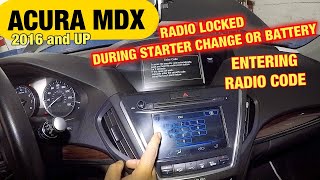
To be safe, a buyer should assume that a trip to a dealer or a specialized independent shop with Honda/Acura diagnostic software (i-HDS) might be necessary after installation. This is different from the radio's anti-theft code, which is typically required after a battery disconnect and can often be reset by the owner.
🎬 See how to enter the radio code after a battery change.Replacement Procedure
Replacing the module is a feasible DIY project for someone comfortable with removing interior trim. The estimated time is 1-2 hours.
- Disconnect the Battery: Always disconnect the negative battery terminal before working on vehicle electronics.
- Remove Trim Bezel: Using a plastic trim removal tool, carefully pry off the large trim piece that surrounds the audio control module and air vents. It is held in by clips.
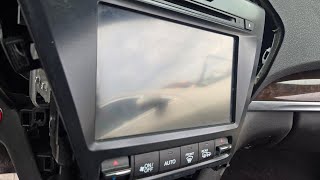
- Unplug and Remove: Once the trim is off, the audio control module is accessible. It is typically held in by several Phillips head screws. Remove the screws, pull the unit out, and disconnect the electrical connectors from the back. 🎬 Watch this video guide on removing the MDX radio screen.
- Install the New Module: Connect the electrical plugs to the replacement module, secure it with the screws, and carefully snap the trim bezel back into place.
- Reconnect Battery and Test: Reconnect the battery and test all functions of the audio and navigation system. Be prepared to enter the radio's anti-theft code if prompted.
Cost Comparison
Prices can vary based on supplier and condition. The following is an estimated breakdown:
| Part Type | Estimated Cost |
|---|---|
| New OEM | $340 - $490 |
| Used OEM | $75 - $150 |
| New Aftermarket | Not Available |
| Remanufactured | Not Commonly Available |
| Shop Labor | $150 - $300 |
Frequently Asked Questions (FAQ)
Will a used audio control module work in my 2017 MDX?
Yes, a used module can work perfectly, but only if you buy the correct part. It must be part number 39050-TZ5-A31 and must come from a 2017 MDX with the Advance package and navigation, but no rear entertainment system. Mismatched parts will likely result in malfunction.
Is dealer programming required after installing a replacement module?
It is uncertain. While some Honda/Acura modules are plug-and-play, others require an initialization procedure to be recognized by the vehicle's computer network. It is best to budget for a potential visit to a dealer or qualified independent shop to ensure full functionality, though it may not be necessary.
Can I replace this module myself?
Yes, the replacement is moderately easy for a DIYer. It involves carefully prying off the dash trim panel and removing a few screws. The main tools required are a plastic trim removal tool and a Phillips head screwdriver. The difficulty is around 2 out of 5.
My screen is blank but the radio still plays. Is this the right part?
Probably not. This module is the control interface (knobs and buttons). If the screen itself has failed but you can still hear audio and perhaps change stations with the steering wheel controls, the problem is more likely the display unit itself, the main radio tuner, or the wiring between them.
Helpful Videos
Technical Specifications
OEM Part Numbers: 39050-TZ5-A31 39050TZ5A31
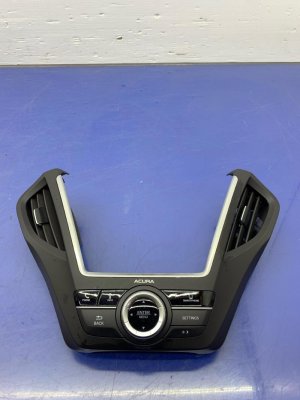
Also known as: Switch Assembly, Multi Jog (Navigation), Radio Knob Switch. Location: Center dash, below A/C controls.
We Have This Part in Stock



The information in this article is provided for general reference and educational purposes only. Vehicle specifications, procedures, and part compatibility can vary by production date, trim level, and region. Always consult your vehicle's factory service manual and verify part numbers before purchasing or performing repairs. Safety-critical components such as airbags, seat belts, and braking systems should be installed by a qualified professional.
- Acura MDX:
- 🎬 Helpful Videos
- 🛍️ Shop This Part
- Symptoms of a Failing Audio Control Module
- Known Issues, TSBs, and Recalls
- Buying a Used Audio Control Module
- 1. Match the Part Number Exactly
- 2. Verify Vehicle Options
- 3. Physical Inspection
- Programming and Installation
- Does this module need to be programmed?
- Replacement Procedure
- Cost Comparison
- Frequently Asked Questions (FAQ)
- 🎟️ Get 5% Off