

2021-2026 Tesla Model S & X Audio Amplifier: Fixing Intermittent Silence and Audio Cutouts
This guide covers the common failures, diagnosis, and replacement of the premium audio amplifier in 2021-2026 Tesla Model S and Model X vehicles.
- A replacement amplifier is NOT plug-and-play and requires a software reinstall procedure to function.
- Intermittent audio that is temporarily fixed by a system reboot is the most common symptom of a failing amplifier.
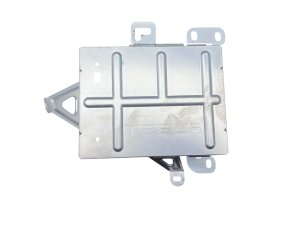
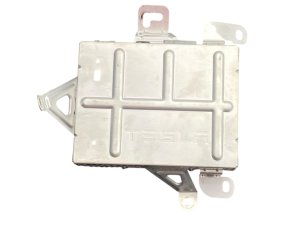
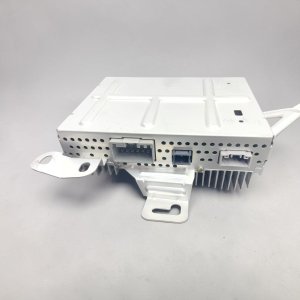
- This amplifier (part # 1490471-00-C) is only for 2021+ Model S and Model X with the 22-speaker Premium Audio system.
- Failure can also cause the microphone and turn signal sounds to stop working.
Known Issues and Failure Symptoms

The audio amplifier in the 2021-2026 Tesla Model S and Model X can fail, often leading to frustrating and intermittent audio problems. Many owners report that these issues seem to start after a vehicle software update, which can make it difficult to distinguish between a hardware failure and a software glitch.
- Partial or Total Audio Loss: The most common symptom is having sound cut out from some or all speakers. You might notice that only the front dashboard speakers are working, while the door speakers, rear speakers, and subwoofer are silent. In other cases, all audio may disappear completely.
- Intermittent Operation: A failing amplifier often works sporadically. A very common complaint is that the audio system is dead after the car has been parked and asleep overnight. Performing a system reboot by holding down both steering wheel scroll wheels often temporarily restores sound, only for the problem to return the next day.
- "Audio System UNAVAILABLE" Message: The center touchscreen may display this error message, indicating it cannot communicate with the amplifier.
- No Microphone or Turn Signal Sounds: The amplifier processes audio for more than just music. A failure can cause the microphone used for voice commands and phone calls to stop working. You may also lose the audible clicking sound for your turn signals.
- Distortion or Poor Sound Quality: Less commonly, the amplifier may produce distorted, crackling, or clipping sounds, especially at higher volumes.
Diagnosing a Faulty Amplifier

If you are experiencing the symptoms above, here are the steps to take before replacing parts:
- Perform a Touchscreen Reboot: While the vehicle is in Park, press and hold both scroll wheels on the steering wheel until the Tesla 'T' logo appears on the screen. This is the first and easiest step. 🎬 Watch this guide on fixing Tesla audio issues If audio is restored, but the problem comes back later, it strongly suggests an issue with the amplifier or its software configuration.
- Perform a Full Power Cycle: For a deeper reset, use the 'Power Off' function. Go to Controls > Safety > Power Off on your touchscreen. Remain still in the driver's seat and do not touch the brake pedal or doors for at least three minutes. This allows all vehicle systems to fully shut down. Press the brake pedal to power the car back on.
- Check Audio Settings: It's rare, but check that the balance and fader controls haven't been accidentally moved all the way to one corner, which would make it seem like some speakers aren't working.
If these steps provide only a temporary fix, the amplifier hardware is the most likely culprit.
Warning: This amplifier is ONLY for 2021-2026 Model S and Model X vehicles equipped with the 22-speaker Premium Audio system. It is not compatible with earlier models or vehicles with the standard audio system.
Buying a Used Audio Amplifier

A used OEM amplifier can be a cost-effective solution, but there are critical factors to consider before you buy.
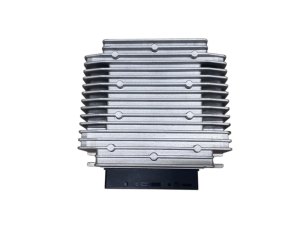
- Verify the Part Number: Ensure the part you are buying is 1490471-00-C. While other part numbers may look similar, only this exact number is correct for this application.
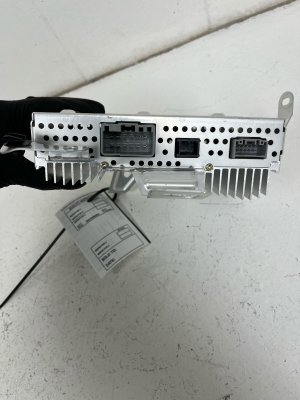
- Physical Inspection: When you receive the part, inspect the three large electrical connectors. Look for any bent pins, corrosion, or signs of damage. The aluminum casing should be free of cracks or major dents.
- Software Reinstall is Required: This is the most important consideration. A used amplifier is not plug-and-play. After physical installation, the vehicle's software must be reinstalled or reconfigured to recognize the new hardware. Without this step, the amplifier will not function correctly. You may be able to perform this yourself through the car's Service Mode, 🎬 Watch how to perform a Tesla software reinstall yourself but many owners will need to visit a Tesla Service Center or a qualified independent shop with Tesla diagnostic software (Toolbox 3) to complete the job.
- Source and Warranty: Purchase from a reputable seller that offers a warranty. This protects you in case you receive a defective unit. Given the electronic nature of the part, a 30-day or longer warranty is recommended.
Replacement Overview
Physically replacing the amplifier is a straightforward job for a DIY mechanic. The main challenge is removing the interior trim panels without causing damage. The amplifier is located in the right-hand side of the trunk in both the Model S and Model X.
Location:
- 2021-2026 Model S: Behind the right-side trunk liner. Access requires removing the trunk floor, lower C-pillar trim, and the main RH trunk side trim.
- 2021-2026 Model X: Also behind the right-side trunk liner. Access requires removing the trunk load floor, sill trim, and pulling back the carpeted side panel.
General Steps:
- Disconnect the low-voltage (LV) battery. This is a critical safety step.
- Remove the necessary trunk floor and plastic trim panels to access the amplifier.
- Disconnect the three electrical connectors from the amplifier.
- Remove the two nuts and one bolt (typically 10mm) securing the amplifier to its bracket.
- Install the replacement amplifier and reconnect everything in the reverse order.
- Perform the software reinstall procedure as mentioned above.
Pro Tip: The nuts used to secure the amplifier are nyloc (nylon-locking) nuts and Tesla recommends replacing them with new ones upon installation to ensure they do not vibrate loose. The torque spec is very light at 5.4 Nm (4.0 lb-ft).
Cost Comparison
| Part Type | Estimated Cost |
|---|---|
| New OEM (from Tesla Service) | $700 - $1,100 (estimate) |
| New Aftermarket | Not Available |
| Used OEM | $250 - $500 |
| Shop Labor (Replacement & Programming) | $150 - $350 |
Frequently Asked Questions (FAQ)
Does a replacement Tesla audio amplifier need to be programmed?
Yes, absolutely. After installing a new or used amplifier, the vehicle's software must be reinstalled for the car to recognize and configure the new component. This is not a plug-and-play part. Failure to perform this step will result in the amplifier not working correctly.
Can I install a used amplifier myself?
The physical installation is straightforward for someone comfortable with removing interior trim panels. However, you must be prepared to handle the final software reinstall step, which may require a visit to a Tesla-aware repair shop if you cannot complete it through the vehicle's on-screen Service Mode.
Where is the amplifier located on my 2022 Model S or Model X?
The amplifier is located in the trunk, behind the trim panel on the right-hand (passenger) side of the vehicle for both the Model S and Model X.
Will this amplifier fix the problem of my audio cutting out after the car sleeps?
This is a classic symptom of a failing amplifier in these vehicles. While a software glitch can cause similar behavior, if reboots only provide a temporary fix, a hardware failure in the amplifier is the most likely cause, and replacement should provide a permanent solution.
Helpful Videos
Technical Specifications
OEM Part Numbers: 1490471-00-C
For 22-speaker, 960-watt Premium Audio System.
We Have This Part in Stock


The information in this article is provided for general reference and educational purposes only. Vehicle specifications, procedures, and part compatibility can vary by production date, trim level, and region. Always consult your vehicle's factory service manual and verify part numbers before purchasing or performing repairs. Safety-critical components such as airbags, seat belts, and braking systems should be installed by a qualified professional.
- Tesla S:
- Tesla X: