

2012-2014 Hyundai Azera Amplifier: Fixing No Sound from the Infinity System
Your guide to diagnosing and replacing the factory Infinity audio amplifier, and ensuring you get the right part without a trip to the dealer.
- This amplifier is only for 2012-2014 Azera models with the premium Infinity sound system; it will not work in a base model.
- Failure typically causes a complete loss of sound or loud popping noises; always check fuses and perform a battery 'hard reset' first.
- Replacement is plug-and-play and does NOT require programming by a dealer or locksmith.
- To ensure compatibility, match the part number on your original amplifier (e.g., 96370-3V200, 96370-3V201, 96370-3V202).
Symptoms of a Failing Amplifier
When the factory amplifier begins to fail, it can cause a range of audio problems. While some issues can be intermittent at first, they typically worsen over time, leading to a complete loss of sound. Here are the most common signs of a bad amplifier in your Azera:
- Complete Loss of Sound: The most frequent symptom is no audio from any speaker, even though the radio head unit appears to be working perfectly. This includes AM/FM radio, satellite radio, CD, and Bluetooth audio.
- Loud Popping or Crackling: A loud pop or crackle from the speakers upon startup or shutdown, or intermittently while driving, can indicate failing internal components in the amplifier.
- Distorted or Muffled Audio: If the sound from all speakers is fuzzy, distorted, or unclear even at low volumes, the amplifier may be failing to regulate power correctly.
- Sound Cutting In and Out: The audio may work for a while and then suddenly cut out, sometimes returning after the car has been turned off and on again. This can be related to the amplifier overheating or having a poor electrical connection.
- Loss of Specific Channels: You might lose sound from a specific group of speakers, such as the front, rear, or the subwoofer, while others continue to work.
Pro Tip: Before assuming the amplifier is bad, perform a 'hard reset'. Disconnect the vehicle's negative battery terminal for 15 minutes, then reconnect it. Sometimes, a software glitch can cause a total loss of sound, and this simple procedure can restore it without needing any parts.
Diagnosing the Issue
If a hard reset doesn't solve the problem, you can perform a few checks before replacing the amplifier:
- Check the Fuses: Verify the fuses related to the audio system. The Azera has fuse panels in the engine bay and inside the cabin. A blown fuse is a simple fix that can cause the amplifier to lose power.
- Inspect the Amplifier: The amplifier is located in the trunk on the right (passenger) side, behind the carpeted liner. Pull back the liner to access it. Check for any signs of water damage or corrosion on the unit and its electrical connectors. Water leaks in the trunk are a common cause of electronic module failure.
- Verify Power and Ground: Using a multimeter, you can check for 12V power at the amplifier's main power wire and ensure it has a solid ground connection. A bad ground is a frequent cause of many amplifier problems.
Buying a Used Audio Amplifier
Warning: This amplifier is ONLY compatible with 2012-2014 Hyundai Azera models factory-equipped with the premium Infinity/JBL sound system. It will not work as an upgrade for a base model vehicle, as the wiring, speakers, and head unit are all different.
When purchasing a used amplifier, careful verification is crucial to ensure it works correctly in your vehicle. A used OEM unit is often the best choice, as direct-fit aftermarket replacements are not readily available, and installing a universal amplifier requires extensive and costly rewiring.
- Match the Part Number: This is the most critical step. Hyundai used several part numbers for this amplifier, which are considered revisions: 96370-3V200, 96370-3V201, and 96370-3V202. While the later revisions likely supersede the earlier ones, the safest approach is to buy a replacement with the exact same part number as your original unit to guarantee compatibility.
- Inspect for Damage: When buying online, carefully review photos. Look for any signs of corrosion on the aluminum casing or the connector pins, which indicates water damage. Avoid units with dented cases or signs that they have been opened.
- Verify the Source: Purchase from a reputable seller that offers a warranty and has good feedback. This provides protection in case the part is defective.
Replacement and Programming
Replacing the amplifier is a straightforward process that can be done with basic hand tools.
Location: The amplifier is mounted to a bracket on the passenger side of the trunk, behind the trunk liner.
🎬 Watch: How to remove the factory amplifierInstallation Steps:
- Disconnect the negative battery terminal.
- Remove the plastic trunk floor and any cargo nets or trays.
- Carefully pull back the carpeted trunk liner on the passenger side to expose the amplifier. You may need to remove a few plastic clips or a tie-down hook.
- Unbolt the three nuts holding the amplifier bracket to the vehicle body.
- Disconnect the two large electrical connectors from the amplifier. Each has a release trigger that needs to be pressed.
- Install the replacement amplifier by reversing these steps. The connectors are keyed and will only fit in their correct spots.
Does the amplifier need to be programmed?
No, dealer programming is not required. As long as you use a compatible OEM amplifier for the Infinity system, the unit is plug-and-play. It does not need to be coded to the vehicle's VIN. Some sellers may incorrectly state that programming is needed, but this is generally not the case for this specific component.
Known Issues, Recalls & TSBs
There are no specific recalls or Technical Service Bulletins (TSBs) from Hyundai that directly address widespread failure of the audio amplifier for the 2012-2014 Azera. However, a broader recall (NHTSA Campaign #23V651000) was issued for many Hyundai models, including the 2012-2015 Azera, for a potential electrical short in the ABS module that could lead to a fire. While unrelated to the audio system, it's crucial to ensure this recall repair has been performed on your vehicle.
Cost of Replacement
The cost to replace the Azera's Infinity amplifier can vary significantly depending on the source of the part.
| Part Type | Estimated Cost |
|---|---|
| New OEM | $1,100 - $1,650 |
| Used OEM | $80 - $250 |
| Remanufactured | $175 - $300 |
| Shop Labor | $100 - $180 |
Frequently Asked Questions (FAQ)
Will a used amplifier from another Hyundai model work?
No. The amplifier is specifically tuned for the Azera's speaker configuration and cabin acoustics. You must use an amplifier from a 2012-2014 Azera with the Infinity sound system.
Is it difficult to replace the amplifier myself?
No, it is a relatively easy DIY job. It involves removing some trunk trim panels and unbolting the amplifier. The entire process typically takes less than an hour and requires only basic hand tools.
Can I just install an aftermarket amplifier instead?
While possible, it is not recommended for most owners. The factory system uses a complex, multi-channel setup. Integrating a standard aftermarket amplifier would require extensive, custom wiring and bypassing the factory digital signal processing, which could result in poor sound quality if not done by an expert. A plug-and-play used OEM unit is a much simpler and more reliable solution.
My radio screen is black. Is that the amplifier?
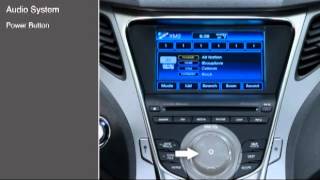
No. The amplifier's function is to produce sound. If the radio display itself is not turning on, the problem lies with the head unit, a fuse, or a wiring issue related to the head unit, not the amplifier in the trunk.
Helpful Videos
Technical Specifications
OEM Part Numbers: 96370-3V200 96370-3V201 96370-3V202 963703V200 963703V201 963703V202
For the 550-watt Infinity Logic 7 premium sound system with 14 speakers.
We Have This Part in Stock



The information in this article is provided for general reference and educational purposes only. Vehicle specifications, procedures, and part compatibility can vary by production date, trim level, and region. Always consult your vehicle's factory service manual and verify part numbers before purchasing or performing repairs. Safety-critical components such as airbags, seat belts, and braking systems should be installed by a qualified professional.
- Hyundai Azera: