

2018-2020 Genesis G80 Lexicon Amplifier: Fixing No-Sound Issues & Replacement Programming
This guide covers common failure symptoms, replacement costs, and the critical programming steps for the Lexicon premium audio amplifier in the 2018-2020 Genesis G80.
- This amplifier (part 96370-B1550) is only for G80s with the Lexicon premium sound system; it will not work with the standard system.
- A replacement amplifier, even a used OEM unit, will likely require programming ('variant coding') by a Genesis dealer to function correctly.
- Before replacing the amp, try simple software resets: use the pinhole reset on the dash, try the 'MOST Reset' in the engineering menu, or disconnect the battery for 15 minutes.
- Common failure symptoms include total silence, intermittent audio, popping noises, or sound from only some speakers.
Symptoms of a Failing G80 Audio Amplifier
When the Lexicon amplifier in a Genesis G80 begins to fail, the symptoms can range from intermittent annoyances to a complete loss of audio. Because the unit is digital and integrated into the vehicle's network, issues are not always straightforward hardware failures.
- Complete Loss of Sound: The most common symptom is a sudden and total silence from all speakers. The infotainment screen may still work perfectly, showing that a song is playing or a radio station is tuned in, but no audio is produced. This can be caused by an internal amplifier fault or a software glitch.
- Intermittent Audio: Sound may cut in and out randomly. This can happen when the vehicle hits a bump, suggesting a loose connection, or it can occur without any physical trigger, pointing towards an internal electronic issue or a system glitch.
- Popping, Cracking, or Static Noises: Unwanted noises from the speakers that are not related to the audio source often indicate a problem with the amplifier's internal components or a poor ground connection.
- Sound from Only Some Speakers: One or more speaker channels may go dead, resulting in an unbalanced sound stage. For example, you might lose all sound from the driver's side of the car.
- Poor or Degraded Sound Quality: A noticeable drop in audio fidelity, where the sound becomes "muddy" or lacks bass, can be a sign of the amplifier failing, although some owners report this as a subjective complaint even with a working system.
- Infotainment System Glitches: In some cases, a failing amplifier on the MOST network can cause the main infotainment system to freeze, lag, or reboot.
Diagnosing the Issue: Simple Fixes to Try First
Before assuming the amplifier is dead, perform these simple diagnostic steps. Many audio issues on the G80 are caused by software glitches that can be resolved with a reset.
- Check Fuses: Consult your owner's manual to locate the fuses for the audio system and amplifier. A blown fuse is a simple fix that can cause a total loss of sound.
- Perform an Infotainment System Reset: With the vehicle on, use a pen or paperclip to press the small, recessed reset button near the CD slot or volume knob. This reboots the head unit and can clear temporary software errors.
- Try a MOST Network Reset: Some owners have had success restoring sound by accessing the vehicle's hidden engineering menu. Go to Setup > System Info, then press and hold the center of the screen for about 5-10 seconds. In the diagnostic menu (password may be 5173), find and select "MOST Reset". This forces all modules on the fiber-optic audio network to re-synchronize.
- Perform a Hard Reset: If other resets fail, a hard reset of the vehicle's electronics may work. Disconnect the negative terminal of the 12V battery, wait for 15 minutes, and then reconnect it. This clears the memory of all modules, including the amplifier, and can resolve stubborn software freezes.
If none of these steps restore sound, the amplifier itself is likely the problem. A professional technician would next check for power, ground, and communication signals at the amplifier's connectors in the trunk.
Compatibility Warning: This amplifier, part number 96370-B1550, is ONLY for 2018-2020 Genesis G80 models equipped with the upgraded Lexicon premium audio system. It will not work in a vehicle with the standard sound system, which uses a different amplifier (part number 96370-B1010). Verify your vehicle has the Lexicon system (often indicated by logos on the speaker grilles) before purchasing.
Replacement and Programming Requirements
The amplifier is located in the trunk on the driver's side, behind the carpeted trim panel. Physical replacement involves removing the trunk floor and side panel, disconnecting three main wiring harnesses, and unbolting the amplifier from its bracket. The physical swap is straightforward and takes 1-2 hours.
Programming May Be Required: Replacing the amplifier is not always a simple plug-and-play procedure. The audio components in the Genesis G80 are linked together, and the main system needs to be configured to recognize the specific amplifier installed. This process is called "variant coding" and requires a dealer-level diagnostic tool like the Genesis GDS (Global Diagnostic System). A used amplifier may not function correctly—or at all—until this coding is performed by a Genesis dealership or a specialized independent shop with the proper equipment. This is similar to "Component Protection" used by other brands to prevent theft and ensure module compatibility.
Buying a Used 2018-2020 G80 Amplifier
Given the high cost of a new OEM amplifier, a used unit from a reputable recycler is an excellent value. However, due to the complexity of the part, careful purchasing is key.
- Verify the Part Number: The most critical step is to match the part number exactly. You are looking for part number 96370-B1550 (or 96370B1550). Do not purchase an amplifier with a different number, even if it looks identical.
- Inspect for Damage: When the part arrives, inspect the casing for any signs of physical damage, like cracks or dents from an accident. Pay close attention to the electrical connectors; the pins should be straight, clean, and free of any corrosion, which would indicate water damage.
- Buy from a Trusted Source: Purchase from an established auto recycler that tests electronics and offers a warranty. A 30-day or longer warranty gives you time to have the part installed and, if necessary, programmed to confirm it is fully functional.
- Factor in Programming Costs: When buying a used amplifier, assume you will need to pay for programming. Contact your local Genesis dealer or a trusted import repair shop beforehand to ask about their policy and cost for "variant coding" a used audio module.
Cost Comparison
The cost to replace the Lexicon amplifier can vary significantly depending on the source of the part.
| Part Type | Estimated Cost |
|---|---|
| New OEM | $2,000 - $2,500 |
| Used OEM | $200 - $500 |
| New Aftermarket | Not Available |
| Shop Labor (Installation & Programming) | $200 - $400 |
Frequently Asked Questions (FAQ)
Do I absolutely have to get a replacement amplifier programmed by the dealer?
It is highly recommended and may be required. While some used amplifiers might work partially upon installation, full functionality (including all speaker channels, surround sound, and proper equalization) often requires "variant coding" using the dealer's GDS diagnostic tool. This procedure ensures the car's head unit correctly identifies and communicates with the replacement amplifier. You should budget for a dealer visit when planning the repair.
Where is the amplifier located in the 2018-2020 Genesis G80?
The Lexicon audio amplifier is located in the trunk, mounted behind the carpeted trim panel on the driver's side (left-hand side) of the vehicle.
Can I use an amplifier from a different Genesis model or year?
No, you must match the part number 96370-B1550 exactly. Amplifiers from other models or even different trim levels of the G80 (like the standard audio system) will not be compatible due to differences in software, wiring, and the number of speaker channels they are designed to drive.
Can I replace the factory Lexicon amplifier with a standard aftermarket amp?
This is not a practical option for most people. The factory system uses a proprietary fiber-optic MOST network to send a digital audio signal and control commands from the head unit to the amplifier. Bypassing this requires expensive and complex digital signal processors (DSPs) and custom wiring to integrate an aftermarket amp, a job best left to high-end car audio specialists.
Technical Specifications
OEM Part Numbers: 96370-B1550 96370B1550
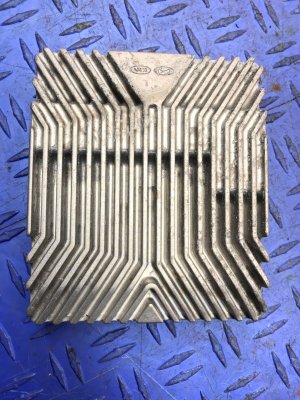
For Lexicon 17-speaker premium audio system. Communicates via MOST fiber-optic network.
We Have This Part in Stock





The information in this article is provided for general reference and educational purposes only. Vehicle specifications, procedures, and part compatibility can vary by production date, trim level, and region. Always consult your vehicle's factory service manual and verify part numbers before purchasing or performing repairs. Safety-critical components such as airbags, seat belts, and braking systems should be installed by a qualified professional.
- Genesis G80: