

2021-2023 Mach-E Amplifier Failure: Solving No Sound, Popping, and B&O Audio Issues
A complete guide to diagnosing audio problems in the Ford Mustang Mach-E, from simple resets to understanding the critical programming required for amplifier replacement.
- A replacement amplifier is NOT plug-and-play; it absolutely requires programming by a Ford dealer or qualified shop with FDRS software.
- Many audio issues, like 'no sound,' are caused by software glitches. Try a SYNC reboot and a 12V battery disconnect before replacing parts.
- Ford issued Technical Service Bulletins (TSBs) for audio loss on early models, with the fix being a software update to the amplifier (DSP) module.
- You must match the part number and ensure the replacement amplifier is for your specific sound system (Standard or B&O).
Known Issues and Technical Service Bulletins (TSBs)

Many audio problems in the 2021-2023 Mustang Mach-E are related to software, not a physical hardware failure. Early production 2021 models were particularly susceptible to glitches that could cause a complete loss of sound.
- SSM 49737 & SSM 50739: Ford issued these Special Service Messages for 2021 Mach-E vehicles (and other models) that may suddenly have no audio. The symptoms include no sound from any source, and vehicle warning chimes defaulting to a small speaker in the instrument cluster instead of the main audio system. The cause was identified as a software issue within the DSP (amplifier). The initial fix is a hard reset by disconnecting the 12V battery, but the permanent solution requires a dealer to reprogram the DSP module with updated software.
- Program 24U14: For certain 2024 models, Ford created this program to address a similar loss of audio, sometimes showing an "Audio off" message on the screen. This also requires an ACM software update at the dealer.
- Low 12V Battery Issues: A weak or dying 12-volt battery can cause a variety of electronic issues in the Mach-E, including audio problems. Owners report loud "thumping" or popping from the speakers on startup when the 12V battery is low, as the amplifier gets stuck in a boot loop without enough power.
Pro Tip: Before assuming the amplifier has failed, perform a SYNC system reboot by pressing and holding the steering wheel's 'Volume Down' and 'Next Track' buttons for about 10 seconds until the screen restarts. If that doesn't work, a 12-volt battery disconnect for a few minutes can often resolve temporary software glitches. If the problem persists, a dealer visit for a software update is likely necessary.
Symptoms of a Failing Audio Amplifier


A failing Mach-E amplifier can manifest in several ways, ranging from intermittent annoyances to complete silence.
- Complete Loss of Sound: The most common symptom is a sudden and total lack of audio from all sources (radio, CarPlay, Bluetooth). The volume control may become unresponsive.
- Loud Pop or Thump on Startup/Shutdown: A loud, sharp "THUNK" or pop from the speakers can occur when the vehicle is turned on or off, often followed by no audio. This can be related to software or a low 12V battery.
- Distorted or "Tinny" Audio: Sound may become thin, with no bass, as if it's only playing through the small center-dash speaker. This suggests the main DSP is not activating correctly.
- Intermittent Audio Cut-Outs: The sound may cut out for a few seconds at a time and then return, sometimes at a different volume level.
- Warning Chimes from Instrument Cluster: When the main amplifier fails to initialize, the vehicle reroutes critical warning sounds (like seatbelt reminders) through a backup speaker in the instrument panel.
- Diagnostic Trouble Codes (DTCs): A scan tool may reveal codes indicating a loss of communication with the audio modules. Common codes include U0237, U0238, U1084, U0184-00, and U1A00-87. An incompatible configuration code, U2101, may appear if a replacement module is not programmed.
Variant Differences: Standard vs. B&O Sound System

It is critical to identify which sound system your Mach-E is equipped with before purchasing a replacement amplifier, as they are not interchangeable.
- Standard System: Found on base Select trims, this system uses 6 speakers and a less complex amplifier configuration.
- B&O (Bang & Olufsen) System: Standard on Premium, California Route 1, and GT trims, this is a 10-speaker system that includes a prominent soundbar integrated into the dashboard and a subwoofer. The amplifier for the B&O system is specifically programmed for this speaker setup. Many used amplifiers will be listed with "B&O" in the description.
Warning: Always verify the part number on your original amplifier before ordering a replacement. The two systems use different programming and potentially different hardware. Installing the wrong amplifier will result in improper function or no sound at all.
Buying a Used Audio Amplifier
Purchasing a used OEM amplifier is a cost-effective solution, but careful verification is essential due to the electronic nature of the part.
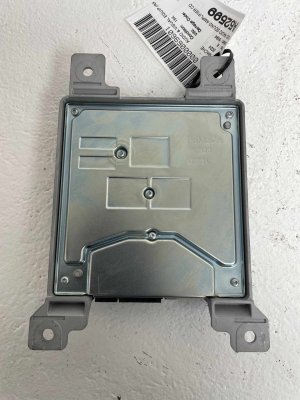
- Verify the Part Number: The most important step. Your replacement module must have the exact same OEM part number as the original. The primary service part number is LJ8Z-18B849-B, which supersedes engineering numbers like LJ8T-18T806-AE, LJ8T-18T806-AG, LJ8T-18T806-AN, etc. The suffix letters (AE, AF, AG) indicate revisions, but matching the main number is key.
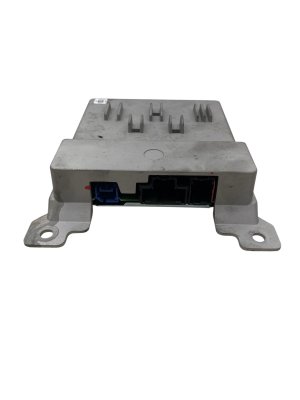
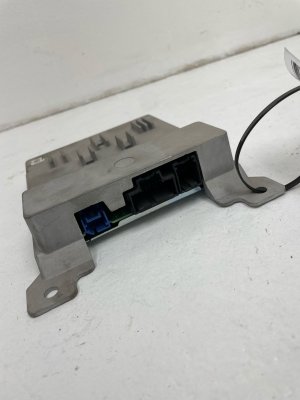
- Inspect for Damage: Check the casing for any signs of physical damage or corrosion. Pay close attention to the electrical connectors for any bent, broken, or corroded pins. Water intrusion is a potential, though not widely reported, cause of failure for any electronic module.
- Budget for Programming: A used amplifier is not a plug-and-play part. It must be professionally programmed to your vehicle's VIN and specific options. Factor in the cost of a visit to a Ford dealer or a well-equipped independent shop.
- Why Used OEM is the Best Choice: For a complex, vehicle-specific module like this, a used OEM part is superior to non-existent aftermarket alternatives. It guarantees the correct hardware and fitment. While aftermarket interfaces like the PAC AP4-FD31 exist for installing custom stereo systems, they are not direct replacements for a failed factory amplifier.
Programming and Calibration Requirements
CRITICAL: A replacement audio amplifier MUST be programmed to your vehicle. The vehicle will not recognize an unprogrammed module, resulting in no audio and potential communication error codes.
- What is Programming?: Programming, sometimes called Programmable Module Installation (PMI), involves using specialized software to load the vehicle's specific configuration data (the "As-Built" data) into the new module. This tells the amplifier whether the car has the B&O system, configures the audio equalization for the cabin, and links it to the vehicle's VIN.
- Who Can Program It?: This procedure requires Ford's official diagnostic software, the Ford Diagnostic and Repair System (FDRS). This means programming must be done by a Ford dealership or an independent repair shop that has a subscription and the proper J2534 interface tool. This is not a DIY-friendly task for the average owner.
- OTA Updates vs. Dealer Programming: While the Mach-E receives many Over-the-Air (OTA) software updates, the Audio Control Module (ACM) and DSP are two of the modules that typically cannot be updated or configured remotely and require a physical connection to FDRS at a service center.
Cost Comparison
Replacing the audio amplifier involves the cost of the part and the labor for installation and programming.
| Part Type | Estimated Cost |
|---|---|
| New OEM | $370 - $450 |
| Used OEM | $150 - $250 |
| Aftermarket / Remanufactured | Not Available |
| Shop Labor (Install & Program) | $250 - $550 |
Frequently Asked Questions (FAQ)
Does a replacement 2021-2023 Mach-E amplifier need to be programmed?
Yes, absolutely. It is not a plug-and-play part. The amplifier must be programmed to your vehicle's VIN and audio system configuration using Ford's FDRS software by a dealer or qualified technician.
Can I program a new or used amplifier myself?
For the average DIY mechanic, this is not feasible. It requires a paid subscription to Ford's FDRS software ($50 for a 2-day license), a compatible J2534 pass-thru device (which can cost several hundred dollars), a Windows laptop, and a stable automotive power supply to maintain battery voltage during programming. The risk of bricking the module or other vehicle systems is high if not performed correctly.
Where is the audio amplifier located in the Mustang Mach-E?
The main audio amplifier (DSP) is located in the rear cargo area, behind the trim panel on the passenger side.
Is a "no sound" problem always a bad amplifier?
No. Often, the issue is a software glitch that can be temporarily fixed by rebooting the SYNC screen or disconnecting the 12V battery for a few minutes. If the problem persists, it could be a software issue requiring a dealer update before the hardware is condemned. A low 12V battery can also cause audio system malfunctions.
Technical Specifications
OEM Part Numbers: LJ8T18T806AE LJ8T18T806AF LJ8T18T806AG LJ8T18T806AH LJ8T18T806AJ LJ8T18T806AK LJ8T18T806AL LJ8T18T806AN LJ8Z18B849B
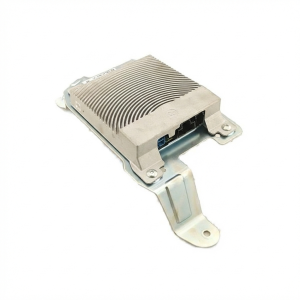
Digital Signal Processor (DSP) and Amplifier. Location: Passenger side of rear cargo area. System Variants: Standard 6-speaker or Premium 10-speaker B&O (Bang & Olufsen). Programming Required: Yes, via Ford Diagnostic and Repair System (FDRS).
We Have This Part in Stock


The information in this article is provided for general reference and educational purposes only. Vehicle specifications, procedures, and part compatibility can vary by production date, trim level, and region. Always consult your vehicle's factory service manual and verify part numbers before purchasing or performing repairs. Safety-critical components such as airbags, seat belts, and braking systems should be installed by a qualified professional.
- Ford Mustang Mach-E: