

2017-2018 Chrysler Pacifica Harman Kardon Amplifier: No Sound, Diagnosis, and Replacement Guide
This guide covers the common failure symptoms of the premium Harman Kardon audio amplifier in the 2017-2018 Chrysler Pacifica and explains the critical programming required for a replacement.
- This amplifier is only for the premium Harman Kardon audio system; it is not compatible with base or Alpine systems.
- A replacement amplifier, whether new or used, MUST be programmed to the vehicle by a dealer or a qualified shop with advanced diagnostic tools.
- The most common symptom of failure is a complete loss of sound, often accompanied by the diagnostic code U0186 (Lost Communication with Audio Amplifier).
- Before replacing the amplifier, always check the 25-amp F9 fuse in the under-hood fuse box.
Symptoms of a Failing 2017-2018 Pacifica Amplifier
When the Harman Kardon amplifier begins to fail, the symptoms are usually obvious and directly impact the audio system's performance. Because the amplifier is a smart module on the vehicle's data network, a failure can sometimes cause seemingly unrelated electronic issues.
- Complete Loss of Sound: The most common symptom is a sudden and total silence from all speakers. The Uconnect screen may look normal and show that music is playing, but no audio is produced.
- Intermittent Audio: The sound may cut in and out randomly. It might work correctly for a short time after starting the vehicle and then suddenly go silent.
- Popping or Crackling Noises: Loud pops or static from the speakers, even when the volume is low, can indicate an internal failure in the amplifier.
- Uconnect System Appears Muted: The radio controls may appear to function, but the system is stuck on mute, and the volume knob has no effect.
- Diagnostic Trouble Code (DTC) U0186: A professional scan tool will often find the code U0186, which means "Lost Communication With Audio Amplifier." This code is stored in other modules (like the radio or body control module) when they can no longer detect the amplifier on the network.
- Parasitic Battery Drain: In some cases, a faulty amplifier may not shut down correctly when the vehicle is turned off, leading to a slow drain on the battery. If you experience a dead battery along with audio problems, the amplifier is a possible cause.
Pro Tip: Before assuming the amplifier is bad, check the F9 (25A) fuse in the under-hood fuse box. This fuse provides power to the amplifier, and a simple blown fuse can cause a total loss of sound.
Known Issues, TSBs, and Recalls
While there are no specific recalls for the Harman Kardon amplifier on the 2017-2018 Pacifica, Chrysler has issued Technical Service Bulletins (TSBs) for similar issues on other vehicles. TSB 08-020-14, for example, addresses a "no audio" condition with a U0186 code on other models, which is fixed by a software update to the amplifier. This indicates that sometimes the problem is software-related rather than a complete hardware failure. Numerous Uconnect software updates have also been released to fix various glitches, which can sometimes be mistaken for an amplifier problem.
Compatibility Warning: This amplifier is ONLY for vehicles factory-equipped with the 20-speaker Harman Kardon premium audio system. It will not work as an upgrade or replacement for the standard 6-speaker base audio system or the 13-speaker Alpine system. Before purchasing, verify your vehicle's original sound system. You can typically find Harman Kardon logos on the speaker grilles in the doors or on the dashboard.
Critical: Amplifier Programming and Installation
Replacing the audio amplifier in a 2017-2018 Pacifica is not a simple plug-and-play job. The amplifier is a networked computer that is tied to the vehicle's Vehicle Identification Number (VIN) and its specific set of features.
Why Programming is Required
A replacement amplifier, whether new or used, must be electronically configured to the vehicle. This process, often called "programming" or "flashing," ensures the amplifier can communicate correctly with the Uconnect head unit and other modules on the CAN bus. Without proper programming, a replacement amplifier will not work, and you will continue to have no sound.
Who Can Program the Amplifier?
- Chrysler/Dodge/Jeep/Ram Dealerships: Dealers have the proprietary wiTECH diagnostic tool and software subscription required to perform the programming. This is the most reliable but often most expensive option.
- Qualified Independent Shops: Some independent repair shops that specialize in automotive electronics may have advanced, professional-grade scan tools (like Autel or Snap-on) with J2534 pass-thru capabilities or software like AlfaOBD. These tools can sometimes perform the same programming as the dealer. Always confirm with the shop that they have the specific capability for a Chrysler amplifier replacement before having the work done.
The programming process involves installing the correct software onto the module and then running a "Proxy Configuration Alignment" to sync it with the rest of the vehicle's modules.
Buying a Used 2017-2018 Pacifica Audio Amplifier
A used OEM amplifier is an excellent, cost-effective alternative to a brand-new part, especially since there are no direct-fit aftermarket replacements available. Here’s what to look for when buying a used unit.
- Verify Your System First: Before you even start shopping, confirm you have the Harman Kardon system. Check for the brand logo on the speaker grilles. Do not buy this part if you have the base or Alpine audio system.
- Match the Part Number (Supersession): The original part numbers for this amplifier have been updated over time. The numbers are interchangeable as long as the replacement is programmed. The latest part number is generally the best choice as it may contain internal revisions.
- 68207344AF
- 68207344AG
- 68207344AH
- 68207344AI (latest known version)
- Physical Inspection: When you receive the used part, inspect the housing for dents or signs of being opened. Most importantly, check the electrical connector pins for any signs of corrosion (green or white crust). Corrosion indicates potential water damage, and the part should be avoided.
- Source from a Reputable Seller: Purchase from a seller that offers a warranty and a clear return policy. This protects you in case the part is defective.
Amplifier Location and Replacement Overview
In the 2017-2018 Chrysler Pacifica, the audio amplifier is typically located behind the glove box on the passenger side of the dashboard. Accessing it requires removing the glove box assembly.
The general steps are:
- Disconnect the vehicle's battery.
- Open the glove box and remove the screws securing it to the dashboard. There are usually screws along the top, bottom, and sides.
- Carefully pull the glove box assembly out. You may need to disconnect a wire for the glove box light.
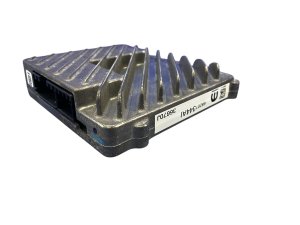
- The amplifier is a metal, finned box mounted behind where the glove box was. Unbolt it from its bracket.
- Disconnect the electrical connectors and remove the amplifier.
- Installation is the reverse of removal. After the new part is installed, the vehicle must be taken for programming.
Cost Breakdown
The cost to replace the amplifier can vary significantly based on the price of the part and labor rates. Remember, programming is a mandatory part of the labor cost.
| Item | Estimated Cost |
|---|---|
| New OEM Amplifier | $240 - $300 |
| Used OEM Amplifier | $150 - $250 |
| Shop Labor (Physical Install) | $125 - $200 (approx. 1-1.5 hours) |
| Shop Labor (Programming) | $250 - $400 |
| Total Estimated Cost (Used Part) | $525 - $850 |
| Total Estimated Cost (New Part) | $615 - $900 |
Note: Prices are estimates and will vary by location and supplier. There are no known new aftermarket or remanufactured options for this specific amplifier.
Frequently Asked Questions (FAQ)
Do I absolutely have to program a replacement amplifier?
Yes. Programming is not optional. The amplifier is a computer on the vehicle's network and it will not function until it is configured for your specific vehicle's VIN and options. An unprogrammed amplifier will not produce sound.
How do I know for sure if I have the Harman Kardon system?
The easiest way is to look for the 'Harman Kardon' logo on the speaker grilles on the front doors or the center speaker on the dashboard. You can also use a VIN decoder or contact a Chrysler dealer to get the original build sheet for your vehicle, which will list the audio system installed at the factory.
Can I install an aftermarket amplifier instead of the OEM one?
No, not directly. The factory system uses a proprietary digital audio bus signal that is not compatible with standard aftermarket amplifiers. Replacing the entire system (head unit, amp, and wiring) is possible but is a complex and expensive job requiring specialized adapters to retain features like steering wheel controls and vehicle settings.
My sound is gone but I don't have the U0186 code. Could it still be the amp?
Yes. It's possible for the amplifier to fail internally (e.g., the power amplification stage) without causing a communication error. However, the first step in diagnosis should always be to check for codes and inspect the amplifier fuse (F9 in the under-hood fuse box).
Technical Specifications
OEM Part Numbers: 68207344 68207344AF 68207344AG 68207344AH 68207344AI
For Harman Kardon 20-speaker premium audio system. Communicates via CAN bus and proprietary digital audio bus. Requires vehicle-specific programming.
We Have This Part in Stock





The information in this article is provided for general reference and educational purposes only. Vehicle specifications, procedures, and part compatibility can vary by production date, trim level, and region. Always consult your vehicle's factory service manual and verify part numbers before purchasing or performing repairs. Safety-critical components such as airbags, seat belts, and braking systems should be installed by a qualified professional.
- Chrysler Pacifica:
- 🛍️ Shop This Part
- Symptoms of a Failing 2017-2018 Pacifica Amplifier
- Known Issues, TSBs, and Recalls
- Critical: Amplifier Programming and Installation
- Why Programming is Required
- Who Can Program the Amplifier?
- Buying a Used 2017-2018 Pacifica Audio Amplifier
- Amplifier Location and Replacement Overview
- Cost Breakdown
- Frequently Asked Questions (FAQ)
- 🎟️ Get 5% Off