

2021-2026 Buick Envision Radio Static and Noise: The Antenna Filter Module Explained
This guide details the symptoms, diagnosis, and replacement of the radio antenna noise filter module, a common cause of AM/FM radio static in the Buick Envision.
- This module (part #84791995 or #84948802) specifically fixes static and whining noises on AM/FM radio only; it does not affect Bluetooth, CarPlay, or SiriusXM.
- Part number 84948802 is the updated replacement for the original 84791995 and is fully compatible.
- This is NOT the Active Noise Cancellation (ANC) module, which controls ambient cabin noise.
- Replacement is a simple plug-and-play process, but requires removing dashboard trim and the infotainment screen to access it.
Symptoms of a Failing Antenna Noise Filter
When the radio antenna noise filter begins to fail, the symptoms are almost exclusively related to the AM/FM radio performance. Issues with other audio sources like Bluetooth, Apple CarPlay, Android Auto, or SiriusXM are not caused by this specific part. Look for these specific indicators:
- Static or Poor Reception: The most common symptom is a noticeable increase in static, making it difficult to tune into radio stations that were previously clear.
- Whining Noise That Changes with Engine Speed: A high-pitched whine or buzz that rises and falls with the engine's RPM is a classic sign of electrical interference that the filter is no longer blocking. This is often caused by the alternator.
- Intermittent Radio Signal: The radio signal may cut in and out, or reception may fade unexpectedly, even when you are not driving in an area known for poor signal strength.
- Specific Bands Affected: Sometimes, the failure might only affect the AM band, which is more susceptible to electrical interference, while the FM band seems to work correctly, or vice-versa.
Known Issues, TSBs, and Recalls for 2021-2026 Buick Envision
As of mid-2024, there are no specific recalls or widespread Technical Service Bulletins (TSBs) directly addressing the failure of the radio antenna noise filter module (part numbers 84791995 or 84948802) for the 2021-2026 Buick Envision.
However, GM has issued TSBs for radio software issues on the Envision platform, which can sometimes be confused with hardware problems. Before replacing hardware, it's wise to ensure your vehicle's infotainment software is up to date, as a dealer or an over-the-air update may resolve some electronic glitches.
The 2021 Envision has had recalls related to the communications gateway module and daytime running lights, but these are not related to the radio noise filter.
Pro Tip: Before assuming the filter module is bad, perform a simple diagnostic test. Check if the noise or static occurs on all audio sources. If it only happens when listening to AM or FM radio, the antenna system (including this filter) is a likely culprit. If the noise is present on all audio sources, the problem lies elsewhere, possibly with the amplifier or speakers.
Buying a Used Antenna Noise Filter Module
Purchasing a used OEM radio noise filter is a cost-effective way to solve radio interference issues. Since this is a simple electronic module without complex programming, a recycled part from a reputable source is a reliable option.
What to Inspect:
- Part Number Verification: The most critical step is to match the part number. The original part number for early models is 84791995. This has been superseded by the updated part number 84948802. Either number will work, but 84948802 is the latest version.
- Connector Integrity: Carefully inspect the electrical connector pins. They should be straight, clean, and free of any corrosion or damage. A bent or corroded pin can prevent the module from working correctly.
- Physical Condition: Check the plastic housing for any cracks, signs of melting, or water damage. While it's a simple part, extreme heat or moisture can cause it to fail.
- Source Vehicle Information: If possible, obtain the VIN of the donor vehicle. This can help verify compatibility and ensure the part is from the correct 2021-2026 model range.
Warning: An eBay listing for a used module mentioned that some control modules may need reprogramming. However, for a simple filter like this, programming is generally not required. The warning is likely a generic disclaimer. Still, it's a good practice to confirm with a dealer or service information if you have concerns.
Cost Comparison
Prices for the Radio Antenna Signal Filter can vary. Here is a general cost breakdown:
| Part Type | Estimated Cost |
|---|---|
| New OEM (GM Part #84948802) | $55 - $95 |
| New Aftermarket | Not commonly available |
| Used OEM | $30 - $60 |
| Shop Labor | $60 - $120 |
Replacement Information
Replacing the radio antenna noise filter is generally a straightforward task. While a specific guide for the 2021+ Envision is not readily available, these modules are typically located in-line with the antenna cable, often behind the main infotainment display or radio unit in the dashboard.
- Difficulty Rating: 2 out of 5
- Estimated Time: 0.5 - 1.0 hours
- DIY Feasible: Yes, for those comfortable with removing interior trim panels.
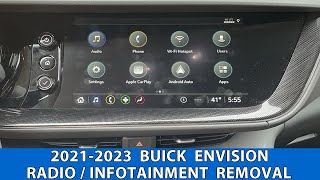
Accessing the module will require carefully removing the dashboard trim surrounding the infotainment screen. A video showing the removal of the radio display on a 2021-2023 Envision 🎬 Watch this video showing how to remove the radio display. indicates that the main radio components are located directly behind the screen, which is a likely location for this filter. You will need a set of plastic trim removal tools and a 7mm socket. Once accessed, the module is a simple plug-and-play component.
Frequently Asked Questions (FAQ)
Is this the same as the Active Noise Cancellation (ANC) module?
No. This part is a radio antenna signal filter that cleans up AM/FM signals. The Active Noise Cancellation (ANC) module is a separate, more complex system that uses microphones in the cabin to detect and cancel out low-frequency road and engine noise through the vehicle's speakers. A faulty ANC module would result in more cabin noise, not radio static.
Will replacing this module fix bad reception on all my radio stations?
It will only fix reception problems caused by electrical interference from within the vehicle (like whining or buzzing). It will not improve poor reception caused by being too far from a radio station's transmitter, or obstructions like tunnels and large buildings.
Do I need to program this part after installation?
No, programming is not typically required for a radio antenna filter. It is a passive electronic component that should function immediately upon being connected.
Where is the antenna noise filter located on a 2021-2026 Buick Envision?
While not explicitly shown in public diagrams, its location is almost certainly behind the main radio unit or infotainment display within the dashboard. Access involves removing the trim and the display screen itself.
Helpful Videos
Technical Specifications
OEM Part Numbers: 84948802 84791995
Also referred to as a Radio Antenna Signal Filter.
We Have This Part in Stock


The information in this article is provided for general reference and educational purposes only. Vehicle specifications, procedures, and part compatibility can vary by production date, trim level, and region. Always consult your vehicle's factory service manual and verify part numbers before purchasing or performing repairs. Safety-critical components such as airbags, seat belts, and braking systems should be installed by a qualified professional.
- Buick Envision: