

2022-2024 Lincoln Navigator Head-Up Display & Light Sensor Module Guide
This guide covers the specific ambient light and HUD module for Navigators with the Head-Up Display option, including failure symptoms and replacement costs.
- This part is a specific module for Navigators with the Head-Up Display (HUD) option and is not a standard ambient light sensor.
- The primary symptom of failure is the HUD having incorrect brightness, followed by malfunctioning automatic headlights and dashboard dimming.
- There are no new aftermarket replacements; a used OEM part is the most cost-effective solution, but you must verify the part number and that the donor vehicle had HUD.
- Replacement is a simple DIY job, typically involving prying off the center dash grille and swapping the plug-in module.
Variant-Specific Information

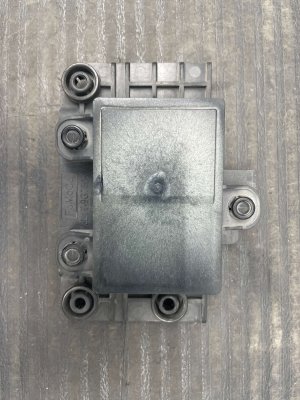
Compatibility Warning: This specific module, part number NL7Z-19G468-C, is designed exclusively for 2022-2024 Lincoln Navigators equipped with the factory Head-Up Display (HUD) option. It is not a standard ambient light sensor. Before purchasing, you must verify that your vehicle has the HUD feature, which projects information like speed and navigation onto the lower part of the windshield.
Common Symptoms of Failure

A problem with the HUD and ambient light module will primarily affect systems that rely on automatic light-level adjustments. Since this is an electronic component, failure is often sudden.
- Incorrect Head-Up Display (HUD) Brightness: The most common symptom will be the HUD being too dim to read during the day or, conversely, far too bright at night, causing a distraction.
- Automatic Headlights Not Working Correctly: The headlights may fail to turn on automatically in the dark, or they might stay on continuously even in bright daylight.
- Erratic Headlight Behavior: In some cases, the sensor may send fluctuating signals, causing the headlights to flicker on and off as you drive under bridges or through shadows.
- Improper Dashboard and Screen Brightness: The main digital instrument cluster and the center infotainment screen may not dim correctly at night, appearing overly bright. They might also be too dim to see clearly during the day.
- "Advanced Front Lighting Features Temporarily Not Available" Message: While this message can be triggered by other issues, a fault in the lighting control system, which relies on this sensor, can be a cause.
Buying a Used Ambient Light / HUD Module

Given the high cost of a new OEM module and the lack of aftermarket alternatives, a used OEM part is an excellent value. However, careful purchasing is essential for this specific electronic module.
- Verify the Part Number: The most critical step. Ensure the part you are buying is NL7Z-19G468-C or one of its superseded predecessors, nl7z19g468a or nl7z19g468b. Using the wrong module will likely result in the HUD not functioning correctly, if at all.
- Confirm the Donor Vehicle Had HUD: The seller should be able to confirm that the Navigator the part was removed from was equipped with the Head-Up Display. This is the best way to ensure you're getting the correct component.
- Inspect the Connector: Check any photos for the electrical connector pins. They should be straight and free of any green or white corrosion, which would indicate moisture damage.
- Physical Condition: While it's an electronic part, check the plastic housing for any cracks or signs of heat damage. The sensor dome on top should be clear and not clouded or yellowed from excessive sun exposure.
- Why Used OEM is the Only Option: As of now, there are no new aftermarket versions of this specific HUD module. A used OEM part is guaranteed to have the correct software and hardware to communicate properly with your Navigator's complex electronic systems, something a non-existent aftermarket part could not promise.
Known Issues, TSBs, and Recalls
As of mid-2024, there are no specific recalls or Technical Service Bulletins (TSBs) from Ford or the NHTSA that directly mention the ambient light sensor or module (NL7Z-19G468-C) for the 2022-2024 Lincoln Navigator.
There have been recalls related to headlamp control module software that could prevent daytime running lights from illuminating, but these do not involve the sensor itself. This indicates the lighting systems are complex, but does not point to a common failure of this specific part.
Cost Comparison
The high price of a new module makes a used part a financially smart choice. Labor costs are relatively low if no other issues are present.
| Part Type | Estimated Cost |
|---|---|
| New OEM | $535 - $610 |
| New Aftermarket | Not Available |
| Used OEM | $150 - $300 |
| Shop Labor | $100 - $200 |
Replacement Information

Replacing the ambient light sensor module is generally straightforward for those with some DIY experience.
- Difficulty: 2 out of 5 (Easy to Moderate)
- Estimated Time: 0.5 - 1.0 hours
- Location: The module is located on top of the dashboard, centered near the base of the windshield, typically under a small plastic grille.
- General Steps:
- Using a plastic trim removal tool, carefully pry up the defroster grille or sensor cover on the top of the dashboard.
- The sensor module will be visible underneath. Disconnect the electrical wiring harness attached to it.
- Release the clips or retaining tabs holding the module in place and remove it from the dashboard.
- Install the new module, reconnect the electrical connector, and snap the dashboard grille back into place.
Pro Tip: After installation, test the system by turning the vehicle on in a dark garage to confirm the headlights and HUD activate, then pull it into bright sunlight to ensure they turn off and the HUD brightens. You may need to cycle the ignition once or twice for the system to fully recognize the new module.
Frequently Asked Questions
Can I use a regular ambient light sensor from a Navigator without HUD?
No. This module contains specific electronics to control the Head-Up Display. A standard sensor will not operate the HUD correctly and may cause other system faults.
Does the new module need to be programmed by the dealer?
In most cases, this module is a plug-and-play component and does not require special programming. The vehicle's body control module should recognize the new part after installation.
Will a bad sensor cause a check engine light?
It is possible, but not guaranteed. A fault in the lighting system is more likely to trigger a specific warning message on the instrument cluster, such as an alert about the front lighting system, rather than a generic check engine light.
Is it safe to drive with a faulty ambient light sensor module?
Yes, but with limitations. You will lose automatic functionality. You must manually turn your headlights on at night and off during the day. The HUD and dashboard screens may be at an uncomfortable brightness level, which can be distracting.
Technical Specifications
OEM Part Numbers: NL7Z-19G468-C nl7z19g468b nl7z19g468a
Integrates ambient light sensor with control logic for Head-Up Display (HUD) brightness. Located on the top center of the dashboard.
We Have This Part in Stock





The information in this article is provided for general reference and educational purposes only. Vehicle specifications, procedures, and part compatibility can vary by production date, trim level, and region. Always consult your vehicle's factory service manual and verify part numbers before purchasing or performing repairs. Safety-critical components such as airbags, seat belts, and braking systems should be installed by a qualified professional.
- Lincoln Navigator: