

Tesla Model S & X Autopilot 3.0 Computer (2016-2020): Upgrade, Diagnosis, and Replacement
This guide clarifies the different Autopilot hardware versions, explains the critical programming requirements, and details symptoms of failure for the HW3.0 ADAS control unit.
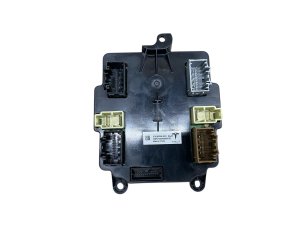
- This part is the Autopilot 3.0 (HW3.0) computer, which is required for Full Self-Driving features on 2016-2020 Model S/X.
- A replacement computer MUST be programmed to the vehicle's VIN by Tesla or a specialized shop with Tesla's software; a simple swap will not work.
- Before buying, confirm your vehicle's current hardware (HW2.0, 2.5, or 3.0) via the touchscreen menu under Software > Additional Vehicle Information.
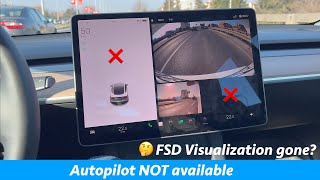
- Failure symptoms include loss of Autopilot, no vehicle visualizations on screen, and multiple error messages for cameras and safety systems.
Understanding Autopilot Hardware in 2016-2020 Model S & X

The 2016-2020 timeframe for the Tesla Model S and Model X covers several generations of Autopilot hardware. It's crucial to identify which hardware your vehicle has before purchasing a replacement or upgrade. You can find this information in your vehicle's touchscreen by navigating to Software > Additional Vehicle Information. The entry for "Autopilot Computer" will specify the version.
- Autopilot Hardware 1.0 (AP1): Found in vehicles built from September 2014 to October 2016, this system uses a single camera and a Mobileye chip. It is not capable of running modern FSD software and cannot be upgraded to HW3.0.
- Autopilot Hardware 2.0 (HW2.0): Introduced in late 2016, this was Tesla's first in-house system with eight cameras and an NVIDIA computer.
- Autopilot Hardware 2.5 (HW2.5): A minor update to HW2.0, introduced in mid-2017, which added some processing redundancy. Vehicles with HW2.0 or HW2.5 can be physically upgraded to HW3.0.
- Autopilot Hardware 3.0 (HW3.0 / FSD Computer): Introduced in April 2019, this is Tesla's custom-designed computer necessary for Full Self-Driving features. Many 2019-2020 vehicles came with HW3.0 from the factory, while earlier 2016-2018 models with HW2.0/2.5 required a physical swap to get this computer.
This guide focuses on the Autopilot Hardware 3.0 computer, as it is the relevant ADAS control unit for enabling modern features on all 2016-2020 Model S and Model X vehicles.
Warning: A used Autopilot computer cannot be simply swapped between vehicles. The module is tied to the vehicle's VIN and requires specific software pairing and configuration by Tesla or a qualified independent technician with access to Tesla's diagnostic tools. Attempting a DIY swap without the proper software tools will result in a non-functional unit.
Symptoms of a Failing Autopilot Computer

A failing Autopilot computer can manifest in several ways, ranging from the loss of driver-assist features to a completely unresponsive unit.
- Loss of Autopilot and FSD Features: The most common symptom is the complete unavailability of Autosteer, Traffic-Aware Cruise Control, and FSD visualizations (seeing other cars on the screen).
- Error Messages on Touchscreen: You may see specific alerts like "Autopilot cameras unavailable," "Driving visualization temporarily degraded," or "Cruise control unavailable." A "Hardware Configuration Mismatch" error can also indicate a problem with the computer.
- Disabled Safety Features: Failure can disable related active safety systems, including Automatic Emergency Braking, Forward Collision Warning, and Lane Departure Warning.
- Camera Malfunctions: The backup camera and other cameras may fail to display, and Sentry Mode will be unavailable. 🎬 Watch: Troubleshooting tips when Autopilot and Sentry Mode fail
- Overheating: In some cases, the computer can overheat, causing it to shut down during use, especially while preconditioning for Supercharging.
Known Issues, Recalls, and Service Bulletins
While there are no specific recalls for widespread hardware failure of the HW3.0 computer itself within the 2016-2020 model years, the Autopilot system has been the subject of major software-related recalls.
- NHTSA Recall 23V-838 (December 2023): This major recall affected over 2 million Tesla vehicles, including the 2016-2020 Model S and X. It addressed concerns that the Autosteer feature did not do enough to prevent driver misuse. The remedy was an over-the-air (OTA) software update that added more stringent driver monitoring alerts. This was a software issue, not a hardware failure.
- NHTSA Recall 23V-085 (February 2023): This recall covered vehicles with the Full Self-Driving (FSD) Beta software, including applicable 2016-2023 Model S and X vehicles. It addressed behaviors like rolling through stop signs or acting unpredictably in intersections. The fix was also an OTA software update.
It's important to note that later hardware versions (HW4.0, found in 2023+ vehicles) have experienced issues with the computer short-circuiting, but this problem is not known to affect the HW3.0 computers in the 2016-2020 models.
Replacement and Programming

Replacing the Autopilot computer is a task that requires both physical installation and critical software procedures.
Physical Installation
In the Model S and Model X, the Autopilot computer is located behind the glove box. The physical replacement involves:
- Powering down the vehicle via the touchscreen.
- Removing the glove box assembly.
- Disconnecting the electrical connectors from the computer.
- Unbolting the four nuts holding the computer to the cross-car beam.
- Installing the new unit and reversing the steps.
While the physical swap is straightforward for a mechanic, the software side is complex.
Programming and Calibration
Important: A new or used Autopilot ECU must be programmed to the vehicle. After installation, the firmware must be deployed to the new module. This process, often called a "DAS redeploy," requires access to Tesla's proprietary software, known as Toolbox. Most independent shops cannot perform this function. The vehicle will not operate correctly, and Autopilot features will not work, until the computer is properly paired with the car's VIN and configuration. Following the software deployment, the vehicle's cameras will also need to be calibrated by driving.
Pro Tip: Before condemning the computer, ensure the issue isn't a simpler problem. Water intrusion into the side repeater (fender) camera harnesses is a known issue that can cause Autopilot to become unavailable and may generate similar error codes. Also, a simple system reboot by holding down both scroll wheels on the steering wheel can sometimes resolve temporary software glitches.
Buying a Used Advance Driver Assistance System (ADAS) Control Unit

Purchasing a used HW3.0 computer can be a cost-effective way to replace a failed unit or upgrade from HW2.5, but it carries significant risks if you don't know what to look for.
- Verify the Hardware Version: The most critical step is to ensure you are buying a Hardware 3.0 (HW3.0) computer. The part numbers listed in this guide are for HW3.0 units. Do not purchase an HW2.0 or HW2.5 computer if your goal is FSD capability.
- Factor in Programming Costs: A used computer from an online marketplace might cost $200-$400, but it is useless without programming. You MUST have a plan for installation and programming by Tesla Service or a rare, highly specialized independent shop that has invested in Tesla's diagnostic software.
- Physical Inspection: When the part arrives, check for any signs of physical damage, especially to the connectors. Ensure all pins are straight and free of corrosion.
- Seller Reputation: Buy from reputable automotive recyclers who specialize in Tesla parts. They are more likely to have correctly identified and handled the component.
- Understand the 'Unfused' Terminology: Some listings may mention 'Unfused Assembly'. This is a technical descriptor and does not affect compatibility for a standard replacement.
Cost Comparison
The cost of replacing the Autopilot computer varies greatly depending on whether it's an upgrade or a simple replacement, and who performs the labor.
| Item | Cost (Estimated) | Notes |
|---|---|---|
| New OEM (from Tesla as upgrade) | $1,000 | This was the price Tesla charged for the HW3.0 upgrade for owners with older hardware who subscribed to FSD. This does not include the FSD software purchase or subscription. |
| Used OEM (Online) | $200 - $500 | Price for the part only, typically from eBay or recycled parts dealers. Does not include mandatory programming. |
| Shop Labor (Installation & Programming) | $300 - $2,500+ | A simple physical swap is quick (1-2 hours). However, the cost for programming can be high. An independent shop may charge $300+, while Tesla's quote for a full diagnosis and replacement can be $2,500. |
Frequently Asked Questions (FAQ)
Do I have to take my car to Tesla to replace the Autopilot computer?
Almost always, yes. While an independent shop can physically swap the module, programming the new computer to your car's VIN and configuration requires Tesla's proprietary diagnostic software. Very few independent shops have this capability. Failure to program the module will result in non-functional Autopilot and safety systems.
Can I upgrade my 2016 Model S with HW1.0 to HW3.0?
No. Vehicles with Autopilot Hardware 1.0 (AP1), built before late 2016, use a different sensor and wiring architecture and cannot be upgraded to HW2.0, HW2.5, or HW3.0.
Will a used Autopilot computer give me Full Self-Driving (FSD)?
No. The HW3.0 computer is the *hardware* required for FSD, but the FSD feature itself is a *software* package that must be purchased or subscribed to from Tesla and is tied to your account and VIN. Installing the hardware alone will not unlock the software features.
My Autopilot stopped working. Is the computer definitely broken?
Not necessarily. Autopilot can be disabled for many reasons, including dirty or blocked cameras, poor weather, or needing calibration. A common failure point is water getting into the side fender camera wiring, which can disable the system. Always perform a system reboot and check for simpler issues before assuming the main computer has failed.
Helpful Videos
Technical Specifications
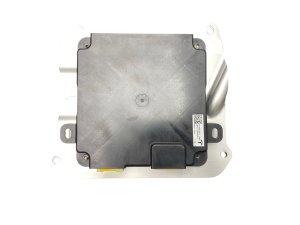
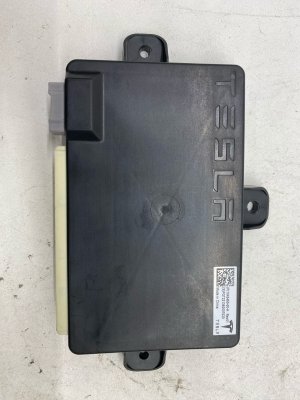
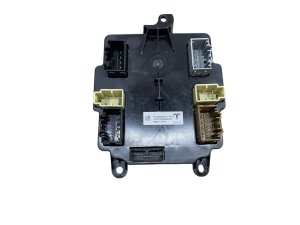
OEM Part Numbers: 1655000-00-G 1655000-00-H 1655000-70-F 1655000-70-G 1655000-70-I 1655000-90-I
Hardware Version: 3.0 (FSD Computer). Location: Behind glove box. Required for Full Self-Driving (FSD) software features.
We Have This Part in Stock


The information in this article is provided for general reference and educational purposes only. Vehicle specifications, procedures, and part compatibility can vary by production date, trim level, and region. Always consult your vehicle's factory service manual and verify part numbers before purchasing or performing repairs. Safety-critical components such as airbags, seat belts, and braking systems should be installed by a qualified professional.
- Tesla X:
- Tesla S:
- 🎬 Helpful Videos
- 🛍️ Shop This Part
- Understanding Autopilot Hardware in 2016-2020 Model S & X
- Symptoms of a Failing Autopilot Computer
- Known Issues, Recalls, and Service Bulletins
- Replacement and Programming
- Physical Installation
- Programming and Calibration
- Buying a Used Advance Driver Assistance System (ADAS) Control Unit
- Cost Comparison
- Frequently Asked Questions (FAQ)
- 🎟️ Get 5% Off