

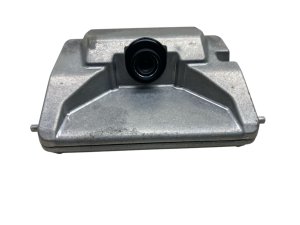
2021-2024 Genesis GV80 ADAS Camera: The Key to Preview ECS Suspension
This front-facing camera does more than just enable safety features; it's a critical component for the GV80's advanced road-reading suspension system.
- This camera is essential for both safety systems and the advanced Preview ECS road-reading suspension.
- Part compatibility is critical: you MUST use a camera designed for models with Electronically Controlled Suspension (part # 99211-T6110 or 99211-T6010).
- Calibration by a dealer or qualified shop with specialized equipment is MANDATORY after replacement. This is not a DIY-friendly part.
- Failure disables key safety features like automatic emergency braking and compromises the vehicle's signature ride quality.
Understanding the GV80's Front Camera: More Than Just Safety
In the 2021-2024 Genesis GV80, the front-facing ADAS camera is not just a component for safety systems; it is the eye of the advanced 'Preview' Electronically Controlled Suspension (ECS). While it manages features like Lane Keeping Assist and Forward Collision-Avoidance, its most sophisticated job is to read the road ahead. The camera identifies bumps and dips, and the vehicle's computer uses this information to instantly adjust the suspension's stiffness. This allows the GV80 to glide over road imperfections, a key feature of its luxury ride. A faulty camera can therefore not only disable critical safety assists but also compromise the vehicle's signature ride quality by deactivating the Preview ECS function.
Common Symptoms of a Failing GV80 ADAS Camera
When the front camera begins to fail, the vehicle will typically provide clear warnings on the instrument cluster. Here are the most common symptoms:
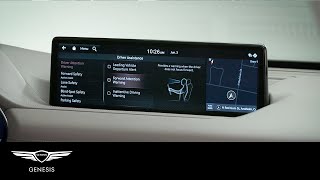
- Warning Messages: You will likely see messages such as "Driver Assistance system limited. Camera obscured." or similar alerts for specific systems like Forward Collision-Avoidance Assist. 🎬 Watch: Genesis Forward Attention Warning system overview
- Disabled Safety Features: Systems like Smart Cruise Control, Lane Keeping Assist, and Automatic Emergency Braking will become unavailable. The corresponding warning lights may illuminate on the dashboard.
- Rougher Ride Quality: On models with Preview ECS, a camera failure will disable the road-scanning function. The suspension will revert to a default, often firmer, setting, making the ride noticeably less comfortable.
- Condensation Inside the Lens: Some owners have reported moisture or condensation getting trapped inside the camera housing, especially after a car wash or heavy rain, which can obscure the view and cause system errors.
Warning: A faulty ADAS camera disables active safety features like automatic emergency braking. While the vehicle remains drivable, its ability to automatically prevent a collision is significantly reduced.
Known Issues, Recalls, and Technical Service Bulletins (TSBs)
As of mid-2026, there are no specific recalls for the ADAS front-facing camera itself on the 2021-2024 Genesis GV80. However, several related issues and service campaigns are worth noting:
- NHTSA Recall 24V-584: This recall addresses an issue where the rearview camera image may not display correctly on some 2025 models, which required a software update. While this concerns the rear camera, it highlights the sensitivity of the vehicle's camera systems to software logic.
- General TSBs: Genesis has issued TSBs for related electronic systems, such as campaigns to fix battery drain issues or loss of connectivity with Connected Car Services, which can sometimes present as general electrical faults.
- Windshield Replacement Issues: A common cause for ADAS camera problems is improper calibration after a windshield replacement. The camera mount is fixed to the glass, and if it's misaligned by even a millimeter, the system can malfunction.
Buying a Used 2021-2024 GV80 ADAS Camera: A Buyer's Guide
Purchasing a used OEM camera can be a cost-effective solution, but careful inspection and verification are crucial. Aftermarket options for this specific, complex camera are virtually non-existent and not recommended due to calibration and integration challenges.
1. Verify Compatibility Above All Else
This is the most critical step. The GV80 uses different front cameras depending on whether it is equipped with the Preview Electronically Controlled Suspension.
- For models WITH Preview ECS: The correct part numbers are typically 99211-T6110 or 99211-T6010. Always verify the part number from your old unit before purchasing a replacement.
- For models WITHOUT Preview ECS: A different part number is used. Installing the wrong camera will result in system malfunctions and fault codes.
Pro Tip: Before buying, provide the seller with your vehicle's VIN and the part number from your existing camera to confirm an exact match. Do not purchase a camera based on vehicle year alone.
2. Physical Inspection Checklist
- Lens Condition: Inspect the lens for any scratches, chips, or haziness. Even minor blemishes can distort the camera's view and cause errors.
- Housing and Connectors: Check the plastic housing for cracks or signs of damage. Ensure all electrical connector pins are straight, clean, and free of corrosion.
- Signs of Water Intrusion: Look for any discoloration or mineral deposits on the housing or connectors that might indicate past exposure to moisture.
- Source Vehicle: If possible, inquire about the donor vehicle. A camera from a rear-end collision is preferable to one from a major front-end impact, which could have subjected the camera to damaging shock.
Replacement and Calibration: A Job for Professionals
Physically replacing the camera, which is mounted behind the rearview mirror, is relatively straightforward for a technician. However, the critical step is what comes next: calibration.
The ADAS camera must be precisely calibrated after installation. This process tells the camera its exact position and angle relative to the vehicle's centerline, ensuring it accurately interprets lane markings, vehicle distances, and road features. Calibration is not optional; without it, the safety systems and Preview ECS will not function correctly and may behave erratically.
- Static Calibration: Performed in a workshop using a specialized target board placed at a precise distance in front of the vehicle.
- Dynamic Calibration: Involves driving the vehicle at specific speeds on well-marked roads to allow the system to self-calibrate.
Due to the requirement for specialized tools and software, this is not a feasible DIY job for most home mechanics. The vehicle must be taken to a Genesis dealer or a qualified independent shop with the proper ADAS calibration equipment.
Cost Comparison: New vs. Used GV80 Camera
Understanding the costs involved can help you make an informed decision. Prices can vary based on location and supplier.
| Part Type | Estimated Cost | Notes |
|---|---|---|
| New OEM | $550 - $700 | Purchased from a Genesis dealership or authorized online retailer. |
| Used OEM | $250 - $400 | Price depends on condition and mileage from the donor vehicle. |
| New Aftermarket | Not Available | Complex, vehicle-specific cameras like this are generally not produced by aftermarket companies. |
| Shop Labor (Installation) | $100 - $200 | Typically around 1 hour of labor for physical replacement. |
| Shop Labor (Calibration) | $250 - $600 | This is a separate, required procedure. Dealer pricing is often higher than independent specialists. |
Frequently Asked Questions (FAQ)
Do I have to calibrate the camera after installation?
Yes, calibration is mandatory. Skipping this step will leave your driver assistance systems and Preview ECS non-functional and can cause unpredictable behavior from safety features.
Can a cracked windshield cause camera problems?
Absolutely. A crack or even a small chip in the camera's field of view can trigger errors. Furthermore, any time the windshield is replaced, the camera must be removed and reinstalled, which necessitates a recalibration.
Why are there two different OEM part numbers (99211-T6110 and 99211-T6010)?
These part numbers often represent minor revisions or updates from the manufacturer but are typically interchangeable for the specified models with Preview ECS. 99211-T6010 appears to be the earlier number. The most important factor is ensuring the part is for a vehicle with the electronic suspension option.
Can I install a camera from a GV80 without Preview ECS on my vehicle that has it?
No. The cameras are different and not cross-compatible. The camera for Preview ECS models contains specific software and capabilities to scan the road surface that the base model camera lacks. Using the wrong part will result in fault codes and system failure.
Helpful Videos
Technical Specifications
OEM Part Numbers: 99211-T6110 99211T6110 99211-T6010 99211T6010
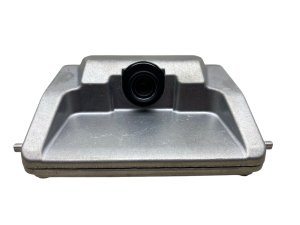
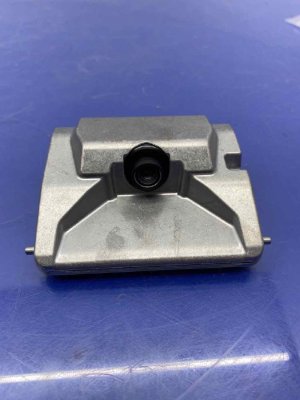
Monocular (single-lens) front-view camera mounted behind the rearview mirror. Integrates with both ADAS and Electronically Controlled Suspension (Preview ECS) systems.
We Have This Part in Stock


The information in this article is provided for general reference and educational purposes only. Vehicle specifications, procedures, and part compatibility can vary by production date, trim level, and region. Always consult your vehicle's factory service manual and verify part numbers before purchasing or performing repairs. Safety-critical components such as airbags, seat belts, and braking systems should be installed by a qualified professional.
- Genesis GV80:
- 🎬 Helpful Videos
- 🛍️ Shop This Part
- Understanding the GV80's Front Camera: More Than Just Safety
- Common Symptoms of a Failing GV80 ADAS Camera
- Known Issues, Recalls, and Technical Service Bulletins (TSBs)
- Buying a Used 2021-2024 GV80 ADAS Camera: A Buyer's Guide
- 1. Verify Compatibility Above All Else
- 2. Physical Inspection Checklist
- Replacement and Calibration: A Job for Professionals
- Cost Comparison: New vs. Used GV80 Camera
- Frequently Asked Questions (FAQ)
- 🎟️ Get 5% Off