

2021-2024 Genesis GV80 ADAS Camera: The Critical Preview ECS Suspension Match
This guide covers failure symptoms, replacement costs, and the essential compatibility check for the front ADAS camera on GV80 models with Preview Electronic Control Suspension.
- This camera is ONLY for GV80 models with Preview Electronic Control Suspension (Preview ECS); using the wrong part will cause system failures.
- ALL replacement cameras, whether new or used, require professional static calibration with specialized equipment. This is not a DIY job.
- Failure disables a wide range of safety features, including Smart Cruise Control, Lane Keeping Assist, and Forward Collision-Avoidance Assist.
- Buying a used OEM camera can save over 50% on the part cost, but you must verify the part number and inspect it for lens or connector damage.
Understanding the Preview ECS Requirement
Warning: The most critical factor when replacing this ADAS camera is your vehicle's suspension type. This guide and the specified part numbers are ONLY for Genesis GV80 models equipped with Preview Electronic Control Suspension (Preview ECS). This feature was standard on most models with the 3.5L V6 engine. A camera from a vehicle without Preview ECS will not function correctly. Always verify your vehicle's original options before ordering.
Symptoms of a Failing ADAS Camera
When the front ADAS camera fails or is obstructed, you won't just lose one feature; a whole suite of driver aids will be disabled. You will typically see a master warning light and a message on the instrument cluster.
- "Check Driver Assistance system" Warning: This is a general fault message indicating a problem within the ADAS network, often pointing to the camera or radar.
- "Driver Assistance system limited. Camera obscured." Message: This message can appear temporarily if the windshield is dirty, fogged, or covered in snow, but if it persists after cleaning the glass, it may indicate an internal camera fault.
- Smart Cruise Control (SCC) Disabled: The vehicle will not maintain speed or distance to the car ahead.
- Lane Keeping Assist (LKA) and Lane Following Assist (LFA) Inoperative: The car will no longer provide steering input to stay in its lane or centered. The system may feel like it 'ping-pongs' between lane lines before failing completely.
- Forward Collision-Avoidance Assist (FCA) Disabled: The automatic emergency braking and forward collision warning systems will not function.
- Poor Ride Quality (on Preview ECS models): A failing camera may stop sending road surface data to the suspension control module, resulting in a noticeably harsher or less responsive ride over bumps.
Known Issues, TSBs, and Recalls
As of mid-2026, there are no specific recalls issued by the National Highway Traffic Safety Administration (NHTSA) for the failure of the forward-facing ADAS camera module on the 2021-2024 Genesis GV80. While the GV80 has had recalls for other components like fuel pumps and seat belt pretensioners, the ADAS camera itself has not been the subject of a safety campaign. A software-related recall was issued for the *rearview* camera on some 2024-2025 models, but this does not affect the front ADAS camera.
Buying a Used ADAS Camera Module
Purchasing a used OEM camera can offer significant savings over a new part, but careful verification is essential. Given its complexity, a new aftermarket equivalent for this specific part is not a viable option.
1. Verify Your Vehicle Has Preview ECS
Before you even search for a part, confirm your GV80 has Preview ECS. You can typically find this listed on your vehicle's original window sticker. It is most common on trims equipped with the 3.5L V6 engine. The parts discussed here are specifically for vehicles with this option, often noted in part descriptions as "With elect susp."
2. Match the Part Number
Check the part number on your original camera and match it to the replacement. The known compatible OEM part numbers for this application are:
- 99211-T6010
- 99211-T6110
- 99211-T6210
These numbers often supersede each other, meaning a newer number will work in place of an older one, but it's always best to confirm with the seller.
3. Physical Inspection
When you receive the used camera, inspect it carefully before installation:
- Lens: Check for any deep scratches, hazing, or cracks. Minor surface scuffs are okay, but anything that could distort the image will cause calibration failure.
- Connectors: Ensure the electrical connector pins are straight, clean, and free of any corrosion.
- Housing: Look for cracks or damage to the housing and mounting points. A damaged housing can prevent the camera from seating correctly, making calibration impossible.
Replacement and Calibration
Professional Installation Required: This is not a do-it-yourself repair. Replacing the ADAS camera requires a mandatory calibration procedure that can only be performed by a dealership or a qualified independent shop with specialized ADAS calibration equipment.
The replacement process involves carefully removing the trim covers behind the rearview mirror, disconnecting the old camera, and installing the new one. The critical step is the calibration that follows.
Calibration Process:
- The vehicle must be on a perfectly level surface with correct tire pressures and a full tank of fuel.
- A technician uses a diagnostic scan tool to initiate the calibration mode.
- Specialized targets are placed at precise distances and heights in front of the vehicle.
- The camera then learns its exact position relative to the vehicle's centerline, ensuring it can accurately interpret lane markings and road conditions.
Failure to perform this calibration will result in the ADAS features not working and persistent warning lights on the dash.
Cost Comparison
The cost to replace the GV80 ADAS camera involves the part itself and the separate, critical cost of calibration. Prices can vary significantly between dealerships and independent shops.
| Part or Service | Estimated Cost |
|---|---|
| New OEM Camera | $630 - $930 |
| Used OEM Camera | $270 - $400 |
| New Aftermarket Camera | Not Available |
| Shop Labor (Installation & Calibration) | $350 - $750+ |
Pro Tip: The labor cost consists of two parts: the physical installation (approx. 1 hour) and the ADAS calibration (1-1.5 hours). Independent ADAS specialists often offer the same calibration service as a dealer for a lower price.
Frequently Asked Questions (FAQ)
What is Preview Electronic Control Suspension (Preview ECS) and how do I know if my GV80 has it?
Preview ECS is an advanced feature where the front ADAS camera scans the road for bumps and tells the electronic suspension how to react before you hit them. It's primarily found on GV80 models with the 3.5T V6 engine. You can confirm if your vehicle has it by checking the original window sticker or by entering your VIN on a Genesis-specific features lookup site.
Does a used ADAS camera need to be calibrated?
Yes. Any time the camera is replaced, or even just removed and reinstalled (like during a windshield replacement), it must be professionally calibrated. The camera needs to learn its precise orientation to the vehicle to function safely and accurately.
Can I use a camera from a GV80 that doesn't have Preview ECS?
No. The camera for a standard suspension vehicle lacks the specific software and integration needed to communicate with the Preview ECS module. While it might fit physically, it will not operate the suspension feature correctly and will likely cause system faults.
Why do multiple part numbers (99211-T6010, T6110, T6210) fit my vehicle?
Automakers often update parts throughout a vehicle's production run. These different numbers typically represent minor revisions or a change in supplier. In most cases, the newer part number supersedes the older one and is backward-compatible. However, you should always confirm with the seller that the part is correct for your VIN and that it is for models with electronic suspension.
Technical Specifications
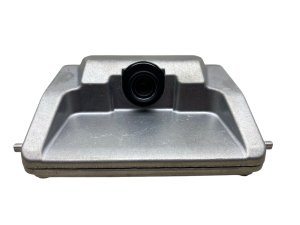
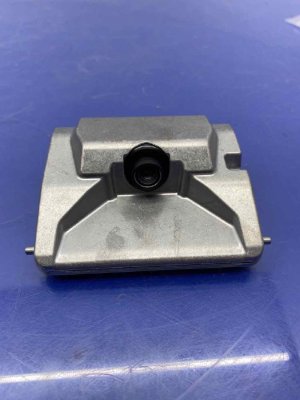
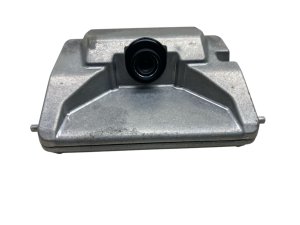
OEM Part Numbers: 99211T6010 99211T6110 99211T6210
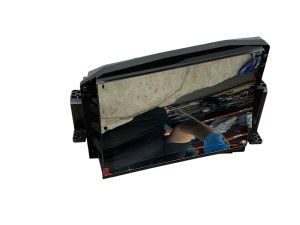
Windshield-mounted mono-lens camera integrated with ADAS and Preview Electronic Control Suspension systems.
We Have This Part in Stock


The information in this article is provided for general reference and educational purposes only. Vehicle specifications, procedures, and part compatibility can vary by production date, trim level, and region. Always consult your vehicle's factory service manual and verify part numbers before purchasing or performing repairs. Safety-critical components such as airbags, seat belts, and braking systems should be installed by a qualified professional.
- Genesis GV80:
- 🛍️ Shop This Part
- Understanding the Preview ECS Requirement
- Symptoms of a Failing ADAS Camera
- Known Issues, TSBs, and Recalls
- Buying a Used ADAS Camera Module
- 1. Verify Your Vehicle Has Preview ECS
- 2. Match the Part Number
- 3. Physical Inspection
- Replacement and Calibration
- Cost Comparison
- Frequently Asked Questions (FAQ)
- 🎟️ Get 5% Off