

Tesla Model 3 & Y Accelerator Pedal Guide: Failure Symptoms and Replacement (2017-2026)
Learn to diagnose a faulty accelerator pedal in your 2017-2023 Model 3 or 2020-2026 Model Y, and see why a used OEM part is often the best fix.
- Claims of 'Sudden Unintended Acceleration' in Teslas have been investigated by NHTSA and attributed to driver error, not a defect with this pedal.
- Failure symptoms are serious and include unresponsive acceleration or the vehicle entering a low-power 'limp mode'.
- Replacement is simple (a few trim panels and one bolt), but official Tesla procedure may require a software check with 'Toolbox 3' to verify operation.
- Used OEM parts are the best value, as no complete electronic aftermarket replacements are available—only cosmetic covers.
Vehicle Fitment and Part Numbers

This accelerator pedal assembly is used across the Tesla Model 3 and Model Y platforms, making it a widely available part. It is designed for Left-Hand Drive (LHD) vehicles sold in the North American market.
| Vehicle | Year Range | OEM Part Number |
|---|---|---|
| Tesla Model 3 | 2017, 2018, 2019, 2020, 2021, 2022, 2023 | 1044691-00-D |
| Tesla Model Y | 2020, 2021, 2022, 2023, 2024, 2025, 2026 | 1044691-00-D |
Note: The accelerator pedal itself can often be replaced separately from the entire brake and pedal assembly bracket.
Known Issues, Recalls, and TSBs

While this specific part has proven reliable, there are some widely discussed topics and concerns worth noting for owners of the Tesla Model 3 and Model Y.
Sudden Unintended Acceleration (SUA) Claims
Over the years, petitions have been filed with the National Highway Traffic Safety Administration (NHTSA) requesting recalls for Tesla vehicles due to claims of sudden unintended acceleration. After thorough investigations, NHTSA has repeatedly denied these petitions, concluding that the incidents were not caused by a vehicle defect but by 'pedal misapplication'—meaning the driver accidentally pressed the accelerator instead of the brake. Vehicle data logs confirmed the cars performed as designed.
Cybertruck Pedal Recall (Does Not Affect Model 3/Y)
In 2024, Tesla recalled the Cybertruck because its decorative metal pedal cover could slide off and become wedged, holding the accelerator down. This issue was caused by a lubricant used during assembly and is specific to the Cybertruck; it does not affect the different pedal assembly used in the Model 3 and Model Y.
Forum-Reported Quirks
Some owners on forums have reported minor, non-critical behaviors. These include a single 'pop' or 'click' feeling from the pedal on the first acceleration of a drive, which happens once and then does not repeat. Others have noted a difference in pedal stiffness between the Model 3 and Model Y.
Symptoms of a Failing Accelerator Pedal

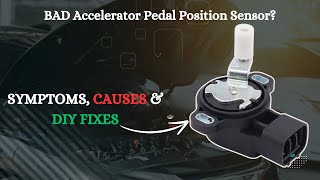
A failing accelerator pedal sensor will cause noticeable and often alarming driving issues. 🎬 Watch: Learn more about common symptoms of a failing sensor. Because it's a primary driver input, the vehicle's computer will typically restrict performance to ensure safety.
- Delayed or Unresponsive Acceleration: You press the pedal, but there's a significant lag before the car responds, or it doesn't respond at all. This can feel like a 'dead spot' in the pedal's travel.
- Erratic or Inconsistent Power: The vehicle may surge or lose power unexpectedly, even with steady pressure on the pedal. This can make maintaining a constant speed difficult.
- Vehicle Enters 'Limp Mode': The car may display a warning message and severely limit power and speed. This is a protective measure triggered when the computer receives conflicting or invalid data from the pedal sensor.
- Vehicle Alerts on Dash: A fault in the pedal sensor will trigger a warning message on the main screen. While there are no standard OBD-II codes, Tesla's internal diagnostics will pinpoint the failure.
- Unusual Shifting Behavior (in older software): In some drive-by-wire cars, a bad pedal sensor can confuse the transmission logic. In a Tesla, this may manifest as jerky or inappropriate application of power.
Buying a Used Accelerator Pedal Assembly

For this part, a used OEM assembly is an excellent choice. There are no major aftermarket manufacturers producing the complete electronic sensor assembly, only cosmetic pedal covers. A used original part ensures perfect compatibility and sensor calibration.
What to Check Before You Buy:
- Verify the Part Number: Ensure the part is listed as 1044691-00-D or a compatible successor. While many parts are visually identical, sticking to the OEM number is safest.
- Inspect the Electrical Connector: Look closely at the connector pins. They should be straight, clean, and free of any corrosion or damage. This is the most common point of failure besides the internal sensor itself.
- Check the Pedal Pad: Minor wear is normal. However, extremely worn-down pedal surfaces could indicate very high mileage.
- Look for Physical Damage: Check the plastic housing for any cracks or signs of stress, which could indicate it was removed forcefully or came from a vehicle in a major collision.
- Buy From a Reputable Source: Since this is an electronic sensor, its internal health can't be judged by eye. Purchase from a recycled parts seller that offers a warranty to protect against a dead-on-arrival part.
Pro Tip: You can often purchase just the accelerator pedal without the large metal bracket for the brake pedal, which can save on cost and shipping. The accelerator is a self-contained unit that bolts to the main assembly.
Cost of Replacement
Replacing the accelerator pedal is a cost-effective repair, especially when using a recycled OEM part.
| Part / Service | Estimated Cost |
|---|---|
| New OEM (Tesla Service) | $150 - $250 (part only, estimated) |
| New Aftermarket | Not Available (electronic assembly) |
| Used OEM (Recycled) | $40 - $120 |
| Shop Labor | $75 - $150 |
DIY Replacement Guide

Replacing the accelerator pedal is a straightforward job for a DIYer with basic tools. The process takes about 30-60 minutes.
- Difficulty: 2 out of 5
- Time: 0.5 - 1.0 hours
- Tools Needed: Socket set, Torx bits (T30), trim removal tools.
Step-by-Step Overview:
- Disconnect Low Voltage Power: This is a critical safety step. Follow the official procedure for your specific model year to disconnect the 12V battery.
- Remove Trim Panels: Use trim removal tools to take off the driver's side footwell cover (hush panel) and any adjacent ducts or panels to gain access to the pedal assembly.
- (If Required) Remove Knee Airbag: On some models, the driver's knee airbag must be unbolted and set aside to access the pedal bolts. Always handle airbags with care.
- Disconnect Electrical Connector: Carefully unplug the electrical connector from the top of the accelerator pedal. There is often a red locking tab that must be pulled out before the connector can be released.
- Unbolt the Pedal: Remove the single bolt (or two nuts on some models) securing the accelerator pedal to the firewall or pedal bracket. The torque spec for reinstallation is 7 Nm (5.2 lb-ft).
- Install the New Pedal: Installation is the reverse of removal. Secure the new pedal, reconnect the electrical connector, reinstall trim panels and the airbag, and finally, reconnect 12V power.
Warning: Some official Tesla service procedures for the Model Y specify connecting the vehicle to a laptop with Toolbox 3 software after installation to run diagnostic routines and confirm pedal operation. While the car may function without this step, it is the official procedure to guarantee proper calibration and communication. DIYers without access to this software should be aware of this final verification step.
Frequently Asked Questions (FAQ)
Can I drive my Tesla if the accelerator pedal is failing?
It is not recommended. A faulty pedal can cause unpredictable acceleration or leave you without power, which is a serious safety risk. The vehicle may also enter a low-power 'limp mode,' making it unsafe to drive in traffic.
Do I need to program or calibrate a new accelerator pedal?
While the pedal itself is plug-and-play, official Tesla service documentation for some models recommends running a pedal function test using their proprietary 'Toolbox 3' diagnostic software after installation to ensure everything is communicating correctly.
Is a stiff accelerator pedal normal on a Model Y?
Some drivers have reported that the accelerator pedal on the Model Y feels stiffer than on the Model 3. This is generally considered a normal characteristic and not a sign of failure unless accompanied by other symptoms.
Why should I buy a used OEM pedal instead of a new aftermarket one?
Currently, there are no reputable aftermarket companies manufacturing the complete electronic accelerator pedal assembly for these models. Available aftermarket parts are typically just cosmetic metal or rubber covers that fit over the existing pedal. A used OEM part is the only reliable and cost-effective alternative to a new part from Tesla.
Helpful Videos
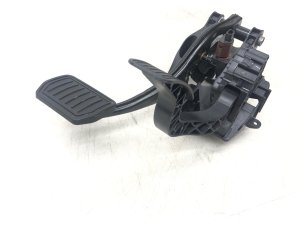
Technical Specifications
OEM Part Numbers: 1044691-00-D 104469100D
Drive-by-wire electronic pedal assembly with integrated Accelerator Pedal Position (APP) sensor. Designed for Left-Hand Drive (LHD) models.
We Have This Part in Stock



The information in this article is provided for general reference and educational purposes only. Vehicle specifications, procedures, and part compatibility can vary by production date, trim level, and region. Always consult your vehicle's factory service manual and verify part numbers before purchasing or performing repairs. Safety-critical components such as airbags, seat belts, and braking systems should be installed by a qualified professional.
- Tesla Model Y:
- Tesla Model 3:
- 🎬 Helpful Videos
- 🛍️ Shop This Part
- Vehicle Fitment and Part Numbers
- Known Issues, Recalls, and TSBs
- Sudden Unintended Acceleration (SUA) Claims
- Cybertruck Pedal Recall (Does Not Affect Model 3/Y)
- Forum-Reported Quirks
- Symptoms of a Failing Accelerator Pedal
- Buying a Used Accelerator Pedal Assembly
- What to Check Before You Buy:
- Cost of Replacement
- DIY Replacement Guide
- Step-by-Step Overview:
- Frequently Asked Questions (FAQ)
- 🎟️ Get 5% Off